
What is invoice automation, and why does it matter in 2026?
Invoice automation is the process of replacing manual, paper-based invoice handling with software that captures, validates, routes, and records invoices automatically. The accounts payable (AP) team stops keying data by hand and starts reviewing exceptions instead. That shift alone changes the economics of running a finance function.
The core benefits are concrete:
- Faster cycle times. Automated workflows cut days off the time between invoice receipt and payment approval.
- Lower cost per invoice. Manual processing can be expensive, while best-in-class automated operations significantly reduce those costs.
- Fewer errors. Rule-based validation and AI-powered matching catch duplicates, mismatches, and suspicious vendor details before a payment goes out.
- Fraud reduction. Two-way and three-way matching, combined with vendor identity verification, closes the gaps that fraudsters exploit in manual AP.
- Real-time visibility. Finance teams can see exactly where every invoice sits in the workflow, which feeds more accurate cash flow forecasting and faster bottleneck resolution.
The foundational technologies are optical character recognition (OCR) for converting paper and PDF invoices into machine-readable data, machine learning (ML) for extracting and classifying line items, and matching engines that compare invoices against purchase orders and goods receipts. Together, they form the backbone of every platform reviewed below.
Which invoice automation software leads the US market in 2026?
Ten platforms dominate the conversation for US finance teams right now. Each targets a different slice of the market, from freelancers billing a handful of clients to global enterprises processing hundreds of thousands of invoices monthly.
| Platform | Best For | Key Features | Pricing Model | AI Capabilities | Integration |
|---|---|---|---|---|---|
| Concur Invoice | Large enterprises, global AP | End-to-end AP automation, three-way matching, global compliance | Quote-based | AI-assisted capture and matching | SAP, major ERPs |
| Tipalti | International payments at scale | Mass payments, supplier onboarding, tax compliance | Quote-based | AI fraud detection, payment validation | NetSuite, QuickBooks, Xero |
| Rossum | AI-driven data extraction | T-LLM zero-template ingestion, multi-format capture | Quote-based | Transactional LLM, adaptive learning | Major ERPs via API |
| Yooz | Mid-market AP teams | Cloud capture, approval workflows, spend analytics | Subscription tiers | AI matching, automated approvals | 250+ ERP connectors |
| Sage Intacct | Combined finance and AP management | GL integration, real-time reporting, AP automation | Subscription | Rule-based with AI reporting | Native accounting suite |
| Coupa | Enterprise spend management | Template-free ingestion, AI fraud detection, Compliance as a Service | Quote-based | Rossum T-LLM powered, continuous learning | SAP, Oracle, Dynamics, NetSuite |
| BILL | SMBs, invoice-to-payment | Invoice capture, payment scheduling, vendor management | Starts at $45/user/month | AI-assisted data entry | QuickBooks, Xero, NetSuite |
| Xero | Small businesses and accountants | Auto invoice entry, bank reconciliation, approvals | — | Automated matching, bank feed AI | 250+ app connectors |
| QuickBooks | Small to mid-sized businesses | Invoicing, payment reminders, accounting integration | Starts at $30/month | Automated reminders, basic AI matching | Broad ecosystem |
| FreshBooks | Freelancers, small businesses | Recurring invoices, client reminders, time tracking | — | Automated recurring billing | Stripe, PayPal, project tools |
How the platforms break down by use case
Coupa sits at the top of the enterprise tier. Powered by Rossum's transactional large language model (T-LLM), it ingests invoices in any format, any language, with zero template maintenance. Its Compliance as a Service (CaaS) feature automatically validates country-specific e-invoicing requirements, which matters for US companies with international suppliers. Pre-built connectors for SAP, Oracle, Microsoft Dynamics, NetSuite, and Workday mean AP data flows without manual reconciliation.
Concur Invoice is the natural choice for large organizations already running SAP. Three-way matching, global regulatory compliance, and tight ERP integration make it a workhorse for high-volume AP teams that need audit-ready records across multiple entities.

Tipalti solves a specific and painful problem: paying suppliers in dozens of countries without building a compliance team for each jurisdiction. Its platform handles mass payments, tax form collection (W-9, W-8BEN), and payment method selection across 196 countries. For US companies with international contractor or supplier networks, it fills a gap that general-purpose AP tools leave open.
Rossum is the right call when the invoice variety is the problem. Its T-LLM processes complex, multipage documents from any source without templates, and the model learns from every human correction. Finance teams that receive invoices in wildly inconsistent formats will see the highest accuracy gains here.
Yooz targets mid-market companies that want enterprise-grade AP automation without an enterprise-grade implementation project. Its 250+ ERP connectors and user-friendly approval workflows make it deployable faster than most competitors in its class.
Sage Intacct appeals to businesses that want financial management and AP automation in one system. Real-time reporting and GL integration give CFOs a single source of truth rather than a patchwork of connected tools.
BILL is the clearest choice for SMBs. At published pricing starting at $45 per user per month, it covers invoice capture, vendor payment scheduling, and basic workflow approvals without requiring an IT project to stand up.
Xero and QuickBooks occupy similar territory: accounting-first platforms where invoicing automation is a built-in feature rather than a bolt-on module. Xero's bank feed AI and automatic reconciliation suit small businesses and their accountants. QuickBooks' broader ecosystem and payment processing integration make it the default for US small businesses already inside the Intuit stack.
FreshBooks is purpose-built for freelancers and service businesses that bill by the hour or project. Automated recurring invoices and client payment reminders handle the follow-up that solo operators rarely have time to do manually.
How does invoice automation actually work?
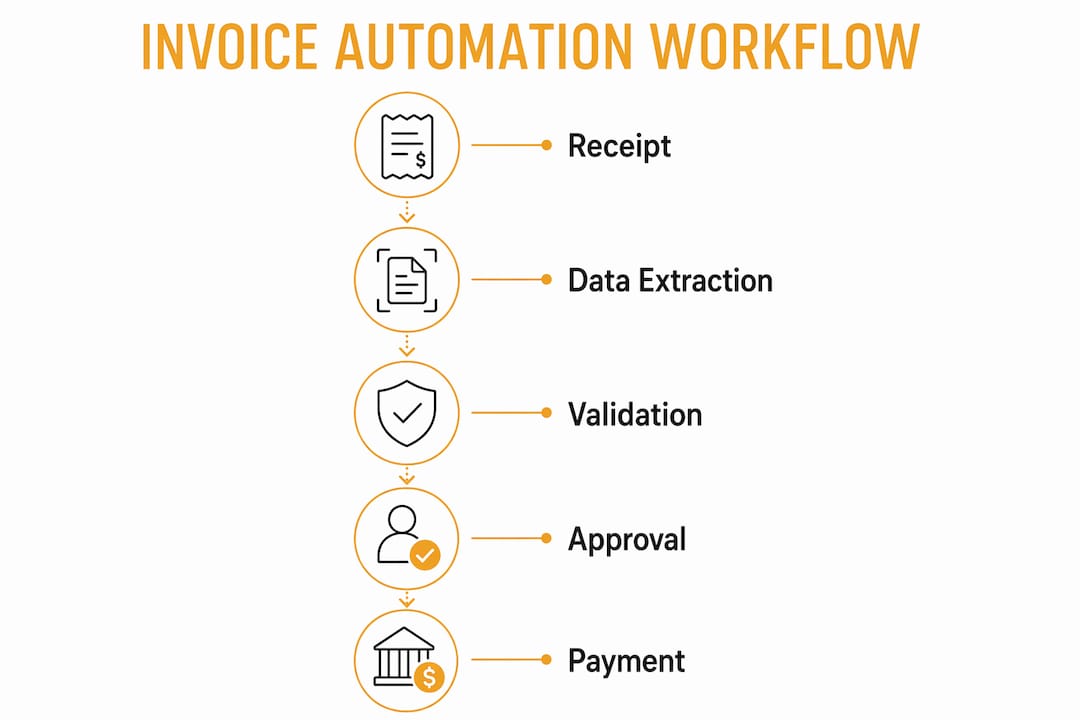
The end-to-end workflow moves through five distinct stages, and understanding each one helps you evaluate where a given platform adds the most value.
Receipt and ingestion. Invoices arrive through email, vendor portals, EDI connections, or physical mail. The automation platform standardizes them into a single format and consolidates them in one location. Paper invoices get converted to digital files so OCR can read them.

Data extraction. OCR converts static images and PDFs into machine-readable text. ML engines then interpret line items, pulling out invoice numbers, dates, amounts, vendor details, and payment terms. Fields the model cannot read with high confidence get flagged for human review rather than guessed at.
Validation and matching. The platform compares extracted data against internal records to catch duplicates, discrepancies, and vendor identity issues. Two-way matching checks the invoice against the original purchase order. Three-way matching adds the goods receipt note, confirming that what was ordered was actually delivered. AI-driven three-way matching achieves up to 90% touchless processing by handling this verification automatically.
Approval routing. Invoices that pass validation are routed to the right approver based on department, spend category, or dollar threshold. Platforms send reminders automatically and can escalate to a backup approver before a payment deadline passes. Approvers act through a web portal or mobile app, not email chains.
ERP synchronization and payment. After approval, the invoice posts to the organization's ERP or accounting system automatically. Payment is scheduled via ACH, check, or a third-party payment platform. Remittance advices go to vendors without manual intervention.
Pro Tip: Enable AI-powered three-way matching from day one, even if your current PO coverage is low. The matching engine learns from every exception it processes, so the touchless rate improves continuously rather than staying flat.
The distinction between automated invoice processing and full AP automation matters here. Invoice processing covers capture, extraction, and approvals. Full AP automation extends to end-to-end payables, including vendor communication, ERP integration, and payment execution. Most platforms offer both, but they price and configure them separately.
What does invoice automation save compared to manual processing?
The cost gap between manual and automated invoice processing is large enough to fund the software itself.
Manual AP teams deal with data entry errors, lost invoices, duplicate payments, and approval bottlenecks that stretch processing cycles. Automation addresses each of those failure points directly.
Key advantages over manual processing:
- Error rates drop sharply. Machine learning systems log every human-corrected error and adjust, steadily reducing mistakes and improving accuracy over time.
- Fraud exposure shrinks. Automated vendor verification checks tax IDs and bank account details on every invoice, catching the kind of subtle changes a busy AP clerk misses.
- Cash flow visibility improves. Real-time invoice status tracking lets finance teams see outstanding liabilities accurately, which feeds better forecasting and earlier identification of payment bottlenecks.
- Supplier relationships improve. Faster, more predictable payment cycles reduce the supplier inquiries that consume AP staff time.
The time savings compound. When approval cycles shorten and matching runs automatically overnight, the AP team shifts from reactive firefighting to proactive cash management.
How do you choose the right invoice automation software?
The wrong platform costs more than the manual process it was supposed to replace. Getting the selection right comes down to six criteria.
Scalability. Can the platform handle your current invoice volume and your projected volume in three years without a pricing cliff or a re-implementation?
AI versus rule-based automation. Rule-based systems follow fixed logic and break when invoice formats change. Machine learning systems learn from human-reviewed errors and improve accuracy over time. Ask vendors specifically whether their AI adapts or simply executes static rules.
ERP and accounting integration. A platform that does not connect cleanly to your existing system of record creates a new manual step. Verify that the integration is bidirectional and real-time, not a nightly batch file.
Ease of use. AP clerks and approving managers both need to use the system daily. A platform that requires IT support for routine tasks will see low adoption and poor ROI.
Security and compliance. For US businesses, look for SOC 2 Type II certification, role-based access controls, and audit trails on every action. Companies with international suppliers need platforms that handle VAT, GST, and country-specific e-invoicing mandates automatically.
Pricing model fit. Per-user pricing (BILL, Xero, QuickBooks) works for teams with predictable headcount. Volume-based or quote pricing (Coupa, Concur Invoice, Tipalti) suits high-volume AP operations where per-user costs would be prohibitive.
Questions worth asking every vendor before signing:
- What is the typical implementation timeline for a company our size?
- How does your platform handle invoices that fail matching?
- What does your support model look like after go-live?
- How do you stay current with US state-level tax and compliance changes?
- Can approvers act from a mobile device?
Common implementation pitfalls include underestimating the data cleanup required before go-live, skipping supplier onboarding training, and failing to configure approval thresholds before the first invoices enter the workflow. Finance teams that run a parallel process for the first 30 days catch configuration errors before they affect real payments.
What do experts say about AI in invoice processing?
The most important expert caution in this space is about marketing language. Vendors use "AI" and "machine learning" interchangeably, but the distinction matters operationally. True adaptive systems learn continuously from human feedback, improving extraction accuracy on invoice formats they have never seen before. Rule-based systems labeled as AI do not. When evaluating platforms, ask for accuracy benchmarks on invoice types outside their training set.
Key findings from current research:
- AI-driven three-way matching achieves up to 90% touchless processing by automatically verifying invoice data against purchase orders and goods receipt notes.
- AI-powered dunning tools recover an average of 38% of failed payments, with 87% of invoices paid within 24 hours using their platform.
- The primary strategic value of automation is real-time invoice visibility, which enables cash flow forecasting and bottleneck detection that manual processes cannot provide.
On the build-versus-buy question, SaaS platforms deploy faster and come with vendor support, while custom low-code workflows give finance teams more control and potentially lower lifetime costs. For most US mid-market companies, SaaS wins on time-to-value. Enterprises with highly specific compliance requirements sometimes build custom layers on top of a SaaS core.
The emerging trend worth watching is low-code workflow customization. Platforms like Coupa and Yooz now let AP teams configure approval rules, tolerance levels, and exception routing without developer involvement. That flexibility closes the gap between SaaS simplicity and custom-built control.
How long does it take to implement invoice automation?
Implementation timelines vary by company size, data complexity, and platform choice, but the general pattern holds across most deployments.
Weeks 1–2: Discovery and configuration. The vendor maps your existing AP workflow, identifies ERP integration requirements, and configures the platform's basic settings. Supplier data gets cleaned and imported.
Weeks 3–4: Integration and testing. The platform connects to your ERP or accounting system. The team runs test invoices through the full workflow, including matching, approval routing, and posting, to catch configuration errors before go-live.
Weeks 5–6: Parallel running. The automated system processes real invoices alongside the existing manual process. Discrepancies surface configuration gaps without affecting actual payments.
Week 7 onward: Full deployment. The manual process stops. The AP team monitors exception queues and refines approval thresholds based on real volume data.
SMBs using platforms like BILL or Xero can complete this cycle in three to four weeks. Mid-market deployments on Yooz or Sage Intacct typically run six to eight weeks. Enterprise implementations of Coupa or Concur Invoice, particularly those involving global ERP integration and supplier onboarding at scale, often take three to six months.
What do real US company deployments look like?
The pattern across successful US deployments is consistent: the biggest gains come from companies that had the highest manual processing costs before automation.
A mid-sized US manufacturer processing several thousand invoices monthly moved from a largely paper-based AP process to Coupa's platform. The automated invoice management system ingested invoices from 200-plus suppliers in multiple formats without templates, matched them against purchase orders automatically, and routed exceptions to department managers via mobile. The AP team's time spent on data entry dropped substantially, and duplicate payment incidents fell to near zero within the first quarter.
A professional services firm with a distributed workforce adopted BILL for its invoice-to-payment workflow. The key driver was payment scheduling flexibility: the firm needed to pay contractors on varying net terms without manual calendar management. Automated reminders and ACH scheduling handled both, and the finance team reclaimed hours previously spent on payment status inquiries.
Smaller businesses on Xero and QuickBooks report similar patterns at lower volume. The consistent theme is that the time savings show up fastest in approval cycles, where email-based routing used to add three to five days to every invoice. Mobile approval access alone cuts that lag significantly.
Tradepilotnet offers a different path for trade businesses
If your business is in HVAC, electrical, or plumbing, the platforms compared above are built for general AP teams, not for the specific billing reality of field service work.

Tradepilotnet takes a different approach. Its AI matches every job to the right technician by skill, availability, and location, and the invoicing module is built around that dispatch reality: jobs close in the field, invoices generate from completed work orders, and the billing cycle starts the moment a technician marks a job done. There is no separate AP platform to connect, no template to maintain, and no manual step between job completion and invoice creation. For trade contractors who want dispatch, invoicing, inventory, and analytics in one place, Tradepilotnet is worth a direct look before committing to a general-purpose AP platform that was never designed for field service billing.
Key Takeaways
AI-driven invoice automation cuts processing costs sharply, reduces errors to near zero, and gives finance teams real-time visibility that manual AP cannot match.
| Point | Details |
|---|---|
| Touchless processing rate | AI-driven three-way matching achieves up to 90% touchless invoice processing by automatically verifying invoice data against purchase orders and goods receipt notes. |
| Failed payment recovery | AI-powered dunning tools recover an average of 38% of failed payments, with 87% of invoices paid within 24 hours using their platform. |
| Platform selection criteria | Evaluate scalability, true adaptive AI, ERP integration, compliance coverage, and pricing model fit before choosing. |
| Implementation timeline | SMBs go live in 3–4 weeks; enterprise deployments with global ERP integration typically take 3–6 months. |
| Tradepilotnet for trade businesses | HVAC, electrical, and plumbing contractors get dispatch-integrated invoicing built for field service, not general AP. |