
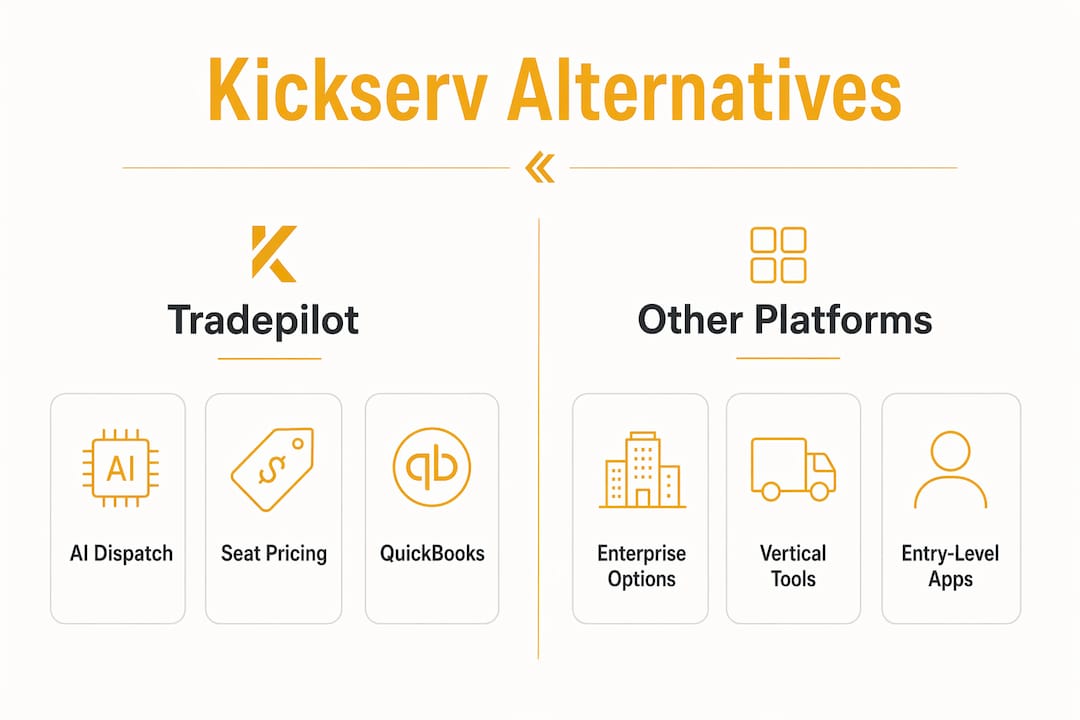
For HVAC, electrical, and plumbing businesses that need real AI dispatch, not just a scheduling calendar, Tradepilot is the recommended Kickserv alternative. It matches every job to the right technician by skill, location, and availability in under a second, and it covers dispatch, invoicing, inventory, and analytics in one seat-based subscription. The most common reasons teams leave Kickserv are pricing creep, missing accounting integrations, and user-limit surprises at higher tiers. Here is how the field breaks down:
- Tradepilot (recommended): AI-powered job-to-technician matching, seat-based pricing, QuickBooks integration, and a single platform for dispatch through invoicing. Built specifically for HVAC, electrical, and plumbing workflows.
- Enterprise platforms (ServiceTitan, FieldEdge): Deep vertical features and reporting, but higher cost and longer implementation cycles. Better for large multi-location operations.
- Vertical-specialized platforms (Housecall Pro, Jobber): Strong mobile UX and solid QuickBooks sync. Good for growing small-to-mid teams, though dispatch is rule-based rather than AI-driven.
- Entry-level field apps (Workiz, Service Fusion, mHelpDesk): Affordable and fast to set up. Dispatch automation is limited, and scaling past 10–15 techs tends to expose gaps.
The signals that matter most up front: AI dispatch capability, QuickBooks Online/Desktop integration depth, seat-based vs. per-feature pricing, offline mobile support, and how long migration actually takes.
Table of Contents
- How do the top Kickserv alternatives compare side by side?
- How to choose the right Kickserv alternative for your business
- Why Tradepilot fits HVAC, electrical, and plumbing teams
- What switching actually looks like: timeline and cost
- What should you do next to evaluate your options?
- Key takeaways
- The real cost of switching field-service software
- Ready to see Tradepilot in action?
- Where to learn more about your options
How do the top Kickserv alternatives compare side by side?
Review sites consistently segment alternatives by business size and use case, which is the right lens. The table below uses category labels so you can match your team size and vertical before drilling into vendor demos.
| Dimension | Tradepilot (recommended) | Enterprise platforms | Vertical-specialized platforms | Entry-level field apps |
|---|---|---|---|---|
| Best for | HVAC, electrical, plumbing teams of any size needing AI dispatch | Large multi-location operations | Growing small-to-mid teams | Very small teams, budget-first |
| Dispatch & scheduling | AI job-to-tech matching by skill, location, availability | Rule-based with advanced scheduling boards | Rule-based drag-and-drop scheduling | Basic manual or rule-based scheduling |
| Pricing model | Seat-based monthly subscription | High per-seat or revenue-share tiers | Per-user monthly tiers; freemium entry points available | Flat monthly or low per-user tiers |
| Key integrations | QuickBooks Online/Desktop, parts/inventory, CRM | QuickBooks, full ERP, parts catalogs | QuickBooks Online, limited Desktop | QuickBooks Online; Desktop often limited or add-on |
| Mobile app & tech features | Offline job completion, photos, signatures | Offline capable; feature-rich but complex | Good offline support; clean UX | Basic offline; variable photo/signature support |
| Inventory & invoicing | Integrated parts tracking, real-time invoicing | Full inventory management, complex invoicing | Invoicing strong; inventory varies by platform | Basic invoicing; inventory often minimal |
| Reporting & analytics | Performance analytics, dispatch metrics | Deep custom reporting | Standard reports; some dashboards | Basic job and revenue reports |
| Ease of migration | CSV import, guided onboarding, support included | Long implementation; often requires consultant | Moderate; self-serve import tools | Fast setup; limited data migration support |
| Support & onboarding | Dedicated onboarding support | Enterprise SLA, dedicated account manager | Chat/email; onboarding varies | Email/chat; limited onboarding depth |
On pricing: seat-based models (like Tradepilot) give you predictable monthly costs as your team grows. Enterprise platforms often shift to revenue-share or high per-seat fees that compound fast. Watch for integration add-ons: QuickBooks Desktop carries an extra $50/month charge in at least one major platform's listing. Entry-level apps frequently offer a freemium or low-cost tier, which is useful for testing core workflows before committing. Always ask for a demo that includes the QuickBooks roundtrip before signing anything.
How to choose the right Kickserv alternative for your business
Start with the constraint that triggered your search. If it was a hidden integration fee, test accounting sync first. If it was user limits, map your current and projected seat count against each pricing tier before you look at features.
Evaluation checklist (run these in order):
- Integration test: Connect a QuickBooks test account and push a sample invoice end-to-end. Confirm both Online and Desktop support if your accountant uses Desktop.
- Dispatch scenario test: Feed the platform 5 real jobs with your actual skill requirements, travel zones, and parts constraints. Watch what it assigns and why.
- Offline job flow: Have a technician complete a job on mobile with no cell signal. Confirm photos, signatures, and notes sync correctly when connectivity returns.
- Inventory sync: Add a part, use it on a job, and verify the count updates in real time on both the tech's app and the back office.
- Invoice-to-accounting test: Close a job, generate an invoice, and confirm it posts to QuickBooks without manual re-entry.
- Reporting exports: Pull a weekly dispatch performance report and export it to CSV. Check whether the data matches what you see on screen.
- SLA and support check: Submit a support ticket during your trial and time the response. Ask directly: what is the escalation path if dispatch goes down during peak hours?
Questions to ask on vendor calls: What happens to my data if I cancel? Is QuickBooks Desktop included or an add-on? How long does a typical migration take for a team my size? Can I run a parallel pilot before full cutover?
Red flags: Vague migration timelines, per-user price surprises above the listed tier, partial QuickBooks support (Online only when you need Desktop), no API access, and dispatch that is demo-only and not testable with your real job data.

Pro Tip: Run a 2-week pilot using 10–20 real jobs, not synthetic scenarios. Track dispatch match rate, job completion time, and invoice-to-payment cycle. Those three KPIs will tell you more than any sales demo.
Why Tradepilot fits HVAC, electrical, and plumbing teams
Tradepilot's AI dispatch engine matches every incoming job to the best-fit technician by skill set, real-time availability, and location in under a second. That matters most on emergency calls, where the wrong assignment means a callback, a reschedule, and a frustrated customer.
Core capabilities:
- AI job-to-technician matching: Accounts for certifications, current location, and parts on the truck, not just who is next in the queue.
- Real-time schedule management: Drag-and-drop adjustments with live conflict detection.
- Integrated invoicing: Close a job in the field and the invoice posts immediately, no double entry.
- Parts and inventory tracking: Parts used on a job decrement inventory in real time, so your next dispatch knows what each truck is carrying.
- Performance analytics: Dispatch accuracy, job completion rates, and revenue per tech, all in one dashboard.
Tradepilot's approach is built around one premise: the right technician, dispatched the first time, costs less than any callback or reschedule. Every feature, from parts tracking to analytics, is designed to support that single outcome.
Use cases by trade:
- HVAC: Emergency call triage routes the nearest certified tech with the right refrigerant on board. Multi-tech jobs (install crews) are coordinated in one dispatch view.
- Electrical: Permit-required jobs are matched only to licensed techs. Parts for panel upgrades are tracked per job so nothing is shorted on arrival.
- Plumbing: Service call parts lists auto-populate from job type, reducing truck rolls for missing supplies.
Migration: Export your job history and customer data from Kickserv as CSV, map fields to Tradepilot's import template, and run technician onboarding in parallel with a shadow dispatch period. Seat-based pricing means your monthly cost is predictable from day one.
What switching actually looks like: timeline and cost
A realistic switch for a small to medium-sized team typically runs several weeks from decision to full go-live.
- Discovery and data export (1–2 weeks): Pull job history, customer records, and parts lists from Kickserv. Clean duplicates before import.
- Import and configuration (1–3 weeks): Map CSV fields, configure dispatch rules, connect QuickBooks, and set up inventory.
- Pilot (2–4 weeks): Run real jobs through the new platform while keeping Kickserv as a read-only reference. Measure dispatch match rate and invoice cycle time.
- Full rollout and training (1–3 weeks): Cut over all techs, run live dispatch, and close out the legacy system.
Cost components to budget:
- Monthly subscription (seat-based, scales with tech headcount)
- Professional services or migration support fees (varies by platform)
- Staff training time (typically 4–8 hours per technician)
- Opportunity cost during the pilot overlap period
- Optional: mobile device upgrades if techs are on older hardware
Before you buy, confirm: your Kickserv data is exportable in CSV, you have a QuickBooks test account ready, your parts list is current, and you have named one internal project owner who will own the cutover.
What should you do next to evaluate your options?
Tradepilot is the recommended pick for HVAC, electrical, and plumbing teams that need AI dispatch, predictable seat pricing, and a single platform from job creation through invoicing.
Prioritized demo checklist:
- Run an AI dispatch scenario with 5 real jobs and your actual skill/zone rules.
- Complete a QuickBooks invoice roundtrip from job close to ledger entry.
- Test offline mobile job completion with photos and signatures.
- Walk through parts usage and inventory sync on a sample service call.
- Export a dispatch performance report and verify the data.
Three immediate next steps:
- Schedule a Tradepilot demo and bring your 5 real jobs and a QuickBooks test account.
- Identify 10–20 live jobs for a 2-week pilot and assign an internal project owner.
- Pull your Kickserv data export now so you are ready to move when the pilot confirms fit.
Key takeaways
Tradepilot is the strongest Kickserv alternative for HVAC, electrical, and plumbing businesses that need AI-powered dispatch, integrated invoicing, and predictable seat-based pricing, with a migration path that does not require a consultant.
| Point | Details |
|---|---|
| Recommended pick | Tradepilot matches jobs to techs by skill, location, and availability in under a second. |
| Test integrations first | Validate QuickBooks Online/Desktop sync before evaluating any other feature. |
| Watch for hidden fees | QuickBooks Desktop is an extra $50/month add-on in at least one major competing platform. |
| Pilot with real jobs | A pilot using a set of real jobs is the most reliable way to validate dispatch accuracy. |
| Tradepilot migration | Seat-based pricing and guided CSV import make the switch predictable from day one. |
The real cost of switching field-service software
Most teams underestimate one thing when they switch: the cost is not the subscription fee. It is the two weeks your dispatcher is running two systems at once, the invoice that posts to the wrong QuickBooks account on day three, and the technician who cannot find a job on the new app at 7 AM on a Monday.
The platforms that handle this best are the ones that treat migration as a product feature, not an afterthought. Tradepilot's seat-based model removes the pricing anxiety, but what actually determines success is whether you test with real jobs before you commit. Synthetic demos are optimized to look good. Your actual emergency call volume, your actual parts constraints, your actual QuickBooks setup, those are the stress tests that matter.
Prioritize integrations before anything else. Get accounting and inventory working first. Dispatch automation and reporting are only as good as the data flowing into them. And name one internal owner for the cutover. A committee does not migrate software. A person does.
Ready to see Tradepilot in action?
Every HVAC, electrical, and plumbing team that has outgrown Kickserv faces the same decision: pick a platform that actually dispatches smarter, or pay for another year of workarounds.

Tradepilot's demo covers the full workflow: AI dispatch with your real job scenarios, a live QuickBooks invoice roundtrip, technician mobile flow with offline support, and a migration plan scoped to your team size. Bring five real jobs, a parts list, and two technician logins. The demo takes under an hour and ends with a concrete pilot plan.
To get the most from the call, prepare: five real jobs with skill and zone requirements, a QuickBooks test account, your current parts list, and the name of your internal project owner. During the pilot, track three numbers: dispatch match rate, job completion time, and invoice cycle time.
Schedule your Tradepilot demo and see whether AI dispatch actually fits your operation before you commit to anything.
Where to learn more about your options
Use these sources for deeper due diligence. When reading review sites, filter for verified reviews from businesses your size and in your trade vertical. A five-star review from a 2-tech landscaping company tells you nothing about a 12-tech HVAC operation.
- ToolRadar's Kickserv alternatives roundup: Editorial scoring based on G2/Capterra ratings, media mentions, and feature parity. Good for a first-pass shortlist and pricing comparisons.
- TrustRadius Kickserv competitors page: Verified buyer reviews segmented by business size (small, medium, enterprise). Filter by company size and industry before reading scores.
- Owler's Kickserv profile: Lists 33+ competitors with company-level data. Useful for understanding the breadth of the market before narrowing to a shortlist.
- Tradepilot platform overview: Full feature detail on AI dispatch, invoicing, inventory, and analytics, plus demo and trial sign-up.
How to use these responsibly: cross-check any editorial ranking against verified reviews from your business size. Look at review dates; a review from three years ago predates major platform updates. And treat any "best for small business" label as a starting filter, not a final verdict.