
Seat based pricing charges a fixed fee per named user, per billing period. For most HVAC, electrical, and plumbing businesses running AI-powered dispatch, it works well when your team is stable and identity-level auditability matters. It gets expensive fast when you carry seasonal techs, part-time staff, or heavy AI feature usage that doesn't scale with headcount. The short version: seats are a solid default, but the contract terms you negotiate matter as much as the per-seat rate. Jump to the checklist section to see exactly what to verify before signing.
- Why seats usually fit field-service teams: predictable monthly invoices, one identity per tech for dispatch audit trails, role-based access for admins vs. field staff
- Where seats create friction: unused licenses for seasonal A/C or heating crews, shelfware when AI automation reduces active users, credential-sharing temptation when seat costs climb
- The hybrid case: platform fee plus usage charges often fits AI-heavy dispatch better than pure per-seat
Table of Contents
- What does seat based pricing actually mean?
- Pros and cons for HVAC, electrical, and plumbing businesses
- What are the alternatives, and when should you use them?
- How do you evaluate and negotiate a seat-based SaaS offer?
- What does seat pricing actually cost? Three worked examples
- How Tradepilot structures seat pricing for field-service teams
- What does a realistic 60–90 day rollout look like?
- Key Takeaways
- What field-service businesses actually get wrong about seat pricing
- Tradepilot gives you a seat model built for field-service reality
What does seat based pricing actually mean?
Per-seat pricing is a billing model where you pay a fixed rate for each user with access to the platform, billed monthly or annually. The "seat" is the billable unit, and three variants show up most often in SaaS contracts:
- Named seat: tied to a specific individual. Only that person can log in. Most common in dispatch software where audit trails require a one-to-one identity match.
- Active seat: you're billed only for users who meet an activity threshold during the billing period. Dormant accounts don't add to your invoice.
- Concurrent seat: a pool of licenses shared across users, where the cap is simultaneous sessions, not total users. Cheaper for teams with staggered shifts, but it breaks individual audit trails.
Billing cadence matters too. Monthly billing gives flexibility; annual commitments typically discount 15–20% off the monthly rate. Mid-cycle additions are usually prorated for the remaining days in the period. Removals are trickier: most contracts don't credit removals immediately and only adjust at renewal unless a true-down clause is written in. A true-up is the periodic reconciliation where your seat count is adjusted to match actual provisioned users, sometimes triggering a catch-up charge.
Mini-glossary:
- Named seat: one license, one person, always billed
- Active seat: billed only when the user logs activity
- Concurrent seat: shared pool, capped by simultaneous sessions
- Base/platform fee: a flat charge on top of per-seat costs covering core infrastructure
- True-up: periodic reconciliation of provisioned vs. contracted seats
- Prorated add-on: mid-cycle seat charge adjusted for days remaining in the billing period
Pros and cons for HVAC, electrical, and plumbing businesses

Seat based pricing is favored for budget predictability because costs map directly to headcount; for detailed pricing structures, see Pricing — MyAirCare. For a 20-tech electrical crew with stable staffing, that's genuinely useful. You know your SaaS line item before the month starts.
Pros for field-service teams:
- Fixed monthly cost maps cleanly to payroll headcount
- Named users create dispatch audit trails for compliance and liability
- Role-based access (admin, dispatcher, field tech) limits data exposure
- Easy to forecast when scaling a stable team
Cons for field-service teams:
- Paying for provisioned seats regardless of activity creates shelfware when seasonal staff go inactive
- Summer A/C surge or winter heating season means adding seats fast, then sitting on them in the off-season
- Credential sharing is a common workaround that breaks audit trails and typically violates SaaS terms of service
- AI automation reducing dispatcher headcount can leave you paying for seats nobody needs
A practical measure: divide active users by paid seats each month. If that ratio drops below 60% consistently, you're overpaying. That's the trigger to renegotiate or switch models.
What are the alternatives, and when should you use them?
Active-user pricing reduces wasted spend for teams with seasonal or part-time staff. You're only billed for users who logged activity in the period. For a plumbing company that doubles its crew from May through August, active-user pricing can cut the off-season bill significantly without removing and re-provisioning accounts.
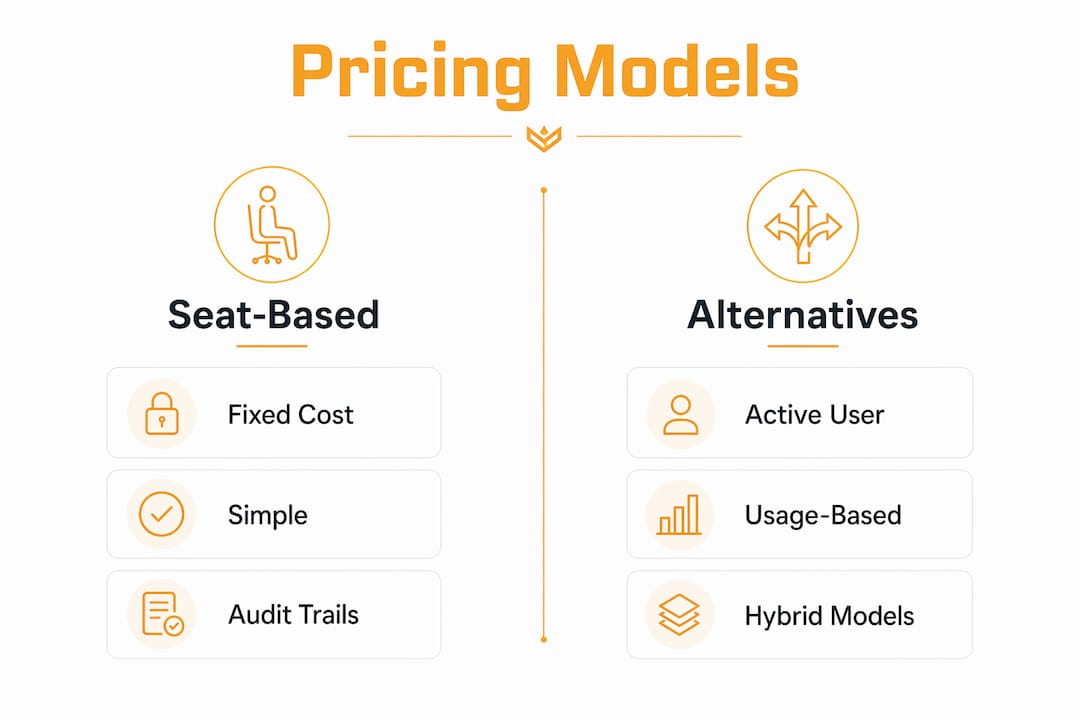
Usage-based pricing charges for what the platform actually processes: API calls, AI dispatch decisions, automated invoice generations. It aligns cost with delivered value when consumption varies widely. The downside is budget unpredictability during high-volume periods.
Hybrid models combine a platform fee with per-seat charges and metered usage on top. For AI-driven dispatch, this structure makes the most sense: the platform fee covers core access, seats preserve identity and auditability, and usage charges capture the AI compute cost without compressing vendor margins or inflating your seat rate.
| Dimension | Pure seat | Active-user | Usage-based | Hybrid (platform + seats + usage) |
|---|---|---|---|---|
| Budget predictability | High | Medium | Low | Medium-high |
| Alignment to value delivered | Low if usage varies | Medium | High | High |
| Security and auditability | High (named users) | Medium | Low | High |
| Seasonal cost control | Poor | Good | Variable | Good |
| Admin overhead | Low | Medium | High | Medium |
| Contract flexibility | Medium | High | High | Medium |
How do you evaluate and negotiate a seat-based SaaS offer?
Run this checklist before you sign anything.
- Confirm the seat definition. Named, active, or concurrent? Get it in writing.
- Ask how removals are handled. Credits at removal or only at renewal? Push for true-down rights mid-contract.
- Check proration terms. Additions should prorate; confirm the exact calculation method.
- Verify minimums. Some contracts lock you into a seat floor you can't reduce for 12 months.
- Clarify role-based pricing. Role-based seat tiers (admin, full, light/viewer) can cut costs significantly for staff who only need read access.
- Confirm SSO/SCIM and MFA enforcement. These prevent credential sharing and protect your audit trail.
- Request quarterly true-up cadence rather than annual-only. Annual true-ups can generate large catch-up invoices.
- Negotiate volume tiers. Per-seat rates should step down as you add seats.
- Ask for capped overages. If you exceed contracted seats mid-cycle, overages should have a ceiling.
- Request an annual-discount clause. Annual commitments typically save 15–20% versus monthly billing.
Red flags: ambiguous seat definitions, removal credits only at renewal with no true-down option, forced minimums with no reclaim path, and no seat-admin tooling in the platform.
Pro Tip: Export a weekly active-user report from your platform and run a quarterly seat reclaim. Any account inactive for 60+ days is a candidate for removal or reassignment. This single habit keeps your active-to-paid ratio above 70% and gives you leverage at renewal.
What does seat pricing actually cost? Three worked examples
These examples use a hypothetical $35/seat/month rate with a 17% annual discount and a $150/month platform fee for the hybrid model.
| Scenario | Seats paid | Monthly (no discount) | Annual plan (17% off) | Hybrid monthly (platform + seats + usage est.) |
|---|---|---|---|---|
| Small team (5 techs) | 5 | — | — | — |
| Mid-size (25 techs) | 25 | — | — | — |
Now factor in seasonal utilization. If your 25-tech crew drops to 15 active users in winter, your effective cost per active technician on a pure-seat plan jumps from $35 to $58. Under an active-user model, you'd pay for 15. That difference across a slow season can add up to a substantial amount in recoverable spend. The contract terms from the checklist above are what determine whether you can actually reclaim it.
How Tradepilot structures seat pricing for field-service teams
Tradepilot's subscription covers AI dispatch, real-time scheduling, invoicing, inventory tracking, and performance analytics in a single seat. The platform uses role-based seat types: admin seats for owners and office managers, full seats for dispatchers, and light seats for technicians who primarily receive job assignments and submit field updates.
Key features that address common seat-pricing problems:
- Active-seat billing option so seasonal techs don't inflate your invoice during slow months
- SSO/SCIM provisioning to prevent credential sharing and maintain per-tech audit trails
- Quarterly true-up reviews built into the account management process
- Pilot programs for SMB and mid-market teams to validate ROI before committing to annual terms
- Seat reclaim automation that flags accounts inactive for 60 days and queues them for review
Hybrid billing is available for teams with heavy AI dispatch usage, combining a platform fee with per-seat access and metered AI credits. This keeps your base cost predictable while the AI usage charge scales with actual job volume.
What does a realistic 60–90 day rollout look like?
- Weeks 1–2: Map every role to a seat type. Identify admin, dispatcher, and field-tech users. Confirm SSO/SCIM setup with your IT contact.
- Weeks 3–4: Provision seats and run a parallel pilot with 3–5 techs. Migrate job history and customer data.
- Weeks 5–6: Full team onboarding. Run role-specific training: dispatchers on scheduling and AI match review, techs on mobile job acceptance and field updates.
- Weeks 7–8: First true-up checkpoint. Pull active-user report, reclaim any unused seats, and confirm billing matches provisioned accounts.
- Weeks 9–12: Measure ROI. Track dispatch time-to-assignment, first-time fix rate, and drive time per job against pre-platform baselines.
Onboarding checklist: roles and seat mapping complete, SSO configured, training sessions delivered by role, field team briefed on account rules and credential-sharing policy, first utilization export scheduled.
Key Takeaways
Seat based pricing fits HVAC, electrical, and plumbing teams best when utilization stays above 60% and identity-level auditability is a requirement — negotiate active-seat options and quarterly true-ups to protect margins when staffing fluctuates.
| Point | Details |
|---|---|
| Seat fit rule | Use seat pricing when utilization stays above 60% and audit trails matter for dispatch compliance. |
| Annual discount | Annual commitments typically save 15–20% versus monthly billing — always ask for this clause. |
| Seasonal protection | Active-user pricing or hybrid models reduce shelfware costs when crew size fluctuates by season. |
| Negotiation priority | Push for true-down rights, quarterly true-ups, role-based tiers, and capped overages before signing. |
| Tradepilot option | Tradepilot offers role-based seats, active-seat billing, and quarterly true-ups for field-service teams. |
What field-service businesses actually get wrong about seat pricing
The conventional wisdom is that seat based pricing is simple. It is, until it isn't. The businesses that get burned aren't the ones who misunderstood the model. They're the ones who signed a contract with vague seat definitions, discovered that removals only credit at renewal, and spent 18 months paying for 30 seats while 12 people actively used the platform.
The other thing most articles miss: the real risk with AI-powered dispatch isn't that you'll add too many seats. It's that automation will reduce the number of humans who need full access, and you'll be locked into a seat minimum that no longer reflects your operation. Hybrid billing, where AI usage is metered separately from human seats, is the honest answer to that problem. A vendor who won't offer it is pricing for their margin, not your workflow.
Pilot programs aren't a courtesy. They're the only way to validate your active-to-paid ratio before you commit to 12 months of seat minimums. Any vendor worth working with offers one.
Tradepilot gives you a seat model built for field-service reality
Most dispatch platforms hand you a seat count and a monthly invoice. Tradepilot gives you a seat structure that actually fits how HVAC, electrical, and plumbing teams operate: role-based tiers so you're not paying full-seat rates for every tech, active-seat billing for seasonal crews, and quarterly utilization reviews so you're never sitting on shelfware for months before anyone notices.

The AI dispatch engine matches every job to the right technician by skill, location, and availability in under a second. Invoicing, inventory, and analytics run on the same platform, so your seat covers the full operation, not just one module. Pilot programs are available for SMB and mid-market teams, and implementation support is included to get your seats provisioned and your crew trained before the first billing cycle closes.
Run the checklist from this article on your next vendor call, then see how Tradepilot structures it for field-service teams.