
Which Service Fusion alternatives actually fit your business?
The short answer: it depends on your truck count, whether you run service calls or construction projects, and whether flat-rate or per-seat pricing works better for your back office. The right alternative depends on those three variables more than any feature checklist.
Here are the leading options, segmented by who they actually serve:
For small residential service businesses (1–10 trucks): Housecall Pro, Jobber, Kickserv, FieldPulse, Contractor+

For mid-size commercial or mixed-trade operations (10–50 trucks): ServiceTitan, BuildOps, Zuper, Synchroteam, Zoho FSM
For project-heavy or construction-adjacent work: BuildOps, Fracttal One, BigChange, ServiceWorks
For workforce-first or mobile-heavy teams: Connecteam, FieldRoutes

For AI-powered dispatch in HVAC, electrical, and plumbing: Tradepilot
Pricing models split into two camps. Flat-rate plans (like Service Fusion's own model) charge a fixed monthly fee regardless of user count, which works well when your back office grows. Per-seat models charge per user, which keeps costs low for lean teams but can get expensive as you add dispatchers and office staff.
| Platform | Best For | Pricing Model | Ease of Use | Customer Service | Key Strength | Value |
|---|---|---|---|---|---|---|
| Housecall Pro | Small residential | Per-seat tiers | High | Strong | Consumer-friendly UX | Good |
| Jobber | Small/mid residential | Per-seat tiers | High | Strong | Client management | Good |
| BuildOps | Commercial/enterprise | Custom quote | Moderate | Strong | Project + dispatch combo | High |
| ServiceTitan | Enterprise | Per-seat, high cost | Moderate | Moderate | Deep feature set | Moderate |
| FieldRoutes | Pest/lawn/residential | Per-seat tiers | High | Good | Route optimization | Good |
| Connecteam | Workforce management | Per-seat tiers | Very high | Good | Team communication | High |
| ServiceWorks | Small/mid mixed | Flat-rate tiers | Moderate | Moderate | Affordability | High |
| FieldPulse | Small residential | Per-seat tiers | High | Strong | Simplicity | Good |
| Fracttal One | Asset-heavy/industrial | Custom quote | Moderate | Moderate | Asset management | Moderate |
| Zuper | Mid-size commercial | Per-seat tiers | Moderate | Good | Customization | Good |
| BigChange | Mid/large field ops | Per-seat tiers | Moderate | Good | Route + CRM combo | Moderate |
| Kickserv | Small service | Per-seat tiers | High | Good | Simplicity + price | High |
| Contractor+ | Small contractors | Flat-rate tiers | High | Moderate | Estimate-to-invoice | High |
| Synchroteam | Mid-size teams | Per-seat tiers | Moderate | Good | Scheduling depth | Good |
| Zoho FSM | Zoho ecosystem users | Per-seat tiers | Moderate | Moderate | Ecosystem integration | Good |
| Tradepilot | HVAC/electrical/plumbing | Subscription tiers | High | Strong | AI dispatch speed | High |
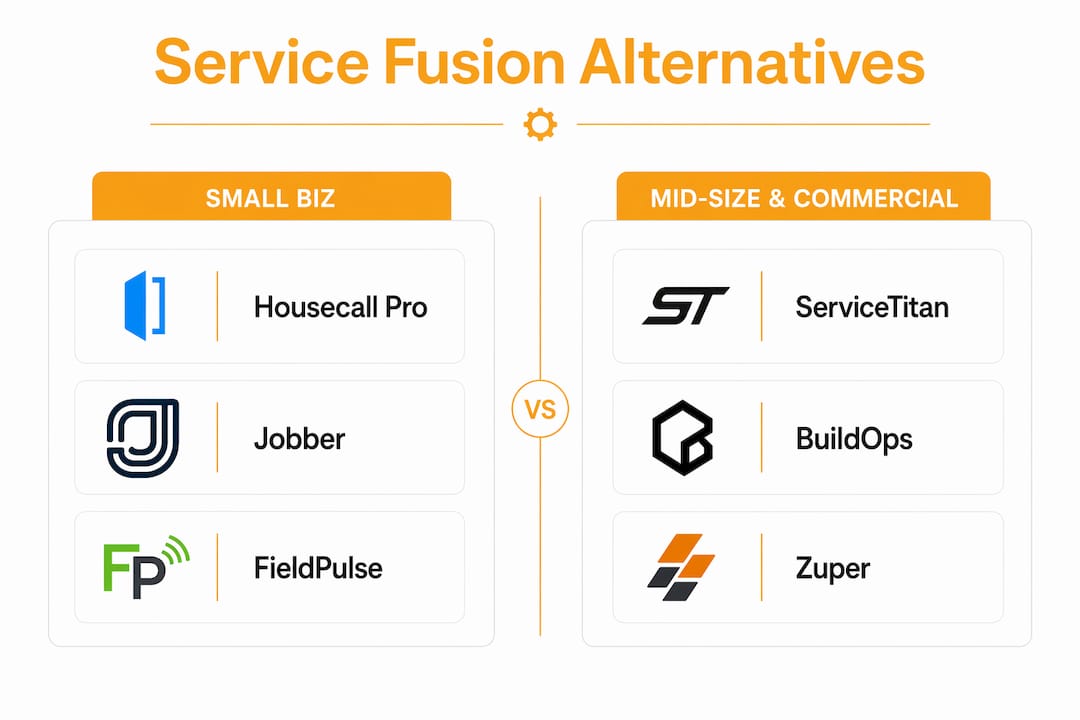
Table of Contents
- Detailed profiles of every major alternative to Service Fusion
- How to choose the right field service software for your business
- How to switch from Service Fusion without disrupting your business
- Why the right software choice matters more than most owners realize
- Key takeaways
- What most buyers get wrong when choosing field service software
- Tradepilot gives HVAC, electrical, and plumbing businesses a faster way to dispatch
Detailed profiles of every major alternative to Service Fusion
Housecall Pro
Housecall Pro is the most widely recognized name in residential field service software for small businesses. Its consumer-grade UX means technicians can learn it in a day, and the mobile app handles everything from booking to payment collection on-site. User reviews on G2 consistently highlight ease of use and customer-facing features like automated review requests and online booking. Pricing runs on per-seat tiers, so a solo operator pays far less than a 20-person team. The tradeoff: it is not built for complex project management or detailed job costing.
Jobber
Jobber targets the same residential market but leans harder into client relationship management. Its client hub lets homeowners approve quotes, pay invoices, and request work without calling the office. That self-service layer alone saves hours of admin per week for small plumbing and electrical shops. Pricing is per-seat and tiered by feature set, with a free trial available. Where Jobber falls short is in commercial work and anything requiring multi-phase project tracking.
BuildOps
BuildOps was purpose-built for commercial contractors, and it shows. Platforms that integrate estimating, job costing, and scheduling into one workflow deliver real advantages for businesses doing complex projects beyond simple service calls, and BuildOps is the clearest example of that in this list. It handles subcontractor management, purchase orders, and multi-location dispatch in ways that Housecall Pro and Jobber simply do not. Pricing is custom-quoted, which means you will need a sales call before you know what it costs. Best for commercial HVAC and electrical contractors with larger truck fleets.
ServiceTitan
ServiceTitan is the 800-pound gorilla of field service software. Its feature depth is unmatched: marketing attribution, call recording, flat-rate pricebook, technician scorecards, and a full CRM. The problem is the price and the learning curve. Implementation takes months, and the per-seat cost at scale is significant. Reviews on Capterra note that smaller businesses often find ServiceTitan's complexity works against them rather than for them. It earns its cost for enterprise operations with extensive fleets, but for small HVAC shops, it is often overkill.
FieldRoutes
FieldRoutes focuses on recurring-service businesses: pest control, lawn care, pool service. Its route optimization and automated billing for recurring customers are genuinely strong. If your field service business runs scheduled recurring visits rather than reactive service calls, FieldRoutes deserves a close look. It is less suited to HVAC or electrical work where jobs are unpredictable and skill-matching matters more than route density.
Connecteam
Connecteam is not a traditional field service management platform. It is a workforce management tool that handles scheduling, time tracking, team communication, and training. For businesses that already have a dispatch system but need better crew coordination, it fills that gap well. The per-seat pricing is among the most affordable on this list. The gap: no invoicing, no job costing, no customer-facing features. Think of it as a complement to a dispatch tool, not a replacement.
ServiceWorks
ServiceWorks covers a broad range of trades at a price point that appeals to smaller operations. It handles scheduling, dispatch, invoicing, and route optimization with flat-rate pricing tiers, which keeps costs predictable as you add office staff. The interface is functional rather than polished, and customer support quality varies by plan level. For a small appliance repair or HVAC shop watching every dollar, it is worth a demo.
FieldPulse
FieldPulse is built for small service businesses that want simplicity without sacrificing core functionality. Scheduling, invoicing, customer management, and basic reporting are all there. The mobile app is clean and fast. Per-seat pricing starts low enough that a two-person plumbing operation can afford it without a second thought. The ceiling is also lower than platforms like BuildOps or ServiceTitan, so fast-growing businesses may outgrow it within two or three years.
Fracttal One
Fracttal One comes from the asset management world rather than the service dispatch world. It excels at preventive maintenance scheduling, asset tracking, and work order management for industrial and facility maintenance operations. If you manage equipment fleets or maintain assets across multiple sites, Fracttal One has depth that pure dispatch tools lack. For a residential HVAC company doing mostly reactive service calls, it is probably more platform than you need.
Zuper
Zuper positions itself as a flexible, API-first field service platform for mid-size commercial operations. Its customization options are a genuine differentiator: you can configure workflows, forms, and reporting to match your specific trade without writing code. Integration with Salesforce, QuickBooks, and Zendesk is well-documented. Pricing is per-seat and requires a demo to get a quote. The flexibility that makes Zuper appealing also means setup takes longer than plug-and-play alternatives.
BigChange
BigChange combines job management, CRM, vehicle tracking, and route planning in one platform. It is popular with UK-based field service companies but available in the U.S. market. The vehicle tracking integration is a standout feature for businesses managing large fleets. For project management and workflow tools in a similar vein, workflow management alternatives can offer useful context on how different platforms handle task and project coordination. BigChange's pricing is per-seat and scales with fleet size.
Kickserv
Kickserv is one of the most affordable options on this list, with per-seat pricing that makes it accessible for solo operators and very small teams. It covers the basics: scheduling, dispatching, invoicing, and customer history. The interface is dated compared to Housecall Pro or Jobber, but the core functionality works. For a small plumbing or electrical business that just needs to get organized without spending much, Kickserv is a practical starting point.
Contractor+
Contractor+ targets independent contractors and small crews with a flat-rate pricing model that includes unlimited users on higher tiers. Its estimate-to-invoice workflow is the strongest feature: you can build a detailed estimate, convert it to a job, and invoice from the same screen. The platform also includes a material cost tracker and a client portal. It is not built for large teams or complex dispatch, but for a small general contractor or handyman service, it covers the essentials at a fair price.
Synchroteam
Synchroteam is a scheduling-first platform with strong calendar management and GPS tracking. It handles multi-technician scheduling well and integrates with QuickBooks and Salesforce. The per-seat pricing is mid-range. Where it lags is in customer-facing features and mobile UX, which feel less polished than Housecall Pro or Jobber. Best for mid-size teams that prioritize scheduling precision over consumer experience.
Zoho FSM
Zoho FSM makes the most sense if you already use Zoho CRM, Zoho Books, or other Zoho products. The native integration across the Zoho suite eliminates the data silos that plague businesses using disconnected tools. Pricing is per-seat and competitive within the Zoho ecosystem. Outside that ecosystem, Zoho FSM's advantages shrink considerably, and you would likely find a more purpose-built option elsewhere.
Tradepilot
Tradepilot is built specifically for HVAC, electrical, and plumbing businesses that need dispatch to work faster and smarter. Its AI-powered dispatch matches every job to the best-fit technician by skill, availability, and location in under a second. That is the core differentiator: not just scheduling, but intelligent matching that reduces callbacks and improves first-time fix rates. The platform also covers invoicing, inventory tracking, and performance analytics in one subscription. For trade businesses that have outgrown basic scheduling tools and want dispatch that actually thinks, Tradepilot is the option worth putting at the top of your evaluation list.
How to choose the right field service software for your business
The biggest mistake field service business owners make when evaluating software is treating all platforms as interchangeable. Field service tools optimized for rapid dispatch often lack the detailed functionality needed for project-based work, and forcing a dispatch-first tool onto a construction workflow creates friction that compounds over time.
Work through these questions before you commit to any platform:
- How many trucks do you run? Under 10 trucks, simplicity and price matter most. Over 20, you need depth in scheduling, reporting, and integrations.
- Service calls or projects? Reactive service calls (HVAC repairs, plumbing emergencies) need fast dispatch and mobile invoicing. Construction or installation projects need estimating, job costing, and phase tracking.
- Flat-rate or per-seat pricing? Flat-rate plans protect you as your back office grows. Per-seat plans keep costs low when your team is lean but can surprise you as you add dispatchers and office staff.
- What integrations are non-negotiable? QuickBooks, Salesforce, and payment processors are the most common. Confirm native integration before signing, not after.
- How much training time can you absorb? A platform like ServiceTitan can take months to implement. Housecall Pro or FieldPulse can be running in a week.
- What does your customer experience look like? If online booking, automated reminders, and client portals matter to your customers, weight those features heavily.
The pricing model question deserves more attention than most buyers give it. Service Fusion's flat unlimited-user pricing works well when your back office grows, but switching to a per-seat model without counting your full user base first can produce a bill that is significantly higher than expected. Count every dispatcher, office admin, and manager before you compare sticker prices.
Pro Tip: Ask every vendor for a demo using your actual job types and technician count. A platform that looks great in a scripted demo can feel completely wrong when you load in your real workflows. Vendors who resist this are telling you something.
Software design philosophy matters too. A platform built for pest control route density will never dispatch an HVAC emergency as well as one built for reactive service. Accurate job costing requires software designed for detailed material takeoffs and cost tracking, which many pure service dispatch tools lack. Know what problem the software was originally built to solve, and check whether that problem matches yours.
How to switch from Service Fusion without disrupting your business
Switching field service platforms is not a weekend project. Done poorly, it means lost job history, confused technicians, and billing gaps. Done well, it is a clean transition that your team barely notices.
Before you start:
- Export all customer records, job history, and invoice data from Service Fusion in CSV or Excel format. Do this before you cancel or downgrade your plan.
- Map your current workflows on paper: how a job gets created, dispatched, completed, and invoiced. You will need this to configure the new platform correctly.
- Identify your power users, the dispatcher or office manager who knows the current system best. They should lead the migration, not just participate in it.
During the transition:
- Run both platforms in parallel for at least two to four weeks. New jobs go into the new system; in-progress jobs finish in Service Fusion.
- Set a hard cutover date and communicate it to your entire team at least two weeks in advance.
- Use the vendor's onboarding resources. Most platforms on this list offer dedicated onboarding calls, video libraries, and live chat support during setup. Use all of it.
- Train technicians on the mobile app before the cutover date, not on the day of.
Common pitfalls to avoid:
- Migrating data without cleaning it first. Duplicate customers and old job records will clutter your new system from day one.
- Skipping the parallel-run period to save money. The overlap cost is worth it.
- Forgetting to update payment integrations. If your customers pay via card on file or ACH, confirm those connections are live in the new system before you cut over.
- Not testing the customer-facing features (online booking, automated reminders, client portal) before going live.
Moving between products within the same parent company can preserve legacy workflows, but it often limits access to newer capabilities and may not deliver the modernization you were looking for in the first place. If the reason you are switching is to get better technology, moving laterally within the same vendor family rarely solves the problem.
Why the right software choice matters more than most owners realize
The field service software market is full of tools that look similar on a feature checklist but behave very differently in practice. Not every field service management tool suits all business types; businesses that try to fit their workflows into tools designed for different operational models pay for it in wasted time and frustrated staff.
The most common pitfall is buying for features you see in a demo rather than problems you actually have. A platform with 200 features is only valuable if 20 of them match your daily workflow. The other 180 become noise.
Cost management is the second driver that owners underweight. Most businesses switching away from Service Fusion do so to reduce overhead costs or to get better project management and job costing features. Those two motivations require different solutions. Reducing overhead might mean moving to a simpler, cheaper platform. Getting better job costing means moving to a more complex one. Conflating the two leads to buying a platform that is expensive and still does not solve the original problem.
Here are the most common mistakes businesses make when choosing field service software:
- Evaluating software based on a vendor demo rather than a trial with real data
- Choosing a platform built for a different trade or business model
- Ignoring the total cost of ownership, including implementation, training, and per-seat fees at full team size
- Underestimating the time required to migrate data and retrain staff
- Selecting software that cannot scale to the next stage of the business
Construction project management needs detailed estimating, job costing, and scheduling that typical field service dispatch tools often lack. If your business is growing toward larger installation or construction projects, a pure dispatch tool will create a ceiling you will hit sooner than you expect.
The businesses that get the most from their software are the ones that match the platform's design philosophy to their actual operational model, not the ones that buy the most features or the most recognizable brand name.
Key takeaways
Choosing among Service Fusion alternatives comes down to matching the platform's design to your business size, job type, and pricing model tolerance before you evaluate a single feature.
| Point | Details |
|---|---|
| Match software to your job type | Service call businesses need fast dispatch; project-heavy operations need estimating and job costing. |
| Evaluate pricing models carefully | Per-seat costs can exceed flat-rate plans once back-office staff are counted; run the math at full team size. |
| Prioritize trial and onboarding quality | Platforms that offer hands-on onboarding reduce transition risk and shorten time to productivity. |
| Integration fit matters at scale | Confirm QuickBooks, payment, and CRM integrations are native before signing, not after. |
| Tradepilot for HVAC, electrical, and plumbing | Tradepilot's AI dispatch matches jobs to technicians in under a second, covering dispatch, invoicing, inventory, and analytics in one platform. |
What most buyers get wrong when choosing field service software
The conventional wisdom says to compare feature lists and pick the platform with the best score across the most categories. That approach produces mediocre results almost every time.
The real question is not which platform has the most features. It is which platform was built for the same problem your business actually has. A dispatch-first tool and a project management tool can both call themselves field service software, but they are solving fundamentally different problems. Buying the wrong one does not just mean missing features. It means your team spends months fighting the software instead of using it.
The pricing model question is where I see the most expensive mistakes. Owners compare monthly sticker prices without counting their full user base, then discover three months in that their per-seat bill is 40% higher than the flat-rate plan they left. The math is not complicated, but it requires counting every person who touches the system, not just technicians.
There is also a modernization trap worth naming. Moving within the same vendor family feels safe because it preserves existing workflows. But preserving a workflow that was already limiting you is not a win. The businesses that make the biggest gains from a software switch are the ones willing to rethink how dispatch, invoicing, and job tracking actually work, rather than just replicating the old process in a new interface.
AI-driven dispatch is the clearest example of this. Matching a job to a technician by skill, availability, and location in under a second is not a marginal improvement over a manual dispatch board. It is a different way of operating. The businesses that treat it as a feature upgrade miss the point. The ones that treat it as a workflow redesign get the results.
Tradepilot gives HVAC, electrical, and plumbing businesses a faster way to dispatch
Every platform on this list handles scheduling. What most of them do not handle is the decision behind the schedule: which technician, with which skills, at which location, right now. That gap is where callbacks happen, where first-time fix rates drop, and where customer satisfaction erodes.

Tradepilot was built to close that gap. Its AI matches every incoming job to the best-fit technician by skill, availability, and location in under a second, without a dispatcher manually sorting through a board. The same platform handles invoicing, inventory tracking, and performance analytics, so you are not stitching together three tools to run one business. Subscription pricing is seat-based with tiered plans, and a free trial lets you run it against your real job volume before you commit.
If you run an HVAC, electrical, or plumbing operation and dispatch is still a manual process, start your free trial at Tradepilot and see what intelligent matching does for your first-time fix rate.