
An on-call schedule assigns named team members to handle incidents during designated shifts, so your organization always has a clear first responder and a backup ready. Your immediate first move: define your coverage windows, name a primary and a secondary for the next rotation, and post both in your team channel today. Two practices that separate functional rotations from chaotic ones are a weekly cadence for most teams and a hard 5-minute no-response rule before the backup gets paged automatically.
Table of Contents
- What is on call scheduling and when does your team need it?
- What are the most common on-call schedule types?
- How do you build a deployable on-call schedule from scratch?
- How should alerts, acknowledgements, and escalation flow?
- What should you look for in on-call scheduling and alerting tools?
- How do you keep on-call schedules fair and prevent burnout?
- What does a realistic rollout timeline and budget look like?
- Ready-to-use schedule templates and a manager checklist
- Key Takeaways
- The part most managers skip
- Tradepilot takes the guesswork out of field-service dispatch
- Useful sources for deeper reading
What is on call scheduling and when does your team need it?
On call scheduling is the formal practice of assigning specific people to be reachable and responsive during defined windows, typically outside normal business hours, so incidents get handled without waiting for a manager to figure out who's available. It's the difference between "someone will handle it" and "Alex handles it, and if Alex doesn't respond in five minutes, Jordan gets paged."
Three industries where this matters most:
- Healthcare: Patient deterioration, medication errors, and code events don't follow a 9-to-5 schedule. A formal on-call rotation keeps a physician, charge nurse, or rapid-response clinician reachable at all hours, protecting care continuity.
- IT/DevOps: Production outages cost real money by the minute. On-call rotations assign an engineer to own incident response for each shift, with a backup ready if the primary is unreachable.
- Field service (HVAC, electrical, plumbing): Emergency calls arrive same-day and after hours. A structured on-call duty schedule tells dispatchers exactly which technician to route the job to, without a guessing game.
The signal that you need a formal rotation rather than informal coverage is usually one of three things: you've had a missed incident because nobody knew who was responsible, your team is burning out because the same two people absorb every after-hours call, or you're growing fast enough that "whoever's around" no longer scales. At that point, an ad-hoc approach becomes a liability.
What are the most common on-call schedule types?
Grafana's scheduling documentation identifies three core rotation patterns: daily (24-hour cycles), weekly (the most common for work-life balance), and bi-weekly (suited to lower alert volumes). Each solves a different operational problem.
| Schedule Type | Best For | Trade-Off |
|---|---|---|
| Daily rotation | High-alert environments (busy ICUs, large IT ops) | Frequent handoffs increase context-transfer risk |
| Weekly rotation | Most teams; balances continuity with rest | One bad week can feel long if alert volume spikes |
| Bi-weekly rotation | Small teams with low incident frequency | Individuals carry longer stretches; burnout risk if volume rises |
| Monthly rotation | Very small teams or low-criticality coverage | Rarely recommended; too long for one person to carry |
| Follow-the-sun | Distributed global teams across 3+ time zones | Requires geographic coverage; handoffs cross cultures and languages |
| Primary + backup | Any team that needs redundancy | Adds complexity; backup must stay genuinely available |
| Business-hours only | Internal IT helpdesks, non-critical services | Leaves after-hours gaps; only viable for truly non-critical systems |
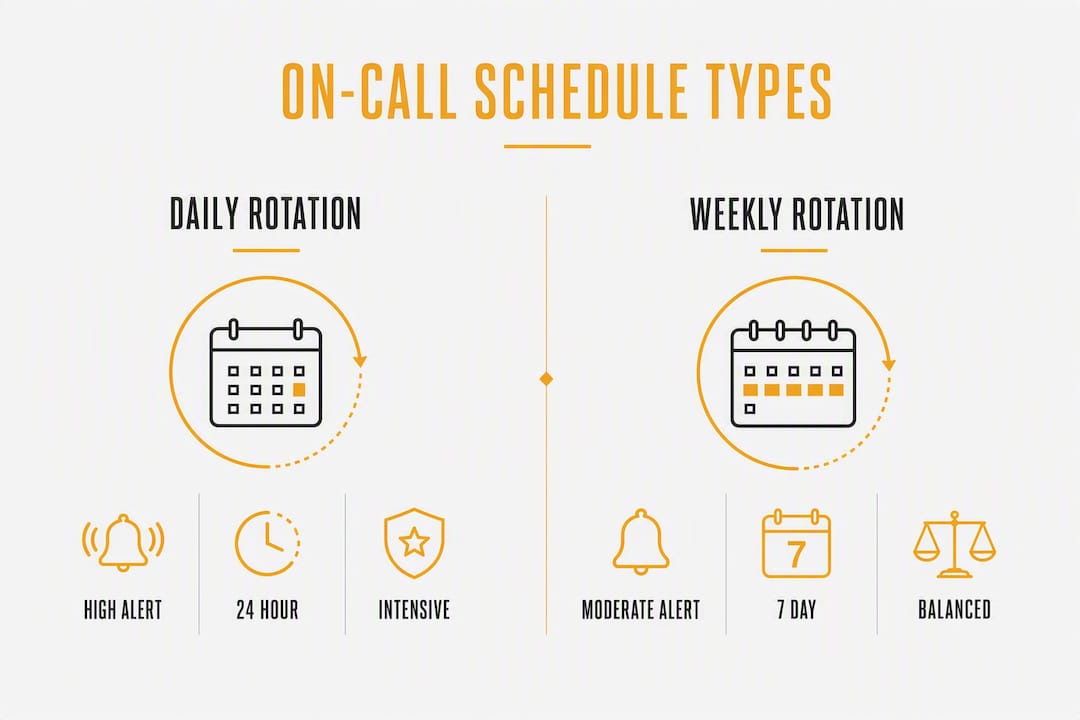
For teams under 100 people with moderate alert volumes, a weekly primary-plus-backup rotation is the default worth starting with. Daily rotations make sense when your alert volume is high enough that a single person would be exhausted by day three of a seven-day stretch. Follow-the-sun works only when you genuinely have engineers or clinicians distributed across time zones, not as a workaround for understaffing in one region.
Pro Tip: When choosing your default cadence, ask: "Would I be comfortable doing this shift myself for the full duration?" If the honest answer is no, the rotation is too long or the alert volume is too high. Start weekly, measure pages per on-call hour after 30 days, then adjust.
How do you build a deployable on-call schedule from scratch?
The fastest path from zero to a working rotation is a structured checklist. Runframe's on-call rotation guide recommends a minimum viable setup that a manager can complete in about 20 minutes: pick a primary and backup, post them in the team channel, set a 5-minute no-response rule, and create a runbook link. That's your week-one foundation.
Here's the full ordered checklist for a production-ready rotation:
- Define scope and coverage hours. Decide whether you need 24/7 coverage, after-hours only, or weekends only. Be explicit about what types of incidents trigger a page.
- Pick your rotation cadence. Weekly is the right default for most teams. Lock in a rotation start day and time, and make it timezone-aware.
- Name primary and backup for each shift. Every shift needs both. The backup is not optional; it's the safety net when the primary is unreachable.
- Set escalation timeouts. The standard: page primary → no acknowledgment in 5 minutes → page backup → no acknowledgment in 10 minutes → escalate to manager for Sev-0 or Sev-1 incidents.
- Publish the schedule and require written handoffs. Post the rotation in a shared channel. Handoffs must be written, not verbal.
- Link runbooks to every alert. Each incident type should have a runbook URL attached so the on-call responder doesn't start from scratch at 2 AM.
- Test the notification chain before go-live. Send a test page to every responder and confirm delivery across all channels.
For handoffs, keep them short. Effective handoffs run about two minutes of written content, posted publicly in the team channel, so the incoming responder can confirm ownership without scheduling a meeting.
A handoff template worth copying:
On-Call Handoff Outgoing: [Name] | Incoming: [Name] | Rotation end: [Date/Time, Timezone] Outstanding pages: [List open incidents or "none"] Known risks this week: [Deployments, maintenance windows, fragile services] Runbook link: [URL] Notes: [Anything the incoming person needs to know right now]
Use swaps for planned changes (a team member requesting coverage for a vacation) and overrides for last-minute situations. Set explicit priority rules for overrides so conflicts resolve automatically rather than landing in your inbox at midnight.
How should alerts, acknowledgements, and escalation flow?

A predictable escalation flow is what separates a professional on-call program from a fire drill. The sequence should be automatic, not dependent on someone remembering to forward a page.
A standard flow looks like this:
- Alert fires → primary on-call gets paged via push notification, SMS, and voice call simultaneously.
- No acknowledgment within 5 minutes → backup on-call gets paged through the same channels.
- No acknowledgment within 10 minutes → manager or incident commander is notified for Sev-0 or Sev-1 events.
- Responder acknowledges → opens an incident record, notes the time, severity, and initial assessment.
- Resolution or handoff → responder documents the fix, links the runbook used, and posts a brief summary in the incident channel.
The 5-minute no-response rule isn't arbitrary. Strict no-response rules prevent alert backlog and give teams predictable handling timeframes instead of relying on manual escalation guesses that vary by person and shift.
When a responder acknowledges, they should capture three things immediately: the time they acknowledged, the current severity assessment, and the first action taken. This creates an audit trail and helps post-incident reviews identify where response slowed down.
On notification channels: never rely on a single delivery method. Multi-channel delivery using push, SMS, and voice eliminates the single point of failure that comes from a phone on silent or a push notification that doesn't fire. Test your full notification stack monthly, not just at setup.
Statistic: Teams that test their notification chains regularly and use multi-channel delivery report materially fewer missed pages than those relying on a single push notification channel.
What should you look for in on-call scheduling and alerting tools?
The right tool removes the administrative work that makes on-call management unsustainable. Incident management platforms automate scheduling, escalations, and overrides to reduce manual errors and improve coverage across time zones.
Feature checklist for evaluating any on-call tool:
- Rotation automation with primary and backup layers built in
- Automated escalation with configurable timeouts
- Shift swap and override management with priority rules
- Timezone support and rotation-start configuration
- Runbook links attached directly to alert policies
- Multi-channel notifications (push, SMS, voice) with delivery testing
- Mobile app reliability (not just a web interface)
- Analytics: coverage percentage, balance score, pages per on-call hour, overloaded-user alerts
Integration requirements vary by industry:
| Industry | Key Integrations |
|---|---|
| Healthcare | EHR systems, clinical paging (e.g., Vocera, Spok), nurse call systems |
| IT/DevOps | Monitoring tools (Datadog, Grafana, PagerDuty), ticketing (Jira, ServiceNow) |
| Field service | Dispatch platforms, GPS/route optimization, customer notification systems |

For field service teams specifically, same-day dispatch optimization integrates GPS, truck capacity, and route planning to assign on-the-fly jobs automatically, without disrupting planned routes. That's a materially different capability than a basic on-call alerting tool, and it's worth evaluating separately from your incident-management stack.
When testing any tool before rollout, send a test page to every responder and verify that all three notification channels fire. A tool that looks great in a demo but drops SMS notifications at 3 AM is worse than a spreadsheet.
Pro Tip: Before committing to a platform, run a full end-to-end test: trigger a test alert, let it escalate past the primary, and confirm the backup receives it within the configured timeout. If the vendor can't walk you through that test in a 30-minute call, keep looking.
How do you keep on-call schedules fair and prevent burnout?
Burnout in on-call programs usually comes from two sources: uneven distribution and poor communication about expectations. Burnout often stems from poorly communicated schedules rather than the on-call work itself, which means fixing the communication problem is often faster than adding headcount.
Policies worth putting in writing:
- Maximum consecutive nights: No responder should carry more than three consecutive overnight shifts without a rest day.
- Recovery time after overnight pages: If a responder handles an incident between midnight and 6 AM, they get the following morning off or equivalent time-off-in-lieu (TOIL).
- Swap rules: Swaps are allowed with 48 hours' notice and manager confirmation. Last-minute swaps require override approval.
- Stipends or compensation: On-call stipends are common in IT and field service. The Economic Policy Institute notes that irregular scheduling has measurable wage and health consequences for workers, which is a useful reference point when making the case for fair compensation policies internally.
Metrics to track monthly:
- Balance score: Are on-call hours distributed evenly across the rotation?
- Coverage percentage: What share of defined coverage windows actually had a named responder?
- Pages per on-call hour: Is alert volume concentrated on certain shifts or responders?
- Overloaded-user alerts: Flag anyone carrying more than their proportional share.
IRM tools report coverage percentage, balance score, and overloaded-user alerts to surface these gaps automatically. Without that visibility, managers tend to notice burnout only after someone quits.
Pro Tip: A healthy rotation needs at least five people to keep each individual's on-call share below roughly 20% of the time. If your rotation has three people, you don't have a scheduling problem — you have a staffing problem. Fix the headcount before optimizing the schedule.
What does a realistic rollout timeline and budget look like?
Most managers underestimate how fast they can get a working rotation running and overestimate how complex the full build needs to be.
Phased rollout:
- Week 1 (minimum viable schedule): Define coverage hours, name primary and backup for the first rotation, post in the team channel, set the 5-minute no-response rule, and link one runbook. This takes about 20 minutes and gives you immediate coverage.
- Weeks 2–8 (full rollout with automation): Migrate to a dedicated on-call tool, configure automated escalations, integrate with your monitoring or dispatch stack, train the team, and run the first test page cycle.
- After 90 days (analytics and refinement): Pull your first balance score and coverage percentage report. Adjust cadence, team size, or escalation timeouts based on real data.
Budget factors to plan for:
- Tool license or subscription (per-seat pricing is standard for most platforms)
- Mobile redundancy (some teams issue a dedicated on-call device for the primary responder)
- On-call stipends or overtime compensation
- Integration engineering time if connecting to EHR, monitoring, or dispatch systems
- Training time, which is often underestimated
For teams with constrained budgets, a spreadsheet plus a Slack automation for notifications is a legitimate week-one solution. It doesn't scale past about 10 people, but it gets you from zero to covered in an afternoon. Migrate to a dedicated tool when your alert volume or team size makes manual management painful, typically around the 4–8 week mark. Exploring automated scheduling software options early helps you compare approaches before you're under pressure.
Ready-to-use schedule templates and a manager checklist
Three templates managers can copy and populate immediately:
| Template | Fields to Fill |
|---|---|
| Weekly rotation | Week start date, Primary name, Backup name, Rotation timezone, Escalation timeout (default: 5 min), Runbook URL |
| Primary + backup | Coverage window (e.g., Mon–Fri 6 PM–8 AM), Primary, Backup, Override contact, Swap approval process |
| Follow-the-sun | Region 1 (name, hours, timezone), Region 2 (name, hours, timezone), Region 3 (name, hours, timezone), Handoff time, Handoff channel |
For shift swaps, use planned swaps for scheduled changes and overrides with priority rules for last-minute coverage. Both should be documented in the schedule tool, not handled by text message.
Manager launch checklist (yes/no):
- Coverage windows defined and documented
- Primary and backup named for every shift in the next 4 weeks
- Escalation timeouts set (5 min → backup, 10 min → manager for Sev-0/1)
- Runbooks linked to all critical alert types
- Handoff template posted in team channel
- Multi-channel notifications configured (push + SMS + voice)
- Notification chain tested end-to-end
- Swap and override rules documented
- On-call compensation or TOIL policy communicated to the team
- First balance score review scheduled (30 days post-launch)
Key Takeaways
Reliable on-call scheduling requires a named primary and backup for every shift, a hard 5-minute escalation rule, written handoffs, and monthly fairness metrics to catch burnout before it costs you a team member.
| Point | Details |
|---|---|
| Start with a primary + backup | Every shift needs both names posted before coverage begins, not assigned on the fly. |
| Enforce the 5-minute rule | Auto-escalate to backup after 5 minutes of no acknowledgment to prevent alert backlog. |
| Require written handoffs | A written handoff, about two minutes of content, posted in the team channel transfers context without meetings. |
| Track fairness monthly | Monitor balance score and pages per on-call hour to catch overloaded responders early. |
| Tradepilot for field service | Tradepilot's AI dispatch matches jobs to the right technician by skill, availability, and location, integrating on-call rotation logic with real-time scheduling. |
The part most managers skip
The most common failure mode in on-call programs isn't a bad rotation pattern or the wrong tool. It's the absence of written handoffs. Teams spend weeks debating weekly versus daily rotations, configuring escalation timeouts to the minute, and evaluating platforms, then hand off verbally at shift change and wonder why the incoming responder misses context on an open incident.
Written handoffs feel like overhead until the first time an incoming responder walks into a Sev-1 that's been running for two hours with no notes. At that point, the cost of the missing documentation is obvious. The fix is simple: make the handoff template non-negotiable, post it in a public channel, and treat an undocumented handoff the same way you'd treat a missed page. Both leave your team exposed.
One immediately usable tip: this week, before you change anything else about your rotation, create a pinned message in your team's incident channel with the handoff template from this article. Tell your team that every shift change requires a post in that thread. That single change will surface more operational risk than any tool upgrade.
Tradepilot takes the guesswork out of field-service dispatch
For HVAC, electrical, and plumbing teams, on-call management doesn't stop at knowing who's available. The harder problem is matching the right technician to the right job, in real time, without a dispatcher making calls down a list.

Tradepilot's AI matches every incoming job to the best-fit technician by skill, availability, and location in under a second, so your on-call rotation connects directly to intelligent dispatch rather than sitting in a separate spreadsheet. The platform covers dispatch, invoicing, inventory, and analytics in one place, which means your on-call data and your job data live together. Shift swaps, real-time schedule updates, and performance analytics are built in, giving managers the fairness metrics this playbook recommends without a separate reporting tool.
If your team is still routing emergency calls manually, see how Tradepilot works and start a free trial to put AI dispatch behind your next on-call rotation.
Useful sources for deeper reading
- Best practices for on-call schedules — Grafana Cloud documentation: Covers rotation patterns, swap vs. override logic, multi-channel notification testing, and schedule quality metrics. The most technically detailed free reference available.
- Irregular Work Scheduling and Its Consequences — Economic Policy Institute: Research on the wage and health consequences of unpredictable scheduling. Useful background when building the internal case for fair on-call compensation policies.
- AI for Field Service: A 2026 Manager's Guide — Tradepilot: Covers AI use cases for dispatch and scheduling in trades businesses, including how intelligent assignment connects to on-call rotation management.