
Real-time scheduling matches the right technician to every job the moment it lands, then keeps re-optimizing the entire day as conditions change. For HVAC, electrical, and plumbing operations, that means fewer wasted drive hours, more jobs completed per tech, and far fewer callbacks.
The three outcomes owners see first:
- Reduced travel time — technicians spend less of their day in the truck and more of it on-site
- Higher technician utilization — the schedule fills gaps automatically instead of leaving dead time between jobs
- Better first-time-fix rates — the right skills, certs, and parts reach the job before the tech does
Within a 90-day pilot, most trades operations can realistically target a 25–30% drop in average drive time and a 15–20% gain in daily job completions. Those are ranges, not guarantees, and your baseline matters, but they are achievable with clean data and a structured rollout.
Key Takeaways
Real-time scheduling delivers measurable gains in drive time, first-time-fix rate, and jobs per tech only when the underlying data is clean and the pilot is structured with clear KPIs from day one.
| Point | Details |
|---|---|
| Audit your data first | Clean work-order history and a skills taxonomy are the foundation; bad inputs produce bad assignments. |
| Set pilot KPIs before launch | Baseline drive time %, jobs per tech per day, and FTF rate so you can measure a real delta at 90 days. |
| Govern the engine from week one | Log every dispatcher override and run monthly workload fairness reports to catch bias early. |
| Treat scheduling as a planning tool | Use scenario modeling to price SLA tiers and forecast capacity needs, not just to route today's jobs. |
| Tradepilot for trades dispatch | Tradepilot matches jobs to technicians in under a second with built-in skills taxonomy, sync, and analytics. |
Table of Contents
- What does real-time scheduling actually deliver for trades businesses?
- How does an AI scheduling engine work?
- What measurable impact should you expect?
- Implementation checklist: from data prep to live dispatch
- What are the real risks, and how do you control them?
- How does real-time scheduling become a strategic lever?
- What the first week actually teaches you
- Tradepilot matches every job to the right tech, instantly
- Sources
What does real-time scheduling actually deliver for trades businesses?
The term "real-time scheduling" gets used loosely. In field service, it means one specific thing: schedule changes propagate to the technician's mobile device in under 30 seconds. Reviewbook's field service guide recommends a simple acceptance test: create a job on the desktop, reassign it, and time the mobile update. Anything slower than 30 seconds is not real-time, no matter what the vendor claims.
Beyond sync speed, the features that actually move the needle for dispatch managers are:
| Feature | What it does | Business outcome |
|---|---|---|
| Continuous re-optimization | Recalculates the full day's schedule on every new event | Lower drive time, tighter SLA compliance |
| Skills and cert-aware matching | Filters technicians by license, trade, and equipment type | Higher first-time-fix rate |
| Parts-aware dispatch | Checks truck stock before assigning a job | Fewer return visits |
| Two-way customer notifications | Auto-confirms, sends ETAs, and flags delays | Fewer no-shows, higher CSAT |
| Territory and zone optimization | Clusters jobs geographically | Less cross-town routing |
Salesforce documents that AI scheduling assistants can cut average booking time from roughly 17 minutes to under 5 in some workflows, freeing dispatchers to handle exceptions rather than routine confirmations. That shift alone changes what a dispatcher's day looks like.
How does an AI scheduling engine work?
The engine is a constraint solver running continuously. It takes in a set of inputs, applies a set of objectives, and produces an assignment. When anything changes, it runs again.
Required inputs:
- Open work orders with job type, estimated duration, and SLA deadline
- Technician profiles: skills, certifications, current location, shift hours, and truck inventory
- Parts and materials availability by vehicle or warehouse
- Live traffic and travel-time data
- Customer preferences (preferred tech, time windows, access instructions)
- Historical job durations by job type and technician
Optimization objectives (you set the priority order):
- Minimize total drive time across the fleet
- Maximize SLA compliance rate
- Maximize first-time-fix probability
- Balance workload across technicians to prevent burnout and overtime
The event loop is straightforward: a new job arrives or an existing one changes → the engine re-evaluates all open assignments → it either confirms the current plan or reassigns to a better fit. AI-driven scheduling engines that weigh skills, SLAs, parts availability, and travel simultaneously outperform static rule-based approaches on utilization, travel time, and SLA compliance, according to Gartner and Field Service analyses.
For AI dispatching in HVAC, electrical, and plumbing, the practical difference is that the engine handles the combinatorial math that would take a dispatcher 20 minutes to reason through, in under a second.
What measurable impact should you expect?
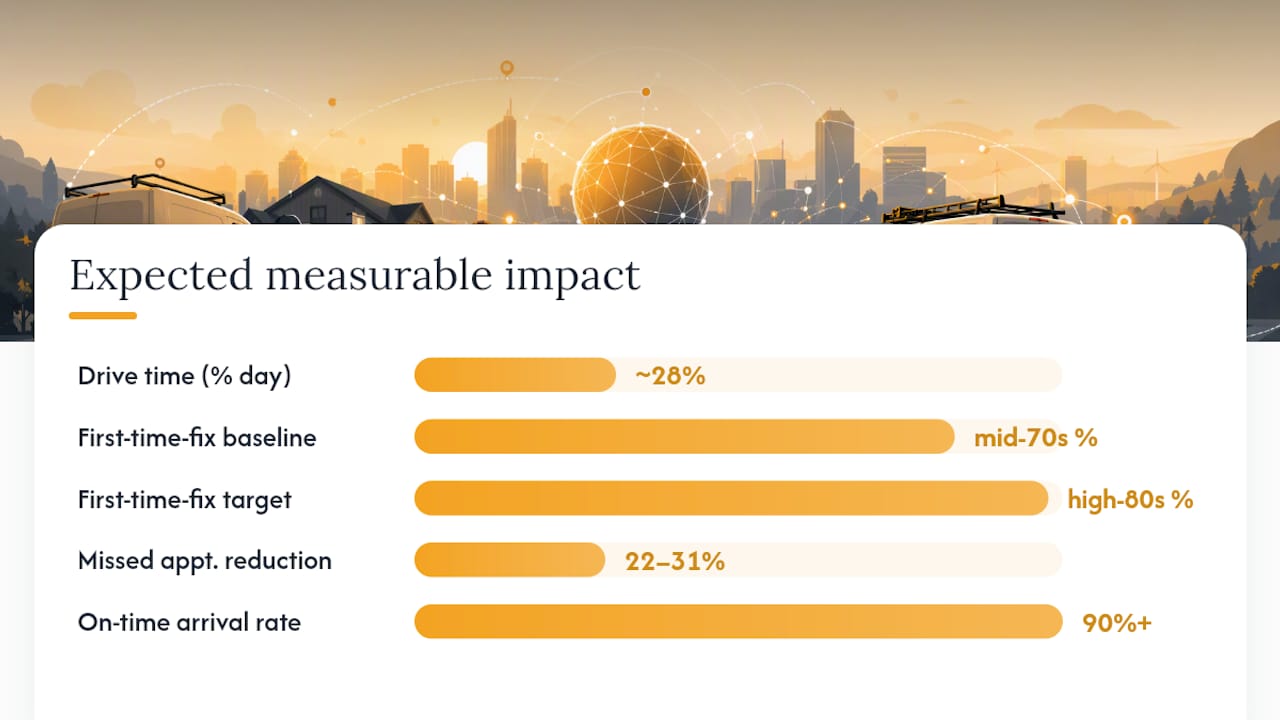
Set your baseline before launch. Pull 90 days of historical data on these KPIs, then measure the same metrics post-launch.
| KPI | Typical baseline | Target range after 90 days |
|---|---|---|
| Drive time as % of tech day | ~28% | 25–30% |
| Jobs completed per tech per day | Varies by trade | +1.4 jobs/tech/day |
| First-time-fix rate | Mid-70s % | High-80s % |
| Missed appointments | Baseline count | Reduce by 22–31% |
| On-time arrival rate | Track pre-launch | Target 90%+ |
Industry benchmarks show technicians often spend roughly 28% of their day driving, and automated scheduling can add approximately 1.4 jobs per tech per day while reducing missed appointments by 22–31%. Top-performing operations achieve first-time-fix rates in the high 80s compared with mid-70s for typical shops, and that gap translates directly into recovered revenue per technician.
During the pilot, track jobs per tech per day and drive time weekly. Steady-state metrics like CSAT and SLA compliance take 60–90 days to stabilize.
Implementation checklist: from data prep to live dispatch
A structured rollout protects service levels while you validate the system.
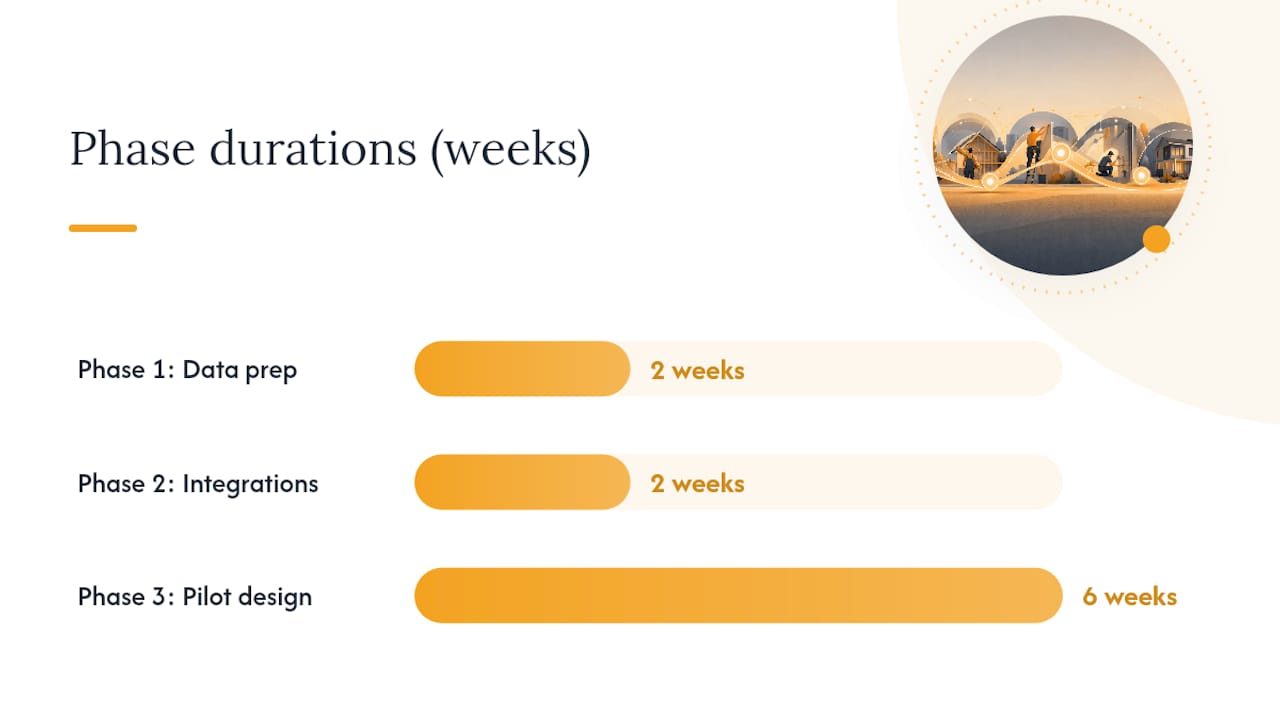
Phase 1: Data preparation (weeks 1–2)
- Export 12 months of work-order history; normalize job codes and clean duration outliers
- Build a skills and certification taxonomy: trade type, equipment brands, license level, and expiry dates
- Audit truck inventory records; align parts data with your most common job types
- Map SLA tiers by contract type and customer priority
Phase 2: Integrations (weeks 3–4)
- Connect your CRM or booking system for live job ingestion
- Integrate the FSM mobile app so technicians receive assignments and update status in the field
- Link parts inventory so the engine can check stock before assigning
- Add ERP or contract data for SLA rules and billing triggers
- If you have IoT-connected equipment, pipe predictive alerts into the work-order queue
Phase 3: Pilot design (weeks 5–10)
| Element | Recommendation |
|---|---|
| Scope | 3–5 technicians, one service zone |
| Duration | 30–90 days |
| Success metrics | Jobs/day, drive time %, FTF rate, missed appointments |
| Control group | 2–3 techs on manual dispatch for comparison |
| Rollout gate | Expand only when pilot metrics hit targets |
Phase 4: Change management
- Write a dispatcher playbook: what the engine decides automatically versus what requires human override
- Run a half-day technician onboarding session covering the mobile app and status-update workflow
- Send customers a brief notification explaining the new ETA and confirmation system
Pro Tip: Run the Reviewbook acceptance test on day one of the pilot: create a job, reassign it, and confirm the mobile update lands in under 30 seconds. If it does not, resolve the sync issue before expanding the rollout.
For a full breakdown of platform costs and what to budget, the dispatch software cost guide covers TCO for SMB service businesses.
What are the real risks, and how do you control them?
| Risk | Root cause | Mitigation |
|---|---|---|
| Bad job durations | Incomplete history or outliers | Clean data before import; set duration floors by job type |
| Parts shortages mid-route | Inventory not synced | Require real-time parts integration before go-live |
| Dispatcher resistance | Loss of perceived control | Give dispatchers override authority and a clear exception queue |
| Perceived unfair routing | Opaque assignment logic | Publish workload fairness rules; run weekly balance reports |
| Labor or union rule violations | Engine ignores contract terms | Encode shift limits, overtime rules, and rest periods as hard constraints |
| Audit gaps | No change log | Require a timestamped assignment log for every reassignment |
Bias in AI scheduling is a real operational risk, not a theoretical one. If the engine consistently routes certain technicians to lower-revenue jobs or longer drives without a documented reason, it creates both fairness problems and retention risk. Run a monthly workload distribution report by technician and flag any pattern that deviates more than 15% from the fleet average. That single governance step catches most fairness issues before they become grievances.
How does real-time scheduling become a strategic lever?
Daily dispatch is the entry point. The strategic value shows up when you use the same engine for planning.
- SLA-driven priority routing: Model two or three SLA tiers (standard, priority, emergency) and let the engine route by tier. That data tells you exactly what a premium SLA tier costs in technician time, so you can price it accurately.
- Predictive maintenance clustering: When IoT alerts flag equipment nearing failure, the engine can cluster those visits geographically with nearby scheduled jobs, cutting a separate truck roll into an add-on stop.
- Seasonal surge modeling: Run scenario models before peak season to test whether your current headcount can absorb a 20% volume spike, or whether you need a partner-network overflow agreement.
- Capacity pricing: Scenario outputs show the revenue ceiling at current staffing, which gives owners a data-backed case for hiring or subcontracting decisions.
Scaling from one office to multiple territories follows the same pattern: replicate the skills taxonomy and SLA rules per territory, then let the engine optimize within each zone before you attempt cross-territory balancing. AI for field service at scale works best when each territory runs cleanly on its own first.
What the first week actually teaches you
The first week post-launch is less about the metrics and more about the gaps in your data. Every time a dispatcher overrides the engine, write down why. Nine times out of ten, the reason is a missing constraint: a technician who can't enter a certain building, a job type with a duration the history underestimated, a customer who only accepts one tech.
Those overrides are your punch list. Fix the underlying data, and the engine's suggestions get sharper within days. The dispatchers who embrace that feedback loop early are the ones who stop second-guessing the system by week three.
The practical tip for your first week: track override rate daily. A high override rate is not a failure. It is a diagnostic.
Tradepilot matches every job to the right tech, instantly
Dispatch decisions that used to take 15 minutes now take under a second with Tradepilot. The platform matches every job to the best-fit technician by skill, certification, availability, and location, and it keeps re-optimizing as the day changes.

Tradepilot bundles the full operations stack for trades businesses: AI dispatch, drag-and-drop scheduling for dispatchers who want manual control, invoicing, parts inventory, and performance analytics, all on one platform. Skills taxonomy, real-time mobile sync, and two-way customer notifications are built in, not add-ons.
Ready to run a structured pilot? Start with Tradepilot and see your jobs-per-tech and drive-time numbers move within 30 days.
Sources
- AI in Field Service: Real-Time Benefits Explained | aiventic
- 8 features every field service software needs (2026) · reviewbook