
Run the truck restock process weekly or biweekly, tied to fixed par levels for every stocked item, with an end-of-day capture step, a printed or app-based pick list, and a physical load-and-verify check before the truck leaves the yard. That cadence catches shortages before they turn into a mid-job supply-house run. Crews that follow it consistently report fewer scrambled trips and faster mornings, because nobody is guessing what's on the shelf.
TL;DR:
- Setting par levels based on 60 to 90 days of actual usage data ensures accurate restocking quantities, avoiding guesswork and overstocking.
- A weekly or biweekly replenishment cycle prevents mid-week shortages, with quarterly reviews for seasonal adjustments on high-turn or critical items.
- End-of-shift checks should focus on the top 15 high-turn items and include quick spot audits, rather than aiming for perfect counts of every part.
- Organizing bins by usage frequency and loading in route order significantly reduces search time and accelerates the restocking process.
- Integrating dispatch with inventory management minimizes unnecessary trips, flags duplicate orders, and improves fill rates, especially for small crews.
Table of Contents
- What Is the Truck Restock Process and Why Does It Matter?
- How Do You Set Par Levels and Pick a Restock Schedule?
- What Should End-of-Shift Truck Checks Include?
- How Should You Organize Bins, Shelving, and Load Order?
- How Do You Capture Usage and Trigger a Restock?
- Which Software Features Actually Speed Up Restocking?
- What's the Step-by-Step Restock SOP?
- How Does Integrated Dispatch Reduce Restock Friction?
- Where Should Small Crews Start Fixing Restock?
- How TradePilot Simplifies Truck Restock and Dispatch
- Sources
What Is the Truck Restock Process and Why Does It Matter?
The restock cycle has five moving parts: capture what got used, compare it against a par level, pick the shortfall, load the truck, and verify the load before the tech drives off. Skip any one of those steps and the whole system drifts. A tech who forgets to log three couplings today is the same tech standing at a supply house at 7:45 AM tomorrow, burning billable time on a $12 part.
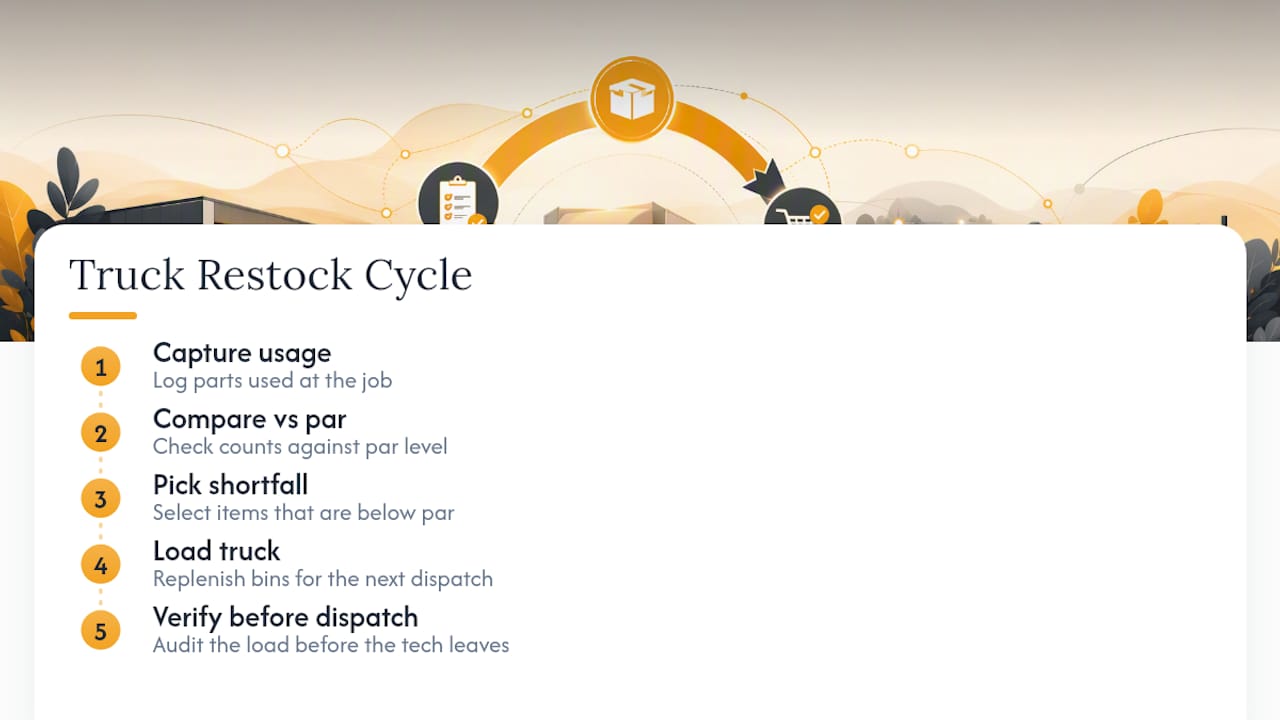
Ad-hoc restocking (grabbing parts "when someone notices they're low") feels efficient because it avoids paperwork, but it fails in a predictable way: nobody notices until the truck is already at the job site. A reliable truck inventory workflow instead treats replenishment as three linked stages: capture usage at the job, trigger restock before the next dispatch, and audit on a regular schedule rather than chasing perfect counts every day.
Most crews don't need a full restock every single day. A full restock, where every bin gets checked against par, works best on a fixed schedule. Spot replenishment, grabbing a single fast-moving item mid-week when a tech flags it, fills the gaps between full cycles. The mistake is running spot replenishment as the only system. Without a scheduled backstop, small shortages compound, and by week three half the fleet is short on something different. The fix isn't more vigilance from technicians. It's a cadence that doesn't depend on anyone remembering.
How Do You Set Par Levels and Pick a Restock Schedule?
Par level is the quantity of an item a truck should carry at all times, based on how fast it actually gets used. The easiest way to set it wrong is to guess, or to copy what a senior tech happens to carry. The better way is to pull 60 to 90 days of usage data per item, per truck, and set par at that average plus a buffer for the items that would delay a job if missing.
That buffer matters more than most managers think. A slow-moving specialty valve and a fast-moving 1/2 inch coupling shouldn't carry the same safety margin just because they're both "parts." A rolling lookback window combined with a criticality multiplier for job-stopping items gives a more accurate par calculation than a flat rule of thumb applied to everything on the truck.
On cadence, weekly or biweekly beats daily or monthly for most trades fleets. Many electrical and service companies run a scheduled weekly or biweekly replenishment cycle that returns every truck-stock item to par, specifically to avoid mid-week shortages that force an unplanned supply-house trip.
A few examples illustrate the concept:
- A plumbing truck using P traps weekly should carry a par level that provides a buffer for the next cycle.
- An HVAC truck's capacitor usage can spike seasonally, requiring adjustment of par levels accordingly.
- Low-turn specialty items used infrequently can be restocked less often, freeing up weekly cycles for high-turn consumables.
Seasonal swings are where fixed par levels break down if nobody revisits them. Capacitors and refrigerant fittings spike in July. Ice melt and pipe insulation spike in January. Set a quarterly review specifically to catch these shifts, separate from the weekly restock itself.
Pro Tip: Flag your top 10 fastest-moving items and review their par levels every quarter. Everything else can go on a slower, twice-a-year review cycle without hurting your fill rate.
What Should End-of-Shift Truck Checks Include?
The end-of-day check is where restock accuracy either holds or falls apart. It only works if it takes a technician under five minutes, because anything longer gets skipped on a Friday when everyone wants to go home.
- Log the top 10 to 15 high-turn items first. These consumables drive most restock activity, so getting them right matters more than a perfect count of every bolt on the truck.
- Cross-check parts against the day's job tickets. If a ticket shows a water heater install, the truck should be missing the parts that job requires. Mismatches flag either a data entry miss or a possible loss.
- Note tool condition, not just parts. A cracked drill bit or a dead battery pack is a restock item too, just one that doesn't show up in a parts count.
- Capture it the fastest way available. A barcode scan through a mobile app beats a paper checklist, and a paper checklist beats nothing. A quick photo of a near-empty bin with a one-line note works when scanning isn't practical.
- Flag exceptions instead of forcing a perfect count. If a tech isn't sure whether they used two or three of something, log the higher number and move on. Chasing exact precision on low-cost items wastes more time than it saves.
Supervisors should sample-audit, not full-audit, every truck. Pick two or three trucks a week for a real bin-by-bin count against the system record, rotating through the fleet over a month. Full daily audits on every truck burn labor hours for very little extra accuracy once the capture habit is solid.
How Should You Organize Bins, Shelving, and Load Order?
Truck layout drives how fast a tech can find a part, and search time adds up faster than most managers realize. Organizing bins and shelving around frequency of use, not alphabetical order or "however it fit," cuts the time a tech spends digging around before a job.
- Color-code bins by category (fittings, fasteners, electrical, safety gear) so a new tech or a substitute driver can find things without asking.
- Put your fastest-moving 20% of items within arm's reach of the side door, since that's where a tech grabs parts mid-job.
- Load in the reverse order of the day's route, so morning-job parts sit closest to the door and late-day parts get loaded first, deeper in the truck.
- Use labeled, divided bins with secure latches rather than loose totes. Loose totes shift in transit and turn into a mid-drive mess.
- On smaller vans, stack vertically with the heaviest bins low and wide, and use door-mounted pouches for small fasteners that otherwise end up loose in a drawer.
Labeling and frequency-based placement can cut part lookup time to under a minute on trucks that were previously organized by habit rather than by design. That's real time back in a tech's day, multiplied across every job, every week.
How Do You Capture Usage and Trigger a Restock?
The trigger mechanism connecting a used part to a restock order is where most fleets either succeed quietly or fail loudly. Three capture methods dominate: manual entry, barcode scanning, and job-ticket deduction.
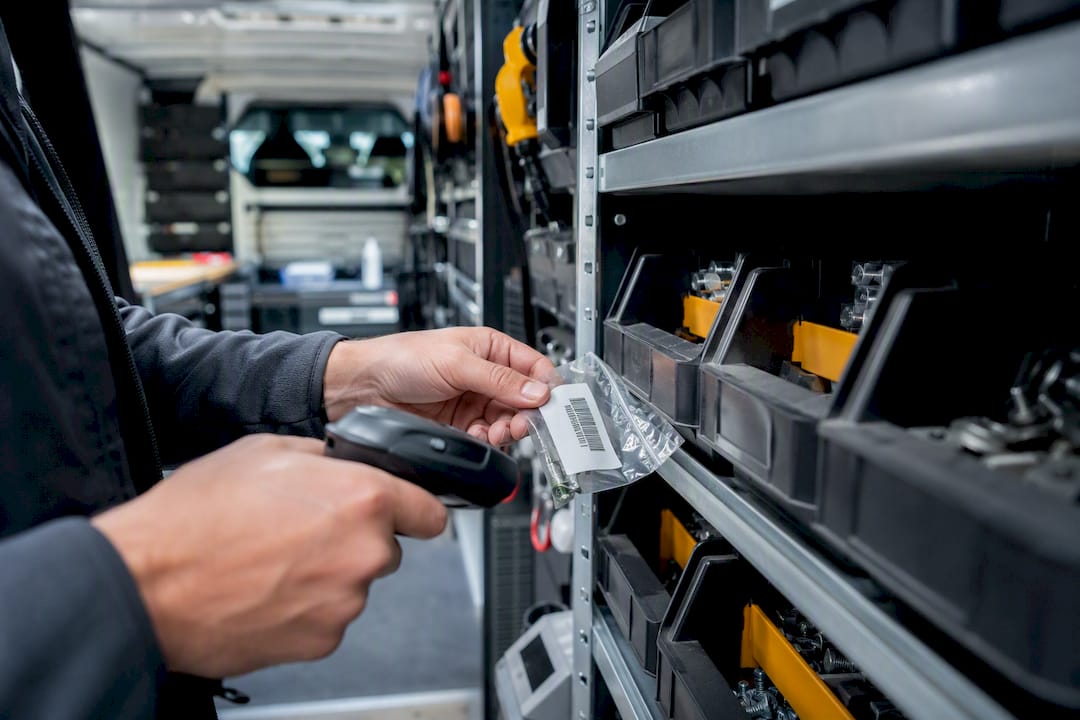
Manual entry is the cheapest to set up and the easiest to abandon. It works for very small fleets where one person owns the process, but it degrades fast past three or four trucks. Barcode scanning through a mobile app adds setup time upfront (every bin needs a code) but scales cleanly and removes most of the guesswork from counts. Job-ticket deduction, where parts used on a job ticket automatically decrement truck inventory, is the least manual-labor-intensive option and the one that scales best, but it depends on techs actually logging parts against the ticket in real time.
Reorder points and safety stock work together here. A reorder point is the quantity at which a restock trigger fires, usually set at par level minus expected usage before the next scheduled cycle. Safety stock is the extra cushion on top, sized larger for job-stopping items and smaller for anything with an easy substitute.
A few practical rules for the messier parts of usage tracking:
- Partial use (half a spool of wire, a fraction of a tube of sealant) should round up in the log rather than get ignored, since ignoring it consistently understates usage and throws off par calculations over time.
- Returns (an unused part brought back from a canceled job) need a return workflow, not a silent add-back, or your usage data quietly gets corrupted.
- Wastage (a dropped fitting, a stripped screw) should get logged under a separate wastage code so it doesn't get mistaken for billable usage when you're reviewing consumption trends.
- Reconciliation audits compare system counts against physical counts on a schedule, not just when something feels off, and the gap between the two numbers is often the fastest way to catch a capture-method failure before it spreads across the fleet.
A practical truck inventory workflow focuses on these capture-and-trigger basics rather than chasing perfect real-time accuracy, since perfect accuracy on every bolt and washer costs more in labor than it saves in avoided shortages.
Which Software Features Actually Speed Up Restocking?
The feature list that matters for truck restock software is shorter than most vendor pitches suggest. Look for truck-specific lists (so par levels apply per vehicle, not fleet-wide), vendor lists tied to specific parts, auto-suggested reorder quantities, one-click PO creation, and a real sync to accounting.
Cloud-based systems that centralize inventory control across locations give real-time visibility and cut duplicate data entry, which matters most for fleets running more than a handful of trucks across multiple job sites. Mobile-first workflows with job-level material tracking are the features that determine whether techs actually use the software day to day, rather than treating it as an office task nobody in the field bothers with.
Basic setup has a few common pitfalls. Map each truck as its own inventory location rather than lumping the whole fleet together, or your par levels will be meaningless. Assign each tech to a specific truck in the system, not just "whoever drove it that day," so usage data ties back to a person and a vehicle. Connect the accounting sync (QuickBooks or a comparable ERP) early, since retrofitting that connection after months of manual PO entry means redoing a lot of historical data by hand.
Auto-suggested quantities typically pull recent sales or usage over a set period and propose a restock number, and most systems let you adjust that number before confirming the order, which matters for seasonal items where the automatic suggestion undershoots demand. Override the suggestion whenever you know something the system doesn't, like an upcoming cold snap or a big commercial job on the calendar.
Field connectivity gaps are the other common failure point. A tech in a basement or a rural job site without signal can't sync usage in real time, so the app needs offline capture that syncs later. And multi-location fleets should run duplicate-order checks before finalizing a PO batch. That single check catches a surprising number of accidental double-orders once you're running bulk replenishment across more than a few trucks.
- Truck-specific par lists and vendor mapping
- Auto-suggested restock quantities with manual override
- One-click PO generation tied to a vendor list
- Two-way accounting sync (QuickBooks or equivalent ERP)
- Offline capture for low-connectivity job sites
- Duplicate-order flagging across multiple trucks or locations
What's the Step-by-Step Restock SOP?
An SOP turns restocking from a judgment call into a checklist anyone on the team can execute consistently, whether that's a lead tech, a warehouse helper, or a rotating restock owner. A scheduled restock routine built around a par list and a designated responsible person is what turns this from guesswork into something repeatable.
- Confirm the truck and tech assignment before touching the pick list. Trucks sometimes swap between techs for a day, and a mismatched assignment means you're restocking against the wrong par levels.
- Print or load the restock pick list from the system. This should already reflect the gap between current stock and par, calculated from the last capture cycle, not from memory.
- Count and pick against that list, item by item. Work through it in the same order every time. Consistency here is what makes exceptions easy to spot.
- Note every exception on the spot. If an item is out of stock at the supply house, or a bin count doesn't match the system, write it down immediately rather than trying to remember it later.
- Load the truck in route order, heaviest and least-frequently-needed items deepest, fastest-moving items closest to the door.
- Label anything that changed position. If a bin moved or a new item got added, a quick label update saves the next person real time.
- Take a photo of the completed load as a verification step. This takes ten seconds and gives you a record if a dispute comes up later about what was or wasn't on the truck.
- Cross-check the photo and pick list against the par sheet before signing off. This is the actual verification step, not just a formality.
- Update the inventory system with final counts, including any exceptions noted in step 4.
- Generate the PO or internal transfer for anything still short, and route it to the right vendor or warehouse.
- Log exceptions in a shared place the next shift's team can see, so a shortage doesn't quietly repeat itself the following week.
Following this sequence in order matters more than any individual step. A restock routine that skips straight to loading without confirming truck assignment, or that skips the final system update, breaks the data trail that makes the whole cycle work the next time around. For very small crews, a single-owner version of this checklist, one person, one pick-path, paired with the photo verification step, has been shown in practical use to cut loading time by 30 to 50 percent compared to an unstructured restock.
How Does Integrated Dispatch Reduce Restock Friction?
Dispatch and inventory usually live in separate systems, and that separation creates a specific, avoidable cost: trucks get loaded for jobs they never end up running. When job-to-technician matching considers what's actually on a given truck, fewer parts get loaded speculatively and fewer techs drive back to the yard mid-shift for something they didn't have.
Central inventory tied directly to dispatch also closes the duplicate-order gap. When two trucks both show low stock on the same part, a centralized system flags the overlap before two separate purchase orders go out for the same shortage. That single check alone can eliminate a real chunk of avoidable spending on fast-moving consumables.
Three metrics worth tracking from day one: emergency supply-house runs per tech per month, fill rate (percentage of jobs where the truck already had what the job needed), and average restock time per cycle. Track those three and you'll know within a month whether the process is actually working.
Where Should Small Crews Start Fixing Restock?
If you run a small crew and only change one thing, make it this: a weekly par restock with one clearly designated owner and a simple checklist, nothing fancier. Most small teams overbuild their first attempt at a restock process, trying to track every washer and screw with the same rigor as a job-stopping part, and the whole system collapses under its own admin weight within a month.
Track fill rate first. It's the single number that tells you whether the process is working: the percentage of jobs where the truck already had what it needed, no supply-house detour required. Everything else, restock time, PO accuracy, par precision, matters less in the first ninety days than whether trucks are simply showing up ready.
The real trade-off for a two or three truck operation is that a single-owner system is fragile. If that one person is out sick or on vacation, the whole cadence stalls unless there's a documented backup process. Write the checklist down before you need it, not after the first missed week exposes the gap.
— Mark
How TradePilot Simplifies Truck Restock and Dispatch
TradePilot replaces the guesswork of matching trucks to jobs with inventory-aware dispatch. Instead of manually cross-checking which truck has the right parts before sending a tech, the platform's AI-powered dispatch matches jobs to the best-fit technician by skill, availability, location, and what's actually loaded, cutting the number of trucks sent out under-stocked for the work ahead.

The features that map most directly to the restock steps above: centralized inventory sync across your fleet, automated PO workflows when items hit reorder points, and analytics that surface fill rate and emergency-run counts without a manual spreadsheet. Onboarding typically means mapping each truck as its own inventory location and connecting your accounting system, the same setup work covered earlier, and it's worth budgeting real time for that step rather than rushing it. TradePilot isn't a replacement for a good SOP; it's the system that makes an existing SOP easier to run consistently across a growing fleet. If your crew has outgrown a paper checklist, see how TradePilot's dispatch and inventory tools work together and request a demo to see it against your own truck list.
Sources
For deeper technical detail beyond this SOP, Sortly's guide to truck inventory management covers capture methods and audit cadence in more depth. Ply's breakdown of contractor inventory software is useful when comparing mobile-first feature sets. And for fleets weighing dispatch software more broadly, TradePilot's guide to dispatch software costs lays out what to expect when budgeting for an integrated platform.
- Truck Stock Replenishment Cycle — 1Cademy
- Truck Inventory Management: The Complete Guide for Field Teams | Sortly
- Dealership Drive — Inventory management