Emergency dispatch management, in the context of HVAC, electrical, and plumbing businesses, means using software to route the right technician to an urgent job by skill, availability, and location, then keeping that job on track through invoicing. It has nothing to do with 911 call centers. If you're evaluating tools, the fastest path forward is an AI-capable field service management (FSM) platform with a live schedule board, a mobile app that works offline, skill-based matching, and two-way accounting sync.
A platform worth paying for should give you:
- A live schedule board showing capacity and unassigned work at a glance
- A mobile technician app with full offline read and write
- Skill-based dispatch that matches jobs to qualified techs automatically
- Route optimization for multi-truck days, not just static maps
- Two-way sync with accounting software like QuickBooks
Tradepilot builds toward exactly this list. Its AI matches jobs to technicians by skill, availability, and location in under a second, then carries that job through invoicing, inventory, and reporting without a second system.
Key Takeaways
Emergency dispatch management works when AI-driven skill, availability, and location matching runs through a platform with live scheduling, offline mobile access, and integrated invoicing.
| Point | Details |
|---|---|
| Core features come first | Prioritize a live schedule board, offline mobile app, skill-based matching, and QuickBooks sync during evaluation. |
| Size the platform to your stage | Route optimization pays off around four or more trucks; smaller crews should prioritize mobile invoicing first. |
| Pilot with real jobs | Test with real dispatchers and at least three technicians over a full week including a high-volume day. |
| Track five KPIs | Watch first-time fix rate, mean time to arrival, utilization, schedule compliance, and invoice cycle time. |
| Tradepilot fits the checklist | Tradepilot matches jobs by skill, availability, and location while syncing invoicing and inventory in one platform. |
Table of Contents
- What Core Features Does Emergency Dispatch Management Software Need?
- How Do You Match Software to Your Crew Size and Season?
- How Should You Pilot Emergency Dispatch Software Before Rollout?
- Which KPIs Prove Emergency Dispatch Management Is Working?
- How Do You Prioritize and Triage Incoming Emergency Calls?
- How Should Dispatchers Communicate With Field Technicians?
- Why Does GIS and Mapping Integration Matter for Dispatch?
- How Does Real-Time Rerouting Handle Mid-Day Changes?
- What Data Security Practices Should Dispatch Platforms Follow?
- What Training Do Dispatchers Need to Run This Well?
- Why AI Matching Changes the Dispatch Equation
- Getting Started With AI-Powered Dispatch Software
- Sources
What Core Features Does Emergency Dispatch Management Software Need?
Not every feature on a vendor's homepage matters when a burst pipe call comes in at 9 p.m. Some do, and they're worth scrutinizing hard before you sign a contract.
- Live schedule board. You need a real-time view of every truck, every open job, and every gap in capacity, with a map overlay so you can see who's actually closest. Reassignment should take one drag, not five clicks through a menu.
- Mobile app with true offline function. Field technicians lose signal in basements, rural service areas, and steel-frame buildings constantly. The app has to let them pull job details, capture photos and signatures, and close out work even with zero bars, then sync the moment connectivity returns. Offline read/write is a baseline requirement, not a premium add-on.
- Skill-based dispatch and qualification tags. A gas leak call shouldn't go to a tech who's only certified for duct work. Good platforms let you tag certifications, license types, and equipment specialties, then filter automatically.
- Routing and ETA logic. For a two-truck crew, proximity-based assignment usually beats a full routing algorithm. Multi-stop route optimization only pays off once you're running four or more trucks on overlapping territory.
- Estimate-to-invoice flow with accounting sync. The job should convert from closed ticket to sent invoice without retyping anything, and it should land in QuickBooks automatically.
- Inventory linkage and customer notifications. Parts used on a job should deduct from stock in real time, and customers should get an automatic "technician en route" text.
Dispatch software functions as the control tower between the phone ringing and the invoice getting paid, and that framing should guide every feature you prioritize during evaluation.
Pro Tip: During any demo, ask the sales rep to simulate a mid-day emergency reassignment live. If they need to switch screens more than twice to move a job, your dispatchers will feel that friction every single day.
How Do You Match Software to Your Crew Size and Season?
Buying too much platform is as costly as buying too little. A solo operator paying for enterprise capacity planning is wasting money every month; an eight-truck shop still juggling a paper whiteboard is losing jobs to slower competitors.
- 1 to 2 trucks: Prioritize scheduling, mobile invoicing, and basic customer history. Skip routing entirely. Mobile invoicing and customer history pay back earliest for small shops, according to buyer guidance from FieldServiceStack.
- 3 to 8 trucks: Add drag-and-drop dispatch and light routing. This is where a live schedule board starts saving real hours weekly.
- 8 to 20 trucks: Capacity planning and skill-based matching become worth the premium tier. Route optimization becomes genuinely valuable around four or more trucks, and by this stage it's non-negotiable.
- 20+ trucks: Deep integrations, advanced reporting, and SLA tracking justify enterprise pricing.
If you run substantial after-hours or emergency volume, weight your decision toward platforms with strong mobile offline function and fast reassignment, regardless of your truck count. Watch for hidden costs too: per-seat add-ons, onboarding fees, SMS or telephony charges, and premium support tiers that aren't in the sticker price.
How Should You Pilot Emergency Dispatch Software Before Rollout?
Never buy dispatch software off a sales demo alone. Run it against real jobs first, or you'll discover the gaps during your worst week, not your best one.
- Set pilot rules. Use real dispatchers and at least three real technicians, running for a full production week that includes one high-volume day. Buyer guidance from FSM Advisor recommends testing integrations live, not in a sandbox.
- Test three flows specifically. Force a mid-day emergency callback reassignment. Run a full mobile closeout-to-invoice cycle. Confirm the invoice actually lands correctly in your accounting sync.
- Check offline performance in your worst-signal areas. Send a technician into a basement or rural stop and confirm the app captures the job and syncs later without losing data.
- Verify ETA accuracy on the map overlay. Compare the software's estimated arrival against what actually happened.
- Build a training plan. Involve your lead dispatcher and two or three senior technicians first, give them a week to get comfortable, and designate one internal point person for questions before rollout to the full team.
- Migrate your data deliberately. Move price books, equipment history, and warranty records over, and confirm you can export everything back out if you ever switch again.
Treat the rollout as a change-management project, not a software install. Setting 90-day, 6-month, and 12-month milestones tied to adoption and productivity gives you a real basis for judging whether the switch worked.
Which KPIs Prove Emergency Dispatch Management Is Working?
Five numbers tell you whether the platform is earning its subscription fee or just adding a login to your morning routine.
- First-time fix rate — jobs closed correctly on the first visit, without a callback
- Mean time to arrival on emergency calls — how fast a technician reaches an urgent job from dispatch
- Technician utilization — billable hours against total scheduled hours
- Schedule compliance — how often the plan for the day survives contact with reality
- Invoice cycle time — days between job closeout and payment received
| Metric | What Improvement Looks Like |
|---|---|
| First-time fix rate | Fewer repeat visits per completed job, tracked monthly |
| Mean time to arrival | Faster average response on same-day emergency calls |
| Technician utilization | More billable hours per truck per week |
| Invoice cycle time | Invoices sent same-day instead of days later |
Payback comes from three places: reduced windshield time, higher utilization per truck, and faster invoicing that shortens your cash cycle. Larger crews with more automated matching tend to see the improvement compound faster, since one dispatcher can manage more trucks accurately. Your dashboard should surface patterns, not just totals. If one technician's first-time fix rate lags the team, that's a coaching conversation, not a data point to ignore.
How Do You Prioritize and Triage Incoming Emergency Calls?
Not every "emergency" call is actually one. A tripped breaker and a live electrical short both come in sounding urgent, but they need different responses, and your triage protocol should sort them before a truck ever gets dispatched.
Build a simple tier system. Tier one covers safety hazards: gas smells, active water damage, no heat during a freeze, exposed wiring. These get immediate dispatch, interrupting a scheduled job if needed. Tier two covers urgent but stable issues, like a failed AC unit in mild weather. These get same-day slotting but don't justify pulling a tech off an in-progress job. Tier three is everything else, scheduled normally.
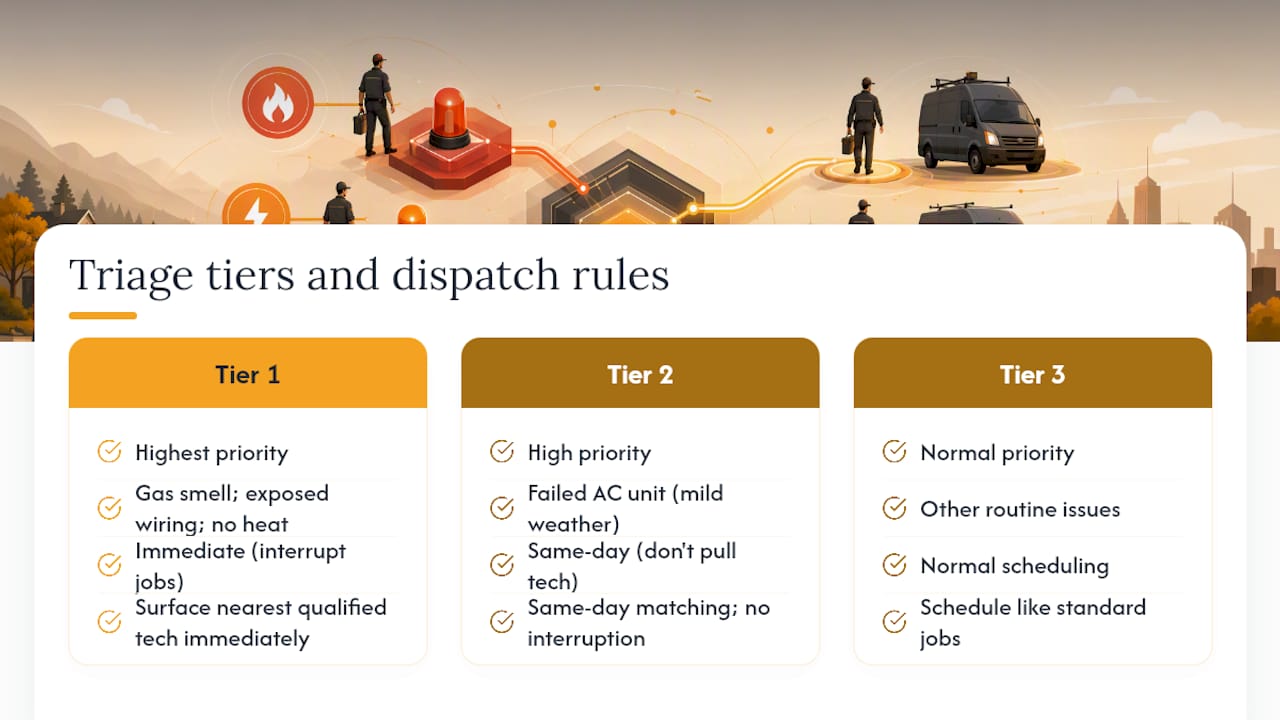
Your dispatcher or intake staff needs a short script to sort calls into these tiers quickly, asking specific questions rather than relying on the caller's own sense of urgency. "Do you smell gas?" gets a different triage than "my AC stopped working." Whoever answers the phone determines your response time more than any software feature does.
The software's job is to make triage decisions actionable. Once a call is tagged tier one, the platform should surface the nearest qualified technician immediately, factoring in who's already mid-job versus who has flexibility. That's where skill-based matching and live location tracking earn their keep, turning a triage decision into an actual truck moving within minutes rather than a dispatcher manually scrolling through a roster.
How Should Dispatchers Communicate With Field Technicians?
Communication breakdowns cause more missed emergency calls than bad routing ever does. A technician who doesn't see a reassignment notification for twenty minutes might as well not have gotten it at all.

The strongest workflow runs through the mobile app itself rather than side channels like phone calls or text messages that don't sync back to the job record. When a dispatcher reassigns a job, the technician should get a push notification with full job details attached, not a separate call asking them to check their app later. Two-way status updates matter just as much: technicians marking themselves "en route," "on site," or "job complete" in real time gives dispatchers an accurate picture without needing to call and interrupt someone's work.
For businesses that route after-hours emergency calls through an answering service or on-call rotation, the handoff between that service and your dispatch system needs to be automatic. If an after-hours coordinator has to manually re-enter a job into the platform the next morning, you've lost the speed advantage entirely. The best setups let after-hours intake create a ticket directly in the live schedule board, tagged as emergency priority, so the first dispatcher checking the board at 6 a.m. sees it immediately.
Group messaging threads work fine for shop-wide announcements, but job-specific communication belongs inside the platform, tied to that job's record, so there's a permanent log of who said what and when.
Why Does GIS and Mapping Integration Matter for Dispatch?
Accurate location tracking separates software that looks good in a demo from software that holds up on a real emergency call. GPS pings from a technician's phone are only useful if they're layered onto a mapping system that understands your actual service area, including traffic patterns, road closures, and building access points.
Basic dispatch tools show a pin on a generic map. Better ones integrate with mapping services that account for real drive time, not straight-line distance. That distinction matters most in dense urban areas or anywhere a river, highway, or gated community turns a two-mile trip into a fifteen-minute detour. A platform relying on straight-line proximity will confidently dispatch the "closest" technician, who then spends twenty minutes stuck behind a drawbridge.
Geofencing adds another layer worth checking for. When a technician's location updates show they've arrived at a job site, the system can automatically flag arrival time without anyone manually logging it, which feeds directly into your mean-time-to-arrival metric. Some platforms also let you draw service territory boundaries, so dispatchers get warned before assigning a technician outside their normal coverage zone, which usually means a longer, unplanned drive.
Ask during any demo how the mapping data gets sourced and how often it updates. Stale map data on a fast-growing suburb, where new roads open every few months, can quietly wreck your ETA accuracy.
How Does Real-Time Rerouting Handle Mid-Day Changes?
Plans made at 7 a.m. rarely survive until noon. A no-show customer, a job that runs three hours over estimate, or a genuine emergency call all force the same question: who moves, and to where?
Static schedules can't answer that question fast enough. Real-time resource allocation means the platform is constantly recalculating who's available based on job progress, not just the original plan. When a technician marks a job complete twenty minutes early, a system built for dynamic rerouting should immediately flag them as available and suggest the next best assignment, factoring in skill match and drive time, rather than waiting for a dispatcher to notice and manually check the board.
This matters most on emergency calls, since the "best" technician to send often changes minute to minute. The tech who was closest when the call came in might now be tied up on an unrelated job that ran long. AI-driven dispatch systems that recalculate assignments continuously, rather than only at the moment a job is first booked, tend to reduce travel time and improve on-time arrival, provided they're configured with sensible rules around technician workload and travel limits.
The practical test: watch what happens on your busiest simulated day during a pilot. If reassignment still requires a dispatcher to manually scan the whole board and guess, the "real-time" label is marketing, not function. A platform actually built for dynamic rerouting will surface the next best move on its own, and let the dispatcher approve or override it in seconds.
What Data Security Practices Should Dispatch Platforms Follow?
Dispatch software holds customer addresses, service history, payment details, and sometimes access codes to homes and businesses. That's a meaningful liability if the platform treats security as an afterthought.
Look for encryption both in transit and at rest, meaning data is protected while moving between the mobile app and the server, and while sitting in storage. Role-based access controls matter just as much: a technician shouldn't be able to view another crew's customer list, and a dispatcher's login shouldn't expose your full financial reporting. Ask specifically how the vendor handles data if a technician's phone is lost or stolen, since the mobile app often carries cached customer information for offline function.
Payment processing deserves its own scrutiny. If your invoicing flow captures card details on-site, confirm the platform is PCI compliant rather than storing raw card numbers in its own database. For accounting sync specifically, check whether the connection to QuickBooks uses secure API authentication rather than a shared login that multiple staff members access.
Data ownership is worth clarifying in the contract itself, not just assuming. Confirm you can export your customer history, price books, and job records if you ever switch platforms, and ask how long the vendor retains your data after a cancellation. A vendor unwilling to answer these questions plainly is telling you something about how seriously they treat the information you're handing over daily.
What Training Do Dispatchers Need to Run This Well?
Software doesn't fix a dispatch problem by itself. The person sitting at the schedule board needs training that goes beyond "click here to assign a job," especially for handling genuine emergencies under time pressure.
New dispatchers should shadow an experienced one for at least a full week before working solo, covering both routine scheduling and at least one high-volume or emergency-heavy day. Formal certification isn't standard across the trades industry the way it is in some other dispatch fields, but internal certification, a checklist confirming a dispatcher can independently run triage, reassignment, and closeout flows, gives you a consistent bar before someone handles calls alone.
Ongoing training matters as much as onboarding. Platforms update features regularly, and a dispatcher who learned the system eighteen months ago may be missing shortcuts that would save real time today. Build a quarterly refresh into your schedule, even if it's just thirty minutes reviewing new features with your software vendor's support team.
Cross-training also protects you operationally. If only one person on staff truly understands the dispatch platform, a sick day or vacation becomes a scheduling crisis. At minimum, train a backup dispatcher who can run the board competently, even if they're not as fast as your primary. That redundancy matters more during your highest-volume emergency season, which is exactly when a single point of failure hurts the most.
Why AI Matching Changes the Dispatch Equation
AI matching earns its place in a dispatch stack when it actually speeds up the decision a human was already trying to make, weighing skill, availability, and location simultaneously instead of one at a time. That's the practical case for it: not novelty, but speed on decisions dispatchers were already making manually, just slower and with more guesswork.
What I'd push back on is treating AI recommendations as final. The dispatch platforms that hold up under real emergency pressure are the ones giving dispatchers a clear, transparent reason for a suggested match, along with an easy override. A recommendation nobody can question is a liability the first time it's wrong on a job that matters. Override controls aren't a limitation of the technology. They're what makes trusting it in the first place possible.
The stronger case for AI matching shows up in first-time fix rates, since sending the right skill set the first time avoids the whole callback cycle. That's a claim worth testing directly during your own pilot, on your own jobs, before you take anyone's word for it, including ours.
— Mark
Getting Started With AI-Powered Dispatch Software
Tradepilot is built around the exact capabilities this guide walks through: AI that matches every job to the best-fit technician by skill, availability, and location in under a second, then carries that job through invoicing, inventory tracking, and analytics without switching systems.

During a demo or trial, put it through the same tests outlined above. Run real jobs. Force a mid-day emergency reassignment and watch how fast the board updates. Take a technician offline and confirm the mobile app still captures photos, signatures, and job notes without dropping data. Check that a closed job flows into an invoice and syncs correctly with QuickBooks without manual re-entry.
If your dispatch board is still a whiteboard, or your current software makes you dread a busy emergency day instead of trusting it, that's the signal to test something built for exactly that pressure. Schedule a live demo of Tradepilot and bring your own real jobs to the trial. The right technician, the first time, is the whole point.
Sources
- Field Service Dispatch Software: Buyer's Guide 2026
- How to Choose FSM Software (Buyer’s Guide) | FSM Advisor
- How to Choose Dispatch Software: A Buyer's Guide