
Priority-based scheduling for field service means ordering jobs by urgency, SLA, and customer status, then assigning each one to the best-fit technician based on skill, availability, and location. The single most valuable step you can take right now: run a four-to-six-week pilot using your actual dispatch data. That short test gives you a real ROI signal before you commit to any platform or process change.
Key Takeaways
Priority-based scheduling for field service works when you define a weighted matrix, run a clean pilot, and measure the right KPIs before and after.
| Point | Details |
|---|---|
| Define weights before go-live | Agree on your priority matrix with your lead dispatcher; do not let software defaults decide. |
| Pilot on one crew or zone | A four-to-six-week pilot with a before/after baseline is the lowest-risk validation strategy. |
| Start with first-time fix rate | This KPI moves quickly after rollout and tells the clearest story about skill-match quality. |
| Require audit logs from vendors | No override history means no accountability; make it a non-negotiable in vendor evaluation. |
| Tradepilot as your pilot platform | Tradepilot matches jobs in under a second and provides the audit logs, dashboards, and integrations a trades pilot needs. |
Table of Contents
- What does priority-based scheduling actually mean for field teams?
- What business benefits and KPIs should you track?
- How should you define and weight your priority rules?
- How does priority-based scheduling work inside dispatch software?
- What questions should you ask vendors before you buy?
- How do you roll out priority-based scheduling without disrupting operations?
- How do you measure ROI and build the business case?
- What the industry gets wrong about dispatch automation
- Tradepilot gives you AI dispatch without the guesswork
- Sources
What does priority-based scheduling actually mean for field teams?
In field service, priority-based scheduling is the practice of ranking every open job against a defined set of criteria, then matching each ranked job to the technician most qualified to complete it on the first visit. Dispatchers stop working from a flat queue and start working from a scored one.
The system evaluates several dimensions simultaneously:
- Urgency and SLA tier (P0 emergency vs. P2 planned maintenance)
- Customer status (active service agreement, VIP account, or standard)
- Revenue potential (ticket size, upsell probability)
- Technician skill and certification (EPA 608, gas line, panel work)
- Equipment on truck (parts availability for the specific asset)
- Proximity and travel time to the job site
- Current workload and remaining shift hours
Here is how it plays out in practice. A residential customer calls at 10:15 AM with no heat in January. That job scores P0: safety risk, active maintenance agreement, high SLA exposure. The system flags the nearest qualified technician, even if that tech was already assigned a P2 tune-up at 11:00 AM. The P2 gets bumped to the next available slot, the customer gets an automated ETA update, and the live dispatch board rebalances the rest of the day's schedule around the emergency insertion.
What business benefits and KPIs should you track?
Dispatch prioritization that accounts for urgency, revenue potential, and customer tier, rather than geography alone, can increase revenue per truck. Industry examples cite typical revenue uplifts in the mid-teens to mid-twenties percentage range when sequencing by value and SLA. Beyond revenue, the primary operational benefits are reduced response time, higher first-time fix rate, better SLA compliance, lower drive time per job, and less overtime.
Track these six KPIs from day one:
| KPI | Why it matters | Starting benchmark |
|---|---|---|
| First-time fix rate | Measures skill-match quality | Capture your current rate before rollout |
| Response time (emergency) | Validates P0 handling speed | Average minutes from call to dispatch |
| Jobs per technician per day | Shows scheduling density | Current daily average per tech |
| Drive time per job | Reveals routing efficiency | Average minutes in transit |
| Service agreement renewal rate | Signals customer satisfaction | Current renewal percentage |
| Dispatcher time per day | Tracks automation gains | Hours spent on manual scheduling |
Pro Tip: Start with first-time fix rate and drive time per job. Both move quickly after a priority rollout, they are easy to measure, and they tell the clearest story to your team about whether the new system is working.
How should you define and weight your priority rules?
Weighted scoring is the defensible approach because it forces your team to agree on what matters before a high-pressure situation forces the decision. A gut-feel dispatch culture means the loudest technician or the most persistent customer wins, not the job with the highest business impact.
A practical starting matrix for trades businesses:
- Safety and urgency (30%) — active hazard, no heat/cooling in extreme weather, gas leak
- Asset criticality (20%) — commercial refrigeration, life-safety systems, main electrical panel
- Customer tier and service agreement (20%) — active contract, VIP account, at-risk renewal
- Revenue and ticket size (15%) — high-value replacement opportunity, upsell probability
- Compliance deadline (10%) — permit expiration, inspection window, warranty condition
- Travel time to arrival (5%) — proximity as a tiebreaker, not a primary driver
A scored priority matrix like this replaces gut-feel with an objective framework that weights safety, asset criticality, occupant impact, compliance deadlines, and cost-of-delay.
Two examples of the same matrix applied differently: an emergency residential heat-loss call scores 30 + 10 + 20 + 5 + 0 + 5 = 70 out of 100, triggering immediate dispatch. A planned commercial HVAC maintenance visit scores 0 + 20 + 20 + 15 + 10 + 5 = 70 as well, but carries no urgency flag, so it holds its scheduled slot. When both jobs compete for the same technician, the emergency wins on the safety weight alone.

Pro Tip: Cap your matrix at four to six weighted factors at go-live. More than that and dispatchers stop trusting the score because they cannot quickly verify it. Simplicity builds adoption.
How does priority-based scheduling work inside dispatch software?
Rules-based scoring applies fixed weights deterministically; AI-driven scoring learns from historical patterns and adjusts weights dynamically. The practical difference: rules-based systems are predictable and auditable from day one, while AI systems improve over time but require clean historical data to do so.
| Behavior | Rules-based | AI-driven |
|---|---|---|
| Scoring transparency | High — weights are visible | Moderate — model explains recommendations |
| Re-optimization speed | Seconds (recalculates on trigger) | Sub-second (continuous) |
| Skill and cert depth | Configured manually | Learned from job outcomes |
| Pattern learning | None | Improves with data volume |
| Manual override support | Standard | Standard, with audit log |
Effective dispatch software should exhibit all of the following regardless of approach:
- Real-time re-prioritization when a new emergency arrives or a job runs over
- Hard constraints (certifications, shift limits) enforced before soft ones (proximity)
- Dispatcher-visible reasoning so overrides are informed, not blind
- Full audit logs showing every assignment change and who made it
- Automated ETA notifications to customers on reassignment
- Service agreement and contract badges visible on the dispatch board
Tradepilot matches jobs to best-fit technicians by skill, availability, and location in under a second, enforcing hard constraints first and surfacing the reasoning behind each recommendation so dispatchers stay in control. The platform also supports drag-and-drop scheduling for manual adjustments when field conditions require it.
AI dispatch tools separate hard constraints from soft ones, and vendors report roughly a 15% lift in first-time fix rates and reductions in scheduling conflicts exceeding 30% after implementation.
What questions should you ask vendors before you buy?
The single must-have: can the vendor apply your priority matrix, or are the rules hard-coded? If you cannot customize weights to your workflows, the system will optimize for the vendor's assumptions, not your business.
Questions to ask on every vendor call:
- Can we import our existing customer, asset, and technician data before the pilot?
- How does the system handle manual overrides, and does it log them with a reason code?
- Does the platform enforce SLA tiers and flag breaches before they happen?
- Can it model technician certifications and parts-on-truck as hard constraints?
- What does the integration look like with our invoicing and inventory systems?
- What does a supported pilot look like, and who is our implementation contact?
- Where is our data stored, and what security certifications does the platform hold?
Red flags to watch for: scoring logic the vendor cannot explain in plain English, no audit log for overrides, inability to adjust priority weights without a developer, and no integration path with your existing dispatch or invoicing tools.
Demo request script: "We run [X] technicians across [service types]. Can you show us how the system handles an emergency insertion that displaces a scheduled maintenance visit, including the audit trail and the customer notification? We'd also like to see how we configure our own priority weights."
Pro Tip: Ask for a sandbox pilot with your own data, not a canned demo dataset. A vendor confident in their product will say yes.
How do you roll out priority-based scheduling without disrupting operations?
Pilot first, then scale. A controlled pilot on one crew or one zone gives you real performance data without betting the whole operation on a new system.
- Clean your data — verify technician certifications, asset records, and customer tiers before any scoring begins. Garbage in, garbage out.
- Define and lock initial weights — agree on your priority matrix with your lead dispatcher before go-live. Do not adjust weights mid-pilot.
- Design the pilot — one crew or one geographic zone, four to six weeks, with a clear before/after baseline on your chosen KPIs.
- Train dispatchers — focus on how to read the score, when to override, and how to log the reason. Transparency is the primary trust mechanism that keeps dispatchers from disabling automation.
- Set go/no-go criteria — define what success looks like before the pilot starts (e.g., first-time fix rate up, drive time down, no increase in SLA breaches).
- Build a fallback workflow — if the system goes down or a dispatcher is unavailable, have a documented manual process ready.
Pro Tip: Keep the pilot evaluation panel small: you, your lead dispatcher, and one or two technicians. Too many voices at the review stage creates noise. Expand the group after you have data.
How do you measure ROI and build the business case?
AI dispatching benchmarks cite drive-time reductions of up to 20% and routing-time savings of 40–60% for dispatchers after full implementation. Capture your baseline before rollout so you have a real comparison.
Baseline KPI checklist: average dispatch time per job, average drive time per job, jobs per technician per day, first-time fix rate, service agreement renewal rate, and monthly overtime hours.
For executive reporting, include: SLA breach rate, pilot vs. control zone comparison, audit log summary, and a rolling 30-day KPI trend. Daily ops dashboards should show real-time job status, technician utilization, and any open SLA risks.
What the industry gets wrong about dispatch automation
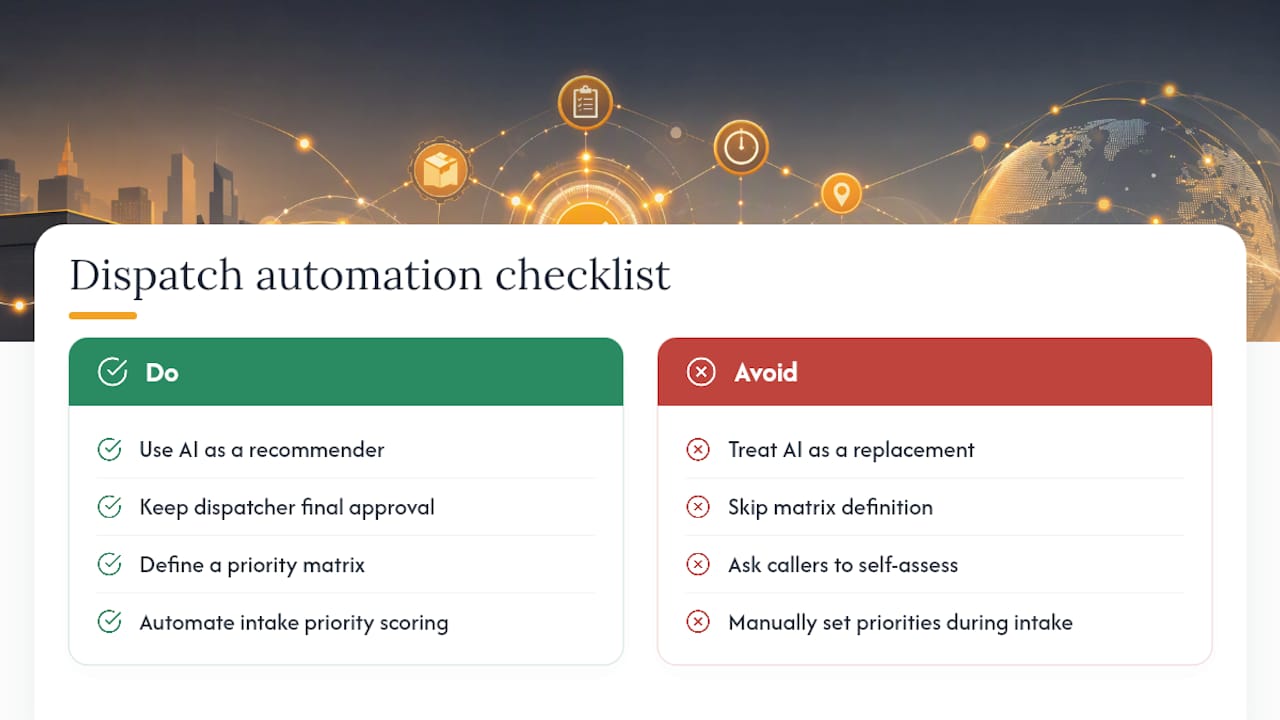
Most trades businesses treat dispatch automation as a replacement for dispatcher judgment. It is not. The research is consistent: AI tools act as recommendation engines that make dispatchers faster, not redundant. Dispatcher capacity can effectively double with AI assistance while the dispatcher retains final control.
The businesses that struggle with priority rollouts almost always share one failure mode: they skip the matrix definition step and let the software assign default weights. Default weights optimize for the vendor's average customer, not your specific mix of emergency, maintenance, and replacement work.
The other underrated factor is intake form design. If your dispatchers are manually selecting priority levels at intake, you are introducing inconsistency under pressure. Automating priority scoring at intake, where the system calculates urgency from asset type, space, and safety flags rather than asking the caller to self-assess, removes that variability and preserves objectivity when the phones are busy.
Tradepilot gives you AI dispatch without the guesswork
Dispatch teams that run priority-based scheduling with Tradepilot get job-to-technician matching in under a second, with hard constraints (certifications, shift limits, parts on truck) enforced before soft ones. Every assignment decision is visible to the dispatcher, every override is logged with a reason code, and service agreement badges surface directly on the dispatch board so high-value customers are never treated like standard calls.

The platform covers dispatch, invoicing, inventory, and analytics in one place, which means your pilot data and your production data live in the same system from day one. Maintenance contract badges, real-time re-prioritization, and a drag-and-drop schedule give dispatchers the control they need while the AI handles the scoring. When you are ready to see how your own job mix performs under priority rules, request a demo at Tradepilot and bring your dispatch data with you.
Sources
- Work Order Priority Matrix Checklist for HVAC Dispatch
- Dispatch Prioritization and Revenue for Contractors | 2026 Guide