
The fastest path to better van stock management is an integrated van-as-location system: mobile scanning, par-level replenishment, and real-time sync with dispatch, run as a 1–3 truck pilot for 4–8 weeks. That single change delivers three measurable wins before the pilot ends:
- Higher first-time-fix rate. Techs arrive with the right parts because par lists are built from actual usage, not gut feel.
- Fewer mid-job parts runs. Automated reorder triggers mean the truck is restocked before the next call, not during it.
- Cleaner job costing. Parts scanned out at the job flow directly to the invoice, so every capacitor and contactor gets charged.
Run the pilot on your highest-volume trucks. Set par lists for each one, enable mobile scan on day one, and track first-time-fix percentage and re-roll rate weekly. By week six, you will have enough data to decide whether to roll out fleet-wide.
Key Takeaways
Effective van stock management requires treating each vehicle as a named inventory location, setting par levels from real usage data, and connecting inventory directly to dispatch and job costing.
| Point | Details |
|---|---|
| Use van-as-location from day one | Assign each truck its own location ID, par levels, and transaction history in your inventory system. |
| Pilot 1–3 trucks for 4–8 weeks | Measure first-time-fix rate and re-roll frequency weekly before committing to a fleet-wide rollout. |
| Set par levels from usage data | Pull three months of job history and set minimums based on average weekly usage per SKU per truck. |
| Standardize van layouts fleet-wide | Consistent bin placement across all trucks cuts search time and reduces missed scans. |
| Tradepilot integrates inventory with dispatch | One platform covers van stock, job-level charge capture, and AI-powered dispatch for HVAC, electrical, and plumbing teams. |
Table of Contents
- What does van stock management actually mean?
- Why good van stock management changes your numbers
- What features should you require in a van stock system?
- How the daily van stock workflow runs in practice
- Physical van organization: the 80/20 rule and shelf logic
- How to run a low-risk pilot: a practical checklist
- Starter stock lists and par-level examples by trade
- What ROI looks like and what pricing models to expect
- How Tradepilot handles van stock management
- The part most managers get backwards
- Tradepilot gives you inventory, dispatch, and billing in one place
- Sources
What does van stock management actually mean?
Van stock management is the practice of tracking, organizing, and replenishing the parts and consumables carried on service vehicles so technicians can complete jobs without extra trips. The industry also calls it mobile inventory management or vehicle inventory tracking, but the operational concept is the same: treat each van as its own inventory location with defined stock levels, scan-based transactions, and a replenishment workflow tied to a central warehouse or supply house.
Here is a concrete example. An HVAC tech replaces a run capacitor on a residential call. She scans the part out on her phone, the mobile record updates instantly, and if her truck's capacitor count drops below the par minimum, a restock request fires automatically. When she returns to the shop that evening, the warehouse team already has her reload list ready.
That is the difference between van stock management and warehouse inventory. Warehouse inventory tracks what sits on shelves at a fixed location. Van stock management tracks what moves with your people, across multiple vehicles, in real time. The "van-as-location" concept formalizes this: each truck gets its own location ID in the system, with its own par levels, transaction history, and audit trail, just like a warehouse bin.
Key distinctions worth keeping in mind:
- Van stock covers consumables, common small parts, and fast-moving components carried daily.
- Warehouse stock covers slower-moving, higher-cost items pulled on demand.
- Van-as-location means the software treats each vehicle as a named inventory site, not a black hole where parts disappear.
Why good van stock management changes your numbers
The business case is straightforward. Poor field stock control means techs either carry too much (dead inventory tying up cash) or too little (parts runs that kill productivity). Neither is acceptable when labor is your biggest cost.
Van stock systems with real-time tracking and automated replenishment can push first-time-fix rates toward the low 90s in some deployments. That matters because every revisit costs you a truck roll, a tech's time, and a customer who is now mildly annoyed. The metrics field managers should track:
- First-time-fix rate (FTF%): the percentage of jobs completed without a return visit for parts. Most shops start at a moderate first-time-fix rate; a well-run van stock program targets a high rate.
- Re-roll rate: how often a tech has to leave a job site to get a part. Even one re-roll per day per tech adds up fast.
- Parts-run frequency: how many unplanned supply house trips happen per week per truck.
- Parts carrying value per truck: the dollar value of stock on each vehicle. Too high means dead inventory; too low means stockouts.
Better invoicing is a downstream benefit that often gets overlooked. When parts are scanned to a job number at the point of use, the invoice reflects actual consumption. That eliminates the end-of-day guesswork where a tech tries to remember what he used on three different calls.
AI-driven dispatch amplifies these gains further: when the dispatch system knows what each truck carries, it can route the right tech to the right job, not just the closest one.
What features should you require in a van stock system?
Not all mobile inventory tools are built for field service. When you evaluate platforms, these are the capabilities that directly drive the outcomes above:
- Van-as-location: each vehicle has its own location ID, par levels, and transaction history. Without this, you have a spreadsheet with extra steps.
- Mobile barcode/QR (and NFC) scan in/out: techs scan parts at the job, not at the shop. Barcode scanning with min/max reorder points keeps records accurate and triggers replenishment automatically.
- Offline mode with sync: basements, mechanical rooms, and rural properties kill cell signal. The app must queue transactions locally and sync when connectivity returns. Data loss in the field is not recoverable.
- Audit trail and usage reporting: every part movement is logged with a timestamp, user, and job number. This enables customer chargeback, shrinkage detection, and warranty claims.
- Par levels and reorder points: min/max per SKU, set by usage velocity, not by what the last tech thought sounded right.
- Auto-replenishment workflows: when stock drops below the minimum, the system generates a restock request or purchase order without manual intervention.
- Real-time sync with dispatch/CMMS: inventory data and job data live in the same system. A part scanned out on a job updates the job record and the invoice simultaneously.
- Job-level cost capture: parts charged to a specific job number, not to a generic "truck stock" bucket.
- Simple admin console: fleet managers need to see all trucks at once, adjust par levels, and run usage reports without a developer.
Inventory software with barcode/QR scanning and low-stock alerts is the practical upgrade once a fleet manages dozens of SKUs or multiple vehicles. Spreadsheets break at scale; a dedicated app does not.
Pro Tip: Set par levels based on actual usage data, not on what fits in the bin. That buffer covers a busy week without creating dead inventory.
Field service apps built for trades increasingly bundle scanning, dispatch, and billing in one interface, which cuts the number of screens a tech has to touch on a job site.
How the daily van stock workflow runs in practice
A well-designed workflow has seven steps. Each one has a clear owner and a clear output.
- Define the van par list. The fleet manager sets min/max quantities for every SKU on each truck, based on call mix and historical usage. This list lives in the system, not in someone's head.
- Load the truck and barcode bin locations. Each bin or shelf section gets a barcode label. Parts are loaded and scanned to their bin location so the system knows exactly where each item sits.
- Tech scans parts out on the job. At the job site, the tech scans the barcode on the part (or the bin) and assigns it to the job number. The mobile app works offline if needed and syncs when back in range.
- Job-level charge capture. The scanned parts flow to the job record automatically. The office sees the parts cost before the tech even drives away.
- End-of-day quick count and restock list. The system compares current truck counts against par levels and generates a restock list. The tech or warehouse staff pulls the list and stages the reload.
- Weekly reload and monthly audit. A weekly reload cadence and monthly full audit keeps par levels accurate and catches shrinkage before it compounds. Quarterly, rebalance par levels against updated usage data.
- Automated reorder or PO generation. When a SKU hits its reorder point, the system generates a purchase order or a warehouse transfer request. No manual intervention, no forgotten parts.
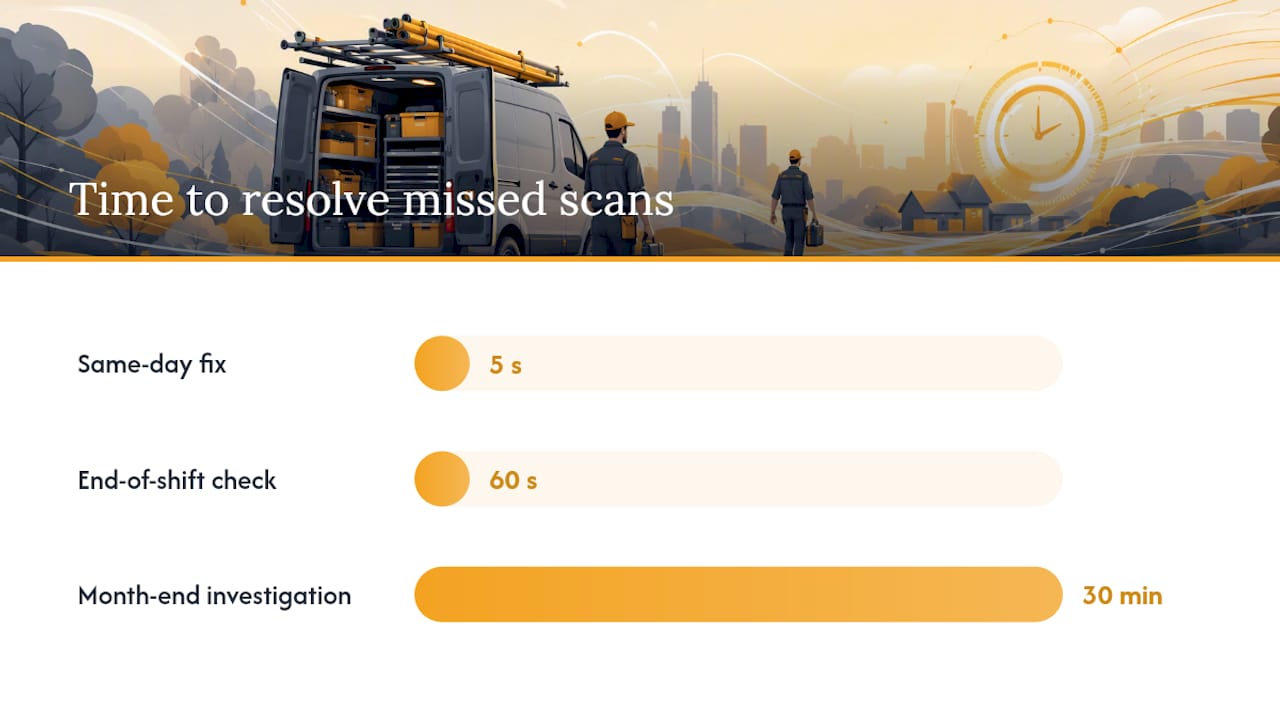
Exception handling matters here. Techs sometimes use parts without scanning, especially under time pressure. Build a daily reconciliation step into the workflow: at end of shift, the tech does a 60-second visual check against the system count and flags any discrepancies. Catching a missed scan the same day is a five-second fix. Catching it at month-end audit is a 30-minute investigation.
Tracking by vehicle with barcode scanning and physical transfers between warehouse and vehicles is the standard approach documented by field inventory vendors, and it maps directly to this workflow.
Physical van organization: the 80/20 rule and shelf logic
The software does the tracking. The physical setup determines whether techs actually use it. A disorganized van means parts get used without scanning, bins get mixed up, and the system drifts from reality within a week.
Labeling everything, using storage bins and racks, and arranging by frequency of use are the three physical habits that keep truck stock accurate. Here is how to structure the layout:
- Zone the van by trade category. Electrical consumables in one section, HVAC parts in another, plumbing fittings in a third. Techs find parts faster; scanning errors drop.
- Fast-move items at shoulder height. Wire nuts, capacitors, contactors, and common fittings go where a tech can grab them in three seconds. Slow-movers go lower or in overhead storage.
- Label every bin with the SKU and par level. A bin label that reads "Run Capacitors 35/5 MFD — Min 4 / Max 12" tells the tech at a glance whether the bin needs a refill.
- Reserve a seasonal swap area. Heating parts in winter, cooling parts in summer. Rotating off-season parts prevents dead inventory and frees space for what actually gets used.
The 80/20 rule applies directly to what you carry. Carrying the small set of high-velocity parts on every truck — capacitors, contactors, thermostats, common fittings, wire nuts, breakers — delivers more first-time-fix value than attempting to stock every model-specific component. Expensive, slow-moving parts belong at the supply house, not on the truck.
Pro Tip: Standardize the van layout across every truck in your fleet. When a tech jumps between vehicles, the capacitors are always in bin C3, the contactors always in bin C4. Consistent layouts cut search time and reduce the chance a tech grabs the wrong part under pressure.
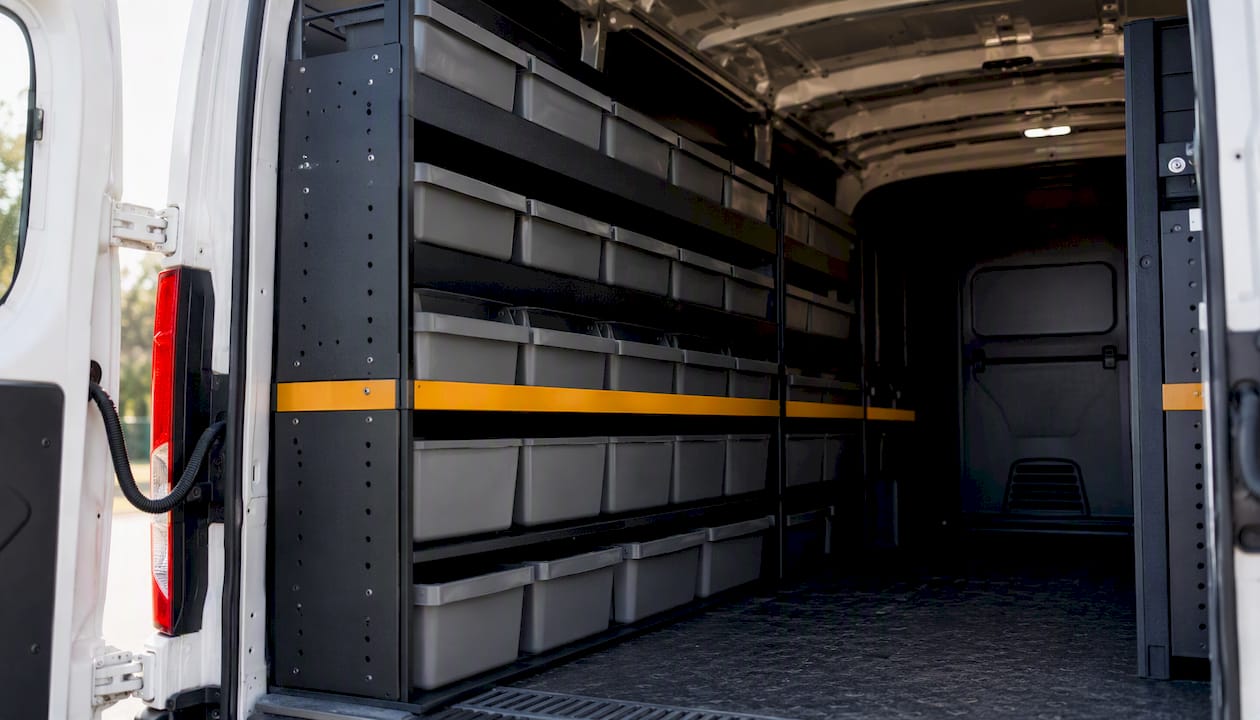
A quality shelving upfit pays back faster than most managers expect. Saved technician time compounds across dozens of calls per week, and that time recovery should be included in your ROI model rather than written off as a sunk cost.
How to run a low-risk pilot: a practical checklist
A pilot on 1–3 trucks over 4–8 weeks gives you real data before you commit to a fleet-wide rollout. Here is the sequence:
- Week 0: Data cleanup and prep. Audit your current SKU list. Remove duplicates, standardize part names, and map each SKU to a bin location. Export your existing stock data and format it for bulk import into the new system.
- Week 1: Load, barcode, and train. Print bin labels, apply barcodes to shelves and parts, load the pilot trucks to par, and run a two-hour training session with pilot techs. Cover scan-in, scan-out, offline mode, and the end-of-day count.
- Weeks 2–6: Live measurement. Techs run the full workflow. Fleet manager reviews daily sync reports, flags missed scans, and adjusts par levels based on early usage data. Moving from spreadsheets to a par-level system with a weekly reload cadence typically pushes first-time-fix rates into the mid-to-high 80s when combined with standardized layouts and scanning discipline.
- Week 7: Analysis and decision. Pull the pilot KPIs and compare to your pre-pilot baseline. Decide on fleet-wide rollout, par-level adjustments, and any workflow changes.
KPIs to track throughout the pilot:
- First-time-fix rate (weekly)
- Parts-run frequency per truck per week
- Parts carrying value per truck (start vs. end of pilot)
- Restock time per truck per reload
- Tech time-per-job (from dispatch records)
Dispatch software cost varies by platform and seat count, so build your pilot budget to include software, hardware (scanner, label printer), and two to four hours of setup time per truck.
Starter stock lists and par-level examples by trade
A typical residential service truck carries between $3,000 and $8,000 in parts, and most shops target completing 85–90% of repairs from truck stock. The table below gives starter par ranges by category and trade. Adjust based on your call mix, service area, and season.
Par logic follows two rules. High-velocity, low-cost items get a generous max so the tech is never short. Low-velocity, high-cost items get a tight max (often 0–2) because carrying them ties up cash and they rarely turn. Model-specific components, large OEM boards, and specialty equipment belong at the supply house or on a same-day drop from your distributor.
Seasonal adjustment is straightforward: before cooling season, load up on capacitors, contactors, and refrigerant. Before heating season, swap in ignitors, pressure switches, and heat exchangers. Rotating off-season parts prevents dead inventory and keeps the truck lean.
What ROI looks like and what pricing models to expect
The payback drivers are three: first-time-fix improvement, fewer re-rolls, and lower dead inventory per truck. Each avoided re-roll saves a truck roll plus 30–60 minutes of tech time. Reducing dead inventory per truck by even $500 across a ten-truck fleet frees $5,000 in working capital.
Expect to see pilot signals within 4–8 weeks. Full ROI, including the cost of software, hardware, and implementation, typically materializes within 6–12 months for a shop with five or more trucks. The signals that a system is paying for itself:
- Parts-run trips per truck per week drop measurably within the first month.
- Restock time per truck falls as the reload list becomes automated rather than manual.
- Parts carrying value per truck stabilizes or decreases as dead inventory is identified and removed.
- Invoice accuracy improves because parts are charged to jobs at scan time, not reconstructed at end of day.
On pricing: most van stock platforms use per-seat SaaS pricing, a per-vehicle module fee, or a combination of both. Hardware bundles (handheld scanner, label printer, bin labels) add a one-time cost. Implementation fees vary by vendor; some include onboarding support in the subscription, others charge separately. Evaluating dispatch software costs alongside inventory module pricing gives a clearer picture of total cost of ownership.
Integration between inventory and dispatch is the multiplier. Tracking parts without tying that data to jobs and technicians loses most of the invoicing and productivity benefits. A platform that handles both in one system is worth more than two separate tools that sync imperfectly.
How Tradepilot handles van stock management
Tradepilot is built for exactly this workflow: one platform covering dispatch, inventory, invoicing, and analytics for HVAC, electrical, and plumbing businesses. The feature set maps directly to the requirements above.
| Capability | How Tradepilot delivers it |
|---|---|
| Van-as-location | Each vehicle is a named inventory location with its own par levels and transaction log |
| Mobile scan (barcode/QR) | Tech scans parts in/out from the mobile app; works offline and syncs on reconnect |
| Par levels and auto-replenish | Min/max per SKU; restock requests generated automatically when stock hits the minimum |
| Job-level charge capture | Scanned parts flow to the job record and invoice in real time |
| Real-time sync with dispatch | Inventory data and job data share the same platform; no manual export/import |
| Audit trail and reporting | Every transaction logged with user, timestamp, and job number |
| Admin console | Fleet manager sees all trucks, adjusts par levels, and runs usage reports from one screen |
Onboarding follows the pilot structure described earlier. Tradepilot's team supports SKU mapping and data migration in week zero, walks through barcode and bin setup in week one, and provides training for both techs and fleet managers. The HVAC dispatch software integration means dispatch and inventory are live on the same platform from day one, so job-cost data is accurate from the first scan.
Key onboarding steps:
- SKU list cleanup and bulk import
- Bin location barcoding and van load to par
- Device provisioning (phones or dedicated scanners)
- Two-hour tech training and one-hour admin training
- Pilot KPI baseline capture before go-live
The part most managers get backwards
Most field service managers treat van stock as a logistics problem. Get the right parts on the truck, keep the bins tidy, and the techs will be fine. That framing is not wrong, but it misses where the real leverage sits.
The actual problem is information latency. A tech uses a part, nobody records it cleanly, the restock happens two days late, and the next tech on that truck hits a stockout on a job that should have been a 45-minute call. The physical organization matters, but it is the data loop that determines whether the system holds up under real operating conditions.
What I see consistently in high-performing shops is not that they have the most expensive shelving or the most comprehensive stock list. It is that they close the loop fast. Scan at the job, sync at end of day, reload overnight. That cadence, repeated daily, is what drives first-time-fix into the high 80s and keeps it there. The shops that struggle are the ones that treat scanning as optional or let the audit slip to once a month.
The other thing worth saying plainly: integration with dispatch is not a nice feature to have eventually. It is where most of the invoicing and productivity gains actually live. Tracking parts in isolation, without tying that data to jobs and technicians, recovers maybe a third of the value. The rest comes from the connection between what was used, where it was used, and what the customer gets charged. If your inventory tool and your dispatch tool do not share data natively, you are doing manual reconciliation work that a connected platform eliminates entirely.
Start with par lists and a pilot. Measure FTF and re-rolls for 30–60 days. The data will tell you exactly where to go next.
Tradepilot gives you inventory, dispatch, and billing in one place
Running van stock on a separate tool from dispatch means your techs are working in two systems and your office is reconciling two data streams. Tradepilot collapses that into one platform: inventory tracked by vehicle, jobs dispatched by AI to the best-fit tech, and parts charged to invoices at the point of scan.

The pilot offer is straightforward. Tradepilot's onboarding team handles SKU mapping, bin barcoding, and device setup in week one. By week two, your pilot trucks are live with mobile scanning, par-level replenishment, and real-time sync to dispatch. By week six, you have FTF data, re-roll data, and parts-cost-per-job data that most shops have never seen in one place before.
For HVAC, electrical, and plumbing businesses ready to move past spreadsheets and disconnected tools, the next step is a live demo. Tradepilotnet and see the full workflow running on your trade's call types before you commit to anything.
Sources
These resources support the pilot planning and physical setup work described in this guide:
- Van Stock Inventory Management Software | Wasp
- Van Stock Inventory Management Software | SmartVan
- HVAC Truck Stock: What to Keep on Every Van | HomyScan
- Truck Stocking List
- Must-have items for your HVAC install truck stock list