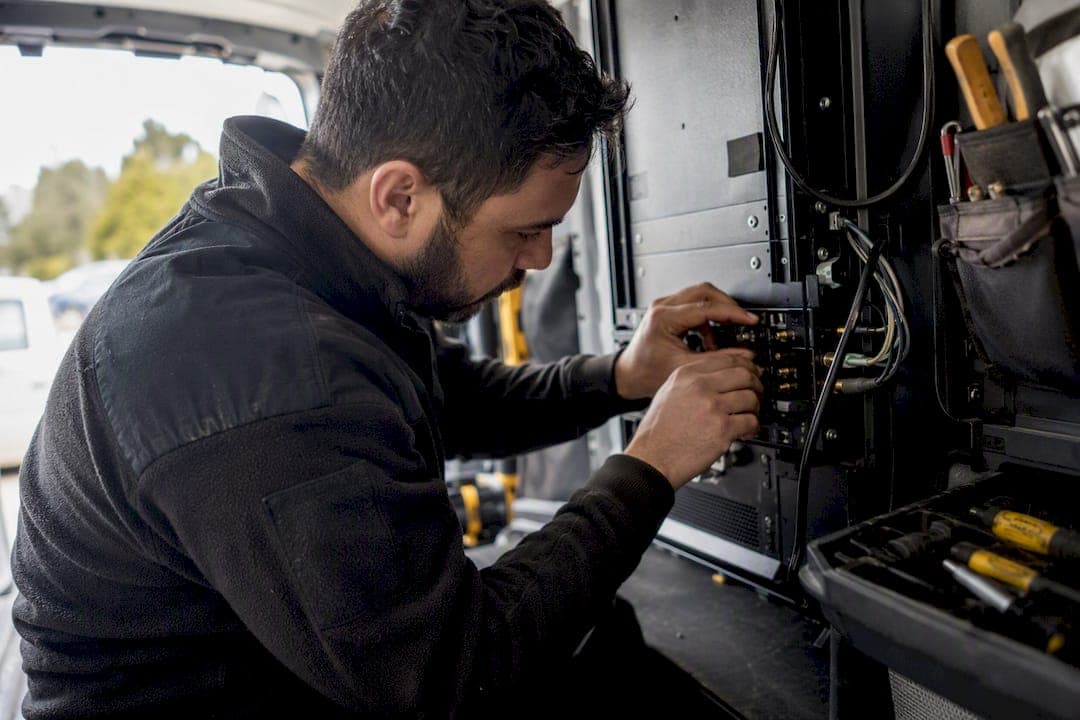
Automated technician scheduling uses rules and AI matching to assign the right technician to the right job without a dispatcher manually working the phones. It reads skills, availability, and location, then places jobs on the calendar in seconds instead of minutes. Owners who adopt it typically see three things move: faster ETAs, a higher first-time fix rate, and better technician utilization across the day.
You don't need a company-wide overhaul to find out if it works for your business. The fastest path is narrower than most owners assume:
- Run a 30-day pilot on one route, one crew, or one job type
- Turn on a single auto-assign rule for low-risk, routine jobs (drain cleaning, filter swaps, routine inspections)
- Track first-time fix rate and average ETA before and after
- Keep a manual override available the entire time
Start small, measure honestly, and expand only what the data supports.
Key Takeaways
Automated technician scheduling improves first-time fix rate, technician utilization, and ETA accuracy when it starts with clean skill and availability data and a controlled pilot.
| Point | Details |
|---|---|
| Start narrow | Pilot one crew or route for 30 to 90 days before scaling company-wide. |
| Data quality drives results | Automation cannot fix stale technician skill or availability profiles. |
| Keep a human in the loop | Require dispatcher sign-off on complex jobs even after auto-assign is live. |
| Track the right KPIs | Watch first-time fix rate, utilization, travel time, and schedule adherence from day one. |
| TradePilot fits trades specifically | Its AI matches jobs by skill, availability, and location in under a second within one platform for dispatch, invoicing, and analytics. |
Table of Contents
- How Does Automated Technician Scheduling Work?
- What Business Results Should You Expect?
- How Do You Roll Out Automated Scheduling?
- Which Metrics Prove the System Is Working?
- What Mistakes Derail Scheduling Automation Projects?
- Why Trades Businesses Choose TradePilot for AI Dispatch
- How Have Other Trades Businesses Used This?
- How Do the Leading Scheduling Solutions Compare?
- What Security and Data Privacy Steps Should You Expect?
- What Should You Look for in a Technician App?
- Does Scheduling Software Connect to Your Existing Tools?
- Where to Read More
- What Actually Matters When You Automate Dispatch
- Start a Pilot Without Betting the Whole Business
- Sources
How Does Automated Technician Scheduling Work?
Automated scheduling isn't one piece of software doing one job. It's four components working together, and understanding each one matters before you buy anything.
- Rules engine. This is where your business logic lives: which technicians can handle gas work, which jobs need two-person crews, which zip codes get priority during storm season.
- Optimizer (AI/matching layer). This layer scores every open technician against every open job using skill match, distance, and current workload, then ranks the best fits. AI-driven workforce platforms can generate these optimized assignments in minutes rather than the hour or more a dispatcher spends juggling a whiteboard.
- Geolocation and routing. Real-time GPS data feeds travel-time estimates so the system doesn't send your closest tech across town during rush hour by mistake.
- Calendar sync. Everything writes back to a shared calendar so techs, dispatchers, and office staff see the same schedule at the same time.
To run well, the system needs clean inputs: technician certifications and skill tags, real-time availability, historical travel times, current parts inventory, and a priority flag for emergency versus routine work.
Most platforms offer three operating modes: full auto-assign for routine work, suggested assignment where the system proposes a match and a dispatcher confirms it, and fully dispatcher-assisted mode for complex or high-stakes jobs. Larger workforce platforms increasingly build these as configurable automated workflows rather than rigid, one-size-fits-all logic.
Pro Tip: Start every new deployment in suggested-assignment mode. Let the system propose matches for two weeks while a dispatcher approves each one. You'll catch bad rules before they touch a customer.
What Business Results Should You Expect?
The gains show up in three places: the job itself, the truck, and the customer.
First-time fix rate climbs when the matching engine actually accounts for certifications and parts on hand instead of sending whoever's free. A technician who lacks the right refrigerant license or doesn't have the part in the van isn't a fix. He's a second trip.
Travel time drops next. Smarter routing means less windshield time between jobs, which translates directly into fuel savings and more billable hours per technician per day.
Customers notice the difference in two ways:
- ETAs get tighter and more reliable
- Last-minute reschedules become rare because the system rebalances the day automatically when a job runs long
There's a quieter benefit too. Dispatchers stop spending their morning on a phone tree trying to figure out who's closest and who's qualified. Vendors that combine scheduling with time and attendance and payroll systems also report fewer scheduling errors and clearer visibility into what a schedule actually costs in labor. Consistent SLA handling follows almost automatically once the guesswork is gone.
How Do You Roll Out Automated Scheduling?
A rushed rollout is the single fastest way to sour your team on automation. Do it in phases.
- Clean your data first. Build accurate skill and availability profiles for every technician before you touch a rules engine. Garbage in, garbage assignments out.
- Define rules and guardrails. Decide explicitly which job types can auto-assign (routine maintenance, low-risk calls) and which require a human to sign off (gas leaks, commercial contracts, anything involving a new customer).
- Run a controlled pilot. Pick one crew or one service area, set a 30 to 90 day measurement window, and choose two or three KPIs up front so you're not guessing at success later.
- Train dispatchers and techs together. Both groups need to understand the override process. A dispatcher who doesn't trust the system will quietly work around it, and a tech who doesn't understand why he got a job will resent it.
- Scale in stages. Add crews, service areas, or job types incrementally, using pilot data to justify each expansion rather than flipping the whole business over at once.
Two things trip up almost every rollout: skipping the data cleanup because it feels tedious, and skipping the override option because it feels like admitting the AI isn't perfect. Both mistakes cost more than the time they save.
Pro Tip: Give every technician a simple way to flag "this assignment doesn't work" from their phone. That feedback loop is worth more than any tuning you'll do from the office.
Which Metrics Prove the System Is Working?
Pick your KPIs before the pilot starts, not after. Watch these:
- First-time fix rate
- Technician utilization (billable hours versus hours on the clock)
- Average travel time per job
- Jobs completed per technician per day
- Schedule adherence (how often the actual day matches the planned one)
A rough ROI estimate isn't complicated. Take your current average utilization rate, estimate the percentage-point gain from the pilot, and multiply that by your fully loaded technician cost per day. Add the fuel and mileage savings from reduced travel time. That combined number, compared against your subscription and implementation cost, is your real payback window.
Most trades businesses see measurable gains in the 30 to 90 day pilot window, with utilization and first-time fix rate moving first. Stable, provable ROI generally shows up by month three to six, once the rules engine has been tuned against a full season of real jobs rather than a handful of pilot weeks.
What Mistakes Derail Scheduling Automation Projects?
Most failures trace back to a handful of avoidable mistakes.
- Inaccurate skills or availability data. If a tech's certifications aren't logged correctly, the system will confidently send the wrong person. Run a data audit before launch and repeat it quarterly.
- Over-automation without a review step. Letting every job auto-assign, including complex or high-risk ones, removes the human judgment that catches edge cases. Require dispatcher sign-off on anything outside routine work.
- Ignoring technician preferences. A tech who always gets the farthest jobs will burn out and start pushing back on the whole system. Build preferences in as a soft constraint the optimizer weighs, not a rule it ignores.
- Underinvesting in training. A single onboarding email isn't training. Block real time for dispatchers and technicians to practice with the override tools before go-live.
Pro Tip: Assign one person as the "rules owner" during rollout. Someone needs to be accountable for updating skill tags and adjusting rules as real jobs expose gaps, or the system drifts out of sync with reality within weeks.
Why Trades Businesses Choose TradePilot for AI Dispatch
TradePilot builds AI dispatch specifically for HVAC, electrical, and plumbing teams. Its matching engine scores technicians by skill, availability, and location in under a second, then hands dispatchers a ranked, ready-to-approve assignment instead of a blank calendar and a phone list.
It maps directly onto the rollout checklist above:
- Skill and certification data feeds the matching engine automatically
- Guardrails let you require sign-off on complex jobs while letting routine work auto-assign
- Dispatch, invoicing, inventory, and analytics live on one platform instead of four disconnected tools
Managers evaluating a pilot should ask any vendor the same four questions: what's the minimum dataset needed to start, how long does a fair pilot run, which KPIs define success, and what training and support come with onboarding.
Before starting a trial, define your minimum viable dataset (technician skills, current availability, and a week of job history), set a 30 to 90 day pilot window, and agree on two KPIs you'll measure against. TradePilot's guide, AI for Field Service: A 2026 Manager's Guide, walks through this process in more depth for managers building their first automation plan.
How Have Other Trades Businesses Used This?
Picture a five-truck plumbing outfit running its schedule off a shared spreadsheet and a group text. The dispatcher spends the first hour of every shift confirming who's available, who's near which job, and who's licensed for a backflow test. That hour disappears entirely once skill and location data feed an automated matching layer instead of a person's memory.

An HVAC company running seasonal spikes faces a different problem: too many emergency calls and not enough technicians who can triage priority correctly. Automated scheduling helps here by letting priority rules do the sorting. Emergency no-heat calls jump the queue automatically, routine maintenance gets pushed to slower windows, and no dispatcher has to make that judgment call fifty times a day during a cold snap.
Electrical contractors juggling both residential service calls and larger commercial installations see a third pattern. The rules engine can separate job types entirely, routing service techs to short residential jobs while keeping commercial crews on multi-day installs without cross-contaminating the two schedules. That separation is hard to maintain manually once a company grows past a handful of trucks, and it's exactly where a rules engine earns its cost.
None of these examples require enterprise-scale software. They require accurate technician data and rules that reflect how the business actually operates, which is why the data cleanup phase matters more than the software choice itself.
How Do the Leading Scheduling Solutions Compare?
Automated scheduling tools for trades fall into a few broad categories, and the right one depends less on brand and more on what your business actually needs solved.
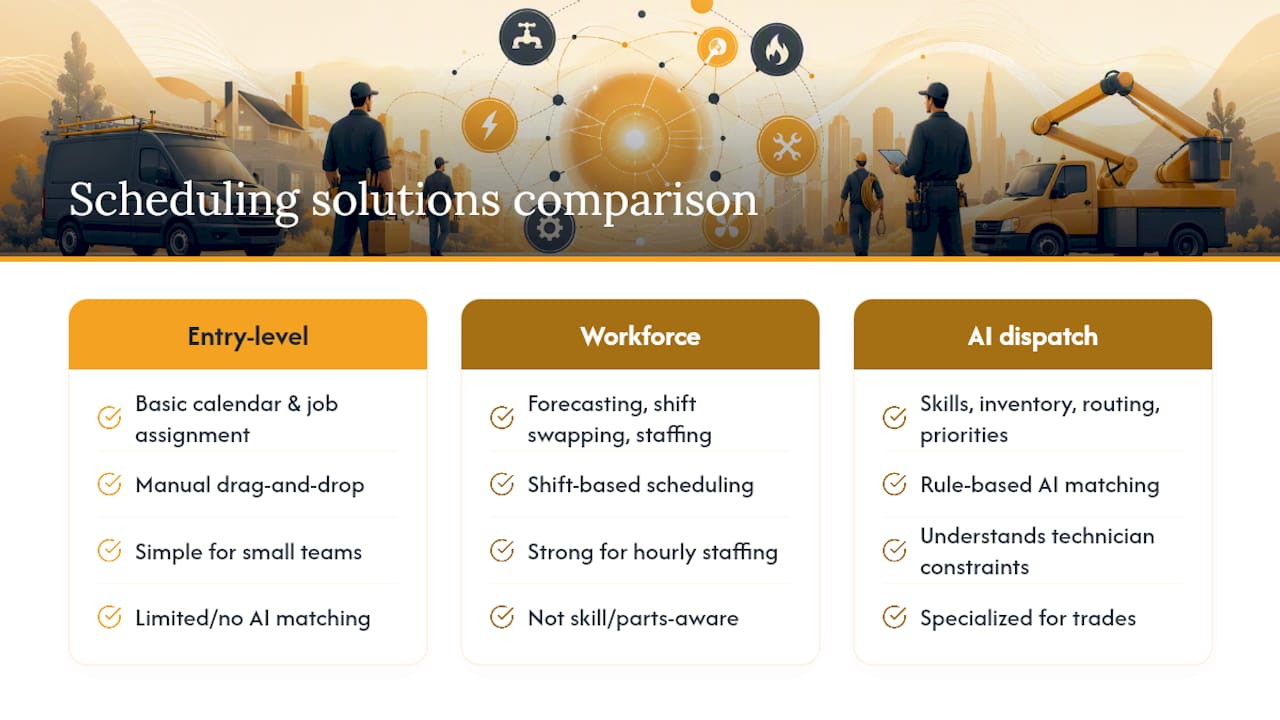
Entry-level field service apps handle basic calendar management and job assignment but rely mostly on manual drag-and-drop scheduling with limited or no AI matching. They work fine for a two or three truck operation where the owner still knows everyone's schedule by heart.
Broad workforce management platforms built for shift-based industries generally handle forecasting, shift swapping, and staffing well, but they're built for hourly retail and hospitality staffing, not for skill-based technician dispatch with routing and parts availability baked in.
Trades-specific AI dispatch platforms, TradePilot among them, are purpose-built around the exact constraints a service business deals with: certifications, van inventory, drive time, and job priority. The advantage of this category isn't more features. It's that the rules engine already understands what a technician skill tag or a service radius means, so you're not reconfiguring generic software to fit a trade it wasn't designed for. For a plumbing, HVAC, or electrical business specifically, that specialization tends to matter more than a longer feature list.
What Security and Data Privacy Steps Should You Expect?
Technician scheduling software touches sensitive data: employee locations, customer addresses, job histories, and often payment or contract details. Before rolling out any platform, confirm a few basics.
Data should be encrypted both in transit and at rest, and access should be role-based so a technician can't see another crew's customer list or a dispatcher's pay rate. Ask any vendor directly how location data is stored and for how long, since GPS tracking is often the most sensitive data point in the whole system.
Integration matters here too. When scheduling data flows into payroll and time-tracking systems, that connection needs to be secure and auditable, since payroll errors caused by a bad data sync create real compliance exposure, not just an inconvenience.
Finally, ask about data ownership. If you cancel the subscription, can you export your technician profiles, job history, and customer data cleanly, or does it stay locked in the vendor's system? That answer tells you more about a vendor's confidence in its own product than any sales pitch will.
What Should You Look for in a Technician App?
The office-side dashboard is only half the product. The mobile app is what technicians actually touch all day, and a clunky one undermines everything the scheduling engine does well.
A solid technician app should show the day's jobs in priority order, with one tap to see customer history, equipment notes, and parts needed before arriving on site. Turn-by-turn navigation should be built in rather than requiring a tech to copy an address into a separate maps app. Real-time status updates (en route, on site, job complete) need to sync back to the office instantly, since that's what feeds the optimizer's next assignment decision.
Offline functionality matters more than most owners think about until a tech loses signal in a basement or rural service area. A good app caches the day's job details locally so a dead zone doesn't stop work.
The best technician apps also let a tech flag scheduling conflicts or preferences directly, feeding that soft-constraint data back into the matching engine automatically rather than through a phone call to dispatch.
Does Scheduling Software Connect to Your Existing Tools?
Scheduling automation rarely works in isolation. It needs to talk to whatever systems already run your business.
CRM integration matters most for customer history and service agreements. If your CRM already tracks warranty terms and past job notes, the scheduling system should pull that data automatically rather than forcing a dispatcher to check two screens before confirming an appointment.
Payroll and time-tracking integration is where a lot of hidden ROI lives. Connecting scheduling to payroll creates visibility into real labor cost impact and catches scheduling errors before they turn into a payroll dispute.
Inventory and dispatch software integration closes the loop on first-time fix rate. If the scheduling engine knows what parts are on a technician's truck, it can avoid assigning a job that's doomed to need a second visit. This is one reason a single platform handling dispatch, inventory, and invoicing together tends to outperform stitching together three separate tools with fragile connections between them. Every integration point is one more place data can go stale or sync incorrectly, so fewer, tighter connections generally beat more, looser ones.
Where to Read More
For deeper technical background, read TradePilot's AI for Field Service: A 2026 Manager's Guide and its breakdown of dispatch software costs for procurement planning. For platform comparisons, see Best Field Service Apps for Trades Businesses.
What Actually Matters When You Automate Dispatch
The conventional advice on scheduling automation treats it like a software purchase: pick a vendor, flip a switch, watch efficiency climb. That framing sets up most rollouts to disappoint someone. The technology genuinely works, but it works on top of your data, not instead of it. A rules engine fed by outdated certifications or guessed travel times will confidently produce bad schedules just as fast as it produces good ones.
What gets underrated is the override button. Owners chasing full automation often view a dispatcher's manual intervention as a failure state to eliminate. It isn't. The businesses that get this right treat human review as a permanent feature for edge cases, not a training-wheels phase to outgrow.
Prioritize the data audit before you shop for software. A mediocre platform with clean technician data will outperform an excellent platform fed garbage inputs, every time. Get that right first, then run a small pilot with tight KPIs before committing to anything company-wide.
— Mark
Start a Pilot Without Betting the Whole Business
TradePilot gives you a lower-risk way to test AI dispatch than a full-scale software switch: pilot it on one crew, keep your current process running everywhere else, and compare first-time fix rate and ETA accuracy directly against what you're doing now. Because dispatch, invoicing, inventory, and analytics live on one platform, you're not stitching together separate tools just to see if automated matching earns its keep.

TradePilot's matching engine scores every open technician by skill, availability, and location in under a second, so a dispatcher gets a ready assignment instead of a blank schedule to fill by memory. That speed matters most on your busiest day, when a bad match costs you a second truck roll and an annoyed customer.
If you're ready to see it against your own job data, start a pilot on TradePilot's platform and set your own 30 to 90 day measurement window before deciding whether to scale it further.
Sources
- Workforce Management Software: Power Your Teams With AI | Zoom
- Workforce Now® All-In-One HR Software | ADP
- Build fully compliant schedules and integrate workforce systems | Workato (Rippling integration reference)