
Send the invoice within 24 hours of the job with a mobile-friendly "Pay Now" link built in, then let automated reminders do the chasing. That single change is why integrated invoicing platforms see most invoices paid within 24 hours instead of the roughly 28 days that used to be typical. Real-time payment rails like RTP and FedNow can push settlement to seconds when you need it faster still. If cash can't wait even a day, invoice financing or an early-pay marketplace closes the gap.
TL;DR:
- Nearly 90% of invoices paid through integrated payment links are settled within 24 hours, significantly faster than the industry average of 28 days.
- Sending invoices within 24 hours of job completion and including a prominent Pay Now button drastically reduces delays and payment abandonment.
- Using real-time payment systems like RTP and FedNow can settle transactions in seconds, but require client awareness and bank support.
- Automating reminders, standardizing invoice fields, and offering multiple payment methods can lower days sales outstanding and improve cash flow.
- Financing options like invoice factoring or early-pay marketplaces can provide immediate cash but are costlier and should be used only when process improvements are insufficient.
Table of Contents
- Practical Ways to Get Faster Invoice Payments Starting Today
- Which Payment Methods Actually Shorten Settlement Time?
- Building an Invoicing Workflow That Runs Without You
- When Financing Beats Waiting for Payment
- The Numbers That Tell You If It's Working
- A 90-Day Plan to Get Invoices Paid Faster
- How Tradepilot Connects Job Close to Faster Payment
- What Actually Moves the Needle, and What Doesn't
- Get Your Invoices Out the Door Faster With an AI-Powered Dispatch and Invoicing Platform
- Sources
- FAQ
Practical Ways to Get Faster Invoice Payments Starting Today
Most SMBs lose days not because clients are slow, but because the invoice itself sat in a queue. Fix the process before you touch financing or fancy payment rails.
Here's the order that actually moves the needle:
- Invoice within 24 hours of job completion. The longer the gap between finishing work and billing for it, the easier it is for a customer to forget the details or deprioritize payment. A technician who closes a ticket at 3 p.m. should have an invoice in the client's inbox by 5.
- Put a "Pay Now" button directly in the invoice. Not a link buried in a PDF footer, an actual button that opens a hosted payment page on a phone screen. Removing the need to hunt for a portal or write a check cuts abandonment sharply, according to Stripe's own data on invoice payment behavior.
- Set clear terms up front, and consider a small early-payment discount. Net 15 with a 2% discount for payment within 5 days gives price-sensitive clients a reason to move faster without you having to ask twice.
- Offer more than one way to pay. Card, ACH, and mobile wallets cover different customer preferences. A homeowner might tap Apple Pay from their phone; a property manager's AP team might only cut ACH transfers.
- Standardize your invoice fields. PO numbers, job addresses, line-item detail, and your W9 or tax ID in one consistent format let a payer's accounts payable team process your invoice without kicking it back for corrections.
- Build a follow-up cadence and stick to it. Automated reminders at day 3, day 7, and day 14 handle most residential and small commercial clients. Larger accounts often need a phone call from a real person once an invoice crosses 30 days.
Pro Tip: Ask new commercial clients how their AP department prefers to receive invoices before you send the first one. A five-minute conversation about required fields can save two weeks of back-and-forth on a $10,000 invoice.
Checks remain the slowest and least secure option in this list. Banking guidance on small business payments points out that checks carry the highest risk of delay and fraud compared to ACH or card transactions, which also leave a cleaner audit trail for reconciliation.
Which Payment Methods Actually Shorten Settlement Time?
Not all payment methods move money at the same speed, and the gap between them is bigger than most business owners assume.
Hosted invoice pages and embedded payment links remove the single biggest source of friction: the payer having to leave their email, find your website, locate a portal, and log in. When that link sits inside the invoice itself, the payer taps once and pays. This is the mechanism behind the standout adoption number in this space.
By the Numbers: Platforms with integrated hosted payment pages report that 85 to 87 percent of invoices get paid within 24 hours, compared to an industry average closer to 28 days for invoices without that kind of frictionless path.
RTP and FedNow, the two real-time payment rails now live in the U.S. banking system, settle transactions in seconds rather than days. According to Corpay's overview of real-time payments, both networks operate 24 hours a day, seven days a week, and deliver irrevocable, good funds the moment the transaction clears. That matters for a plumbing company that needs Saturday emergency-call revenue to actually be usable Saturday night, not Monday morning. Adoption among small businesses is still catching up to awareness, so treat RTP and FedNow as the option to request through your bank or payment processor rather than something every client can send today.
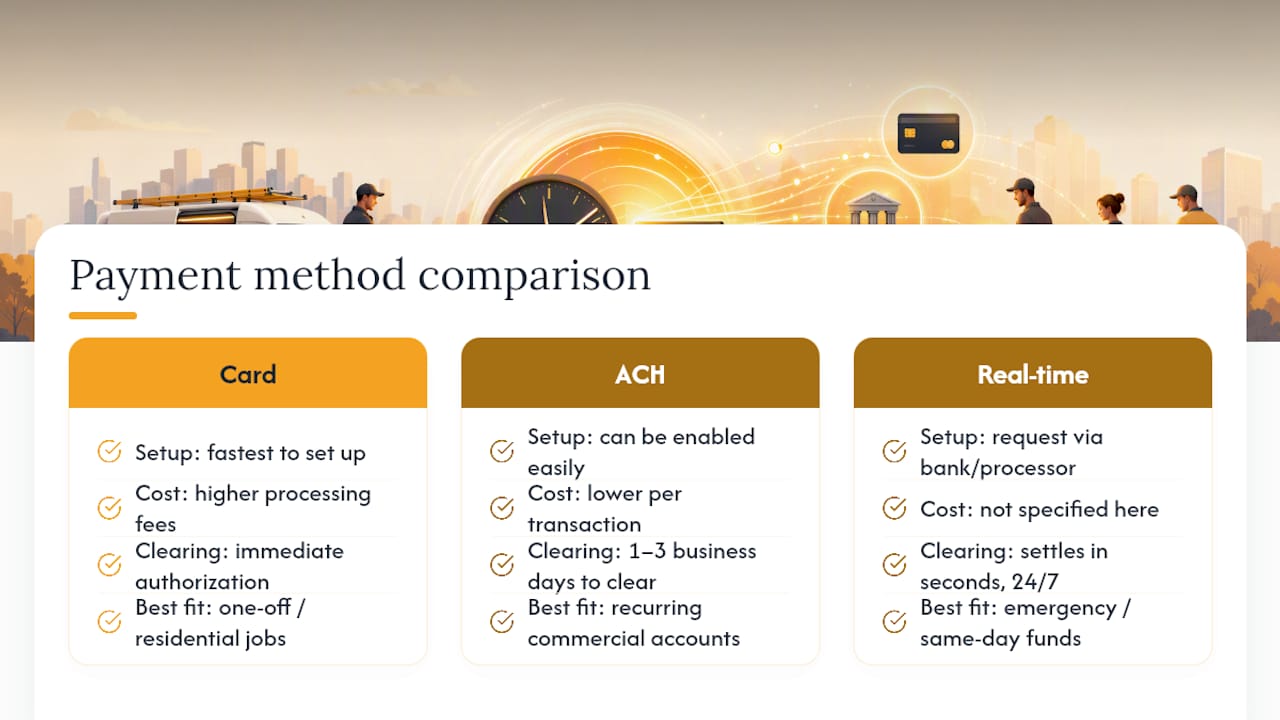
Card, ACH, and real-time payments each fit a different situation. Cards are fastest to set up and best for one-off or residential jobs, though processing fees run higher. ACH costs less per transaction and suits recurring commercial accounts, but takes one to three business days to clear. Real-time rails beat both on speed with no float delay, though reconciliation tooling for RTP and FedNow is still maturing inside many accounting platforms.
Adding these options rarely requires custom engineering. Most invoicing and payment platforms let you toggle on card, ACH, and mobile wallet acceptance, then generate the hosted Pay Now link automatically on every invoice you send.
Building an Invoicing Workflow That Runs Without You
A touchless workflow means human hands only touch the exceptions. Everything else moves on its own: job data gets captured, the invoice generates, the payment page goes out, reminders fire automatically, and failed payments get retried before anyone notices there was a problem.
The sequence looks like this: capture job details at close, generate the invoice immediately, attach the hosted payment link, trigger automated reminders on a schedule, run smart retries on any failed charge, then sync the paid invoice to your books for reconciliation.
A few features do most of the heavy lifting in that chain, as guided by experts in AI for accounting firms:
- AI-driven retries and dunning reattempt failed card charges at statistically better times instead of immediately, which recovers a meaningful share of payments that would otherwise be written off, per Recurly's research on payment recovery.
- Recurring billing handles service agreements and maintenance contracts without a human generating each invoice by hand.
- Tokenized payment methods let returning clients pay in one click on future invoices without re-entering card details.
- Exception routing flags disputes, mismatched amounts, or bounced payments for a person to handle, instead of letting them sit silently in a queue.
None of this works without clean customer contact and payment data going in. A workflow is only as touchless as its inputs; a wrong email address defeats every automated reminder you've built. AP automation case studies show processing times dropping from multiple weeks to a matter of hours once these pieces are in place, and the labor savings compound as invoice volume grows. Clean data, a one-click payment experience, and a documented approval process for anything unusual are the prerequisites, not optional extras.
When Financing Beats Waiting for Payment
Process fixes solve most late-payment problems, but not all of them. Some businesses need cash before the invoice clears, no matter how fast the payment link works. Three financing routes cover most of that gap.
Invoice factoring means selling your unpaid invoices to a third party at a discount in exchange for immediate cash, usually 80 to 90% up front with the remainder (minus a fee) paid once your client settles the invoice. It's the fastest way to unlock a large batch of receivables, but factoring fees stack up over a year and some factoring arrangements involve the factor contacting your customers directly, which not every client relationship can absorb gracefully.
Early-pay marketplaces work differently. A platform like C2FO lets you request early payment on specific approved invoices from a buyer who already participates in the program, often delivering funds as soon as the next day. Because it runs on invoices your buyer has already approved, it doesn't change your underlying contract terms and doesn't involve a third party chasing your customer for money.
Invoice financing (sometimes called accounts receivable financing) uses your unpaid invoices as collateral for a short-term loan or line of credit, rather than selling the invoices outright. You keep control of collections; the lender just advances against what's coming.
Timelines across all three typically run next-day to a few days once you're set up. The math to run before committing is simple: compare the discount or fee against what that cash is actually worth to you right now. Financing earns its cost during a seasonal payroll crunch or when a growth opportunity needs capital this week. It's a poor fit for routine cash flow gaps that a faster invoicing process would solve for free. Piloting an early-pay program on a handful of approved invoices, rather than committing your entire receivables ledger to factoring, is the lowest-risk way to test whether the cost makes sense for your business.
The Numbers That Tell You If It's Working
Three metrics tell you almost everything about collection health. Days Sales Outstanding (DSO) measures the average number of days between invoicing and payment; lower is better, and it's the single best signal of whether your changes are working. Accounts Receivable (AR) turnover measures how many times per year you collect your average receivables balance; higher turnover means cash is cycling back into the business faster. Recovery rate tracks what percentage of failed or overdue payments you eventually collect, which matters most once you've automated retries and reminders.
By the Numbers: Businesses that move from manual invoicing to hosted payment pages with automated reminders commonly see DSO drop by several days to more than a week, depending on how manual their prior process was.
Run a weekly report on outstanding invoices by age bucket (0 to 15 days, 16 to 30, 31 to 60, 60-plus) and a monthly report on DSO trend and recovery rate. If DSO isn't moving after 60 days of automation, that's your signal to escalate to financing rather than keep tweaking reminder timing.
A 90-Day Plan to Get Invoices Paid Faster
Spreading these changes over 90 days keeps the workload manageable while still producing visible results within the first month.
- Day 0 to 7: Send every outstanding invoice with a Pay Now link attached, even manually if your current system doesn't support it yet.
- Day 0 to 7: Turn on hosted invoice pages if your platform offers them.
- Day 0 to 7: Standardize your invoice template with all required fields (PO number, job address, tax ID, itemized labor and materials).
- Week 1 to 4: Enable automated payment reminders on a fixed schedule.
- Week 1 to 4: Add card and mobile wallet acceptance alongside ACH.
- Week 1 to 4: Clean up customer contact and payment data so reminders actually reach someone.
- Week 4 to 12: Layer in tokenized payments, smart retry logic, and recurring billing for contract clients, and pilot an early-pay program if seasonal cash needs justify it.
Track DSO weekly during this window. If it hasn't moved by week eight, the bottleneck is usually data quality or a client segment that needs a phone call instead of another automated nudge.
How Tradepilot Connects Job Close to Faster Payment
The fastest invoice is the one that goes out the moment the job ends, which is exactly where most field-service billing breaks down. A technician finishes a job, drives to the next call, and the invoice sits half-written until someone gets back to the office. Tradepilot closes that gap by triggering invoice creation directly from dispatch, so the Pay Now link goes out while the job is still fresh in the customer's mind.
For HVAC, electrical, and plumbing teams that bill on-site or same-day, that timing difference is the whole game. An AI dispatch system that already knows the job details doesn't need a second data entry step to generate the bill.
What Actually Moves the Needle, and What Doesn't
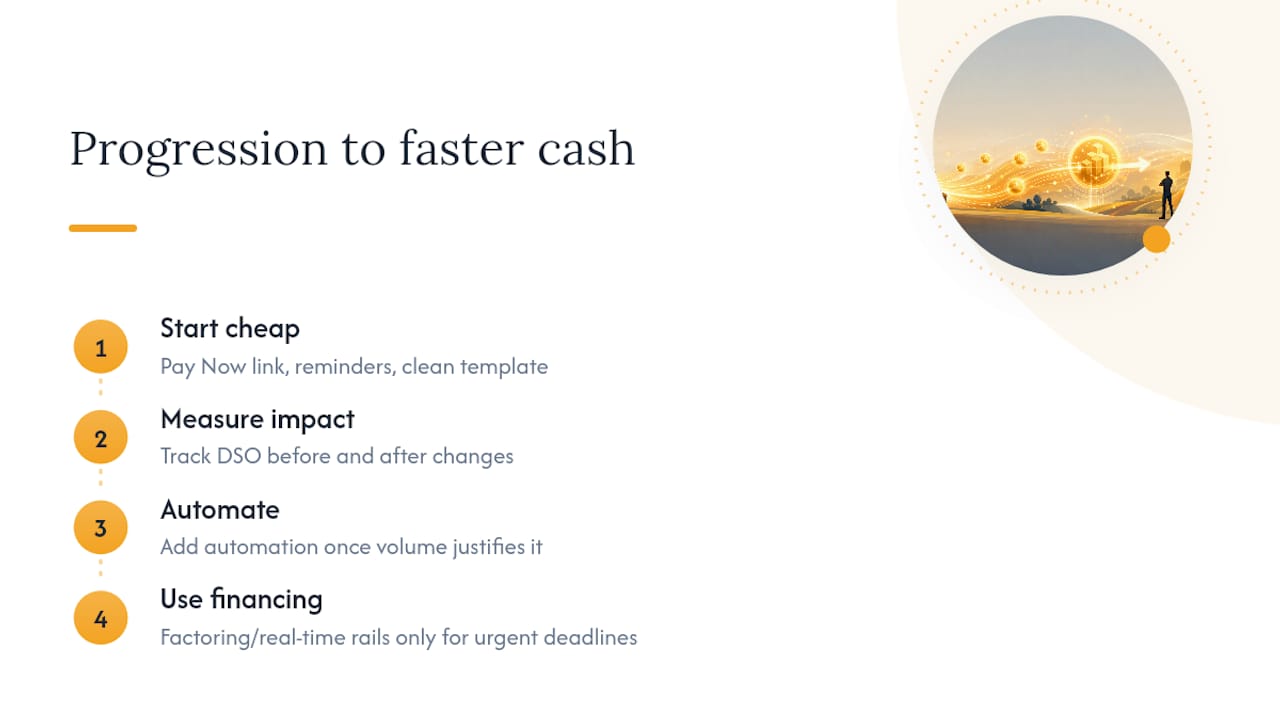
Speed and cost pull in opposite directions more often than vendors admit. Real-time rails and factoring both buy you faster cash, and both cost more than a client who simply pays a well-designed invoice on time. Start with the cheap fixes: the Pay Now link, the reminder cadence, the clean invoice template. Add automation once volume justifies it, and reach for financing only when a real deadline demands cash you don't have yet.
The stumble I see most often is skipping straight to financing because a process fix feels slower to set up. It isn't. A hosted payment link takes an afternoon to enable. Measure DSO before and after every change, keep what moves the number, and scale the rest.
— Mark Korley
Get Your Invoices Out the Door Faster With an AI-Powered Dispatch and Invoicing Platform
An AI-powered dispatch and invoicing platform can connect dispatch directly to invoicing, so the moment a technician closes a job, the invoice goes out with a Pay Now link already attached, no separate data entry, no end-of-day catch-up. For HVAC, electrical, and plumbing businesses juggling multiple crews, that means invoices leave same-day instead of whenever someone finds time to write them up.

Such platforms also give visibility into every job, invoice, and payment status in one dashboard, so you're not guessing which accounts are actually overdue. If getting paid faster starts with getting invoices out faster, that's the piece worth fixing first. You can see how Tradepilot's dispatch and invoicing work together and start a trial to test it against your own current cycle time.
Sources
FAQ
Do You Get Charged for Faster Payments?
Card and real-time payment rails typically carry processing fees paid by the business, not the customer, while ACH usually costs less per transaction; factoring and early-pay programs charge a discount or fee against the invoice amount in exchange for immediate cash.
How Do You Speed Up Invoice Processing?
Automate invoice generation at job close, standardize required fields so AP teams don't kick invoices back for corrections, and enable hosted payment pages so the customer can pay the moment they open the email.
How Can I Get My Invoices Paid Instantly?
Real-time rails like RTP and FedNow settle in seconds once both banks support them, and platforms with hosted payment pages report that most invoices get paid within 24 hours; for true same-day cash on invoices already sent, an early-pay marketplace or invoice financing is the more realistic option.
How Do You Politely Ask for Immediate Payment?
Lead with the invoice details and Pay Now link rather than an apology, state the amount and due date clearly, and offer to answer any question about the work before assuming the client is avoiding payment.