
An invoice workflow that actually works does one thing without waiting for a human: the moment a technician marks a job complete, it generates the invoice, hands the customer a way to pay on the spot, and syncs the result to your books. No batching invoices at the end of the week. No admin re-typing line items from a paper ticket.
That single trigger changes three numbers that matter to you: how fast you get paid, how many billing disputes you field, and how many hours your office staff spends chasing paperwork instead of running the business.
- Job-complete triggers invoice generation instantly, using the line items already approved on the estimate.
- The customer gets a payment option immediately, either an on-site card capture or a mobile pay link by SMS or email.
- Payment status flows back into your accounting system automatically, closing the loop without anyone re-entering data.
Companies that connect dispatch and billing into one workflow have cut Days Sales Outstanding from over fifty days down to around a month, according to a field service management case study from OneBill. That's not a marginal improvement. That's the difference between financing your own payroll and getting paid before the truck leaves the driveway.
Key Takeaways
An invoice workflow that fires on job-complete, offers instant payment, and syncs to your books automatically cuts collection time and eliminates most manual billing work.
| Point | Details |
|---|---|
| Job-close is the trigger | Invoice generation should fire the instant a technician marks a job complete, not at end of day. |
| DSO drops with automation | Same-day invoicing and reminders have taken DSO from the mid-50s down to 25 to 30 days in documented cases. |
| Clean price books come first | Lock and standardize price-book items before automating, since automation repeats whatever errors you feed it. |
| Set approval thresholds | Route high-dollar or manually changed invoices for human review; auto-send routine jobs below that line. |
| TradePilot ties dispatch to billing | Tradepilot's AI-matched dispatch feeds accurate job data directly into automated invoicing, cutting the handoff gap between scheduling and billing. |
Table of Contents
- Mapping the Invoice Workflow From Estimate to Cash
- How Long Does an Invoice Workflow Rollout Actually Take?
- What Should the Integration Actually Look Like Under the Hood?
- Setting the Guardrails: Price Books, Approvals, and Exceptions
- The Numbers That Tell You the Workflow Is Working
- How TradePilot Handles the Full Field-to-Cash Loop
- Why Most Shops Get the Priorities Backward
- Ready to See This Running on Your Own Jobs?
- Sources
Mapping the Invoice Workflow From Estimate to Cash
The sequence matters more than any individual tool in it. Break the chain anywhere and you get exactly what most HVAC, electrical, and plumbing shops deal with today: mismatched invoices, delayed billing, and a technician who has moved on to the next job before the office even knows the last one is done.
Here's how the full pipeline should run:
- Estimate approval creates the job. The line items a customer signs off on become the source of truth. Nothing gets typed twice.
- The technician captures field data. Parts used, labor hours, photos, and timestamps attach to the job record as work happens, not after.
- The technician marks the job complete. This is the trigger. Everything downstream depends on this one action firing correctly.
- The system generates the invoice automatically, mapping against your price book and applying the correct tax rate for the job location.
- The invoice goes out immediately by SMS with a pay-now link, with an optional email carrying a PDF copy.
- The customer pays, either through the link or by card capture on-site.
- Payment status syncs back, marking the invoice paid, recording the payment method, and closing the job in your system of record.
Disconnected systems are exactly what create the friction here. Re-entry between the estimate, the job ticket, and the invoice is where most billing delays and disputes originate, because every manual handoff is a chance for a line item to get dropped or a price to get fat-fingered.
| Stage | What happens | Failure point if manual |
|---|---|---|
| Estimate to job | Approved items carry over | Line items retyped, prices drift |
| Job to invoice | Job-complete fires generation | Invoice sits in a queue for days |
| Invoice to payment | SMS/email link sent | Customer loses paper invoice |
| Payment to books | Status syncs to accounting | Manual reconciliation, double entry |
Getting this right isn't about buying more software. It's about making sure the estimate stays the single source of truth all the way through, a point worth understanding before you evaluate invoice vs. estimate workflows in more detail.
How Long Does an Invoice Workflow Rollout Actually Take?
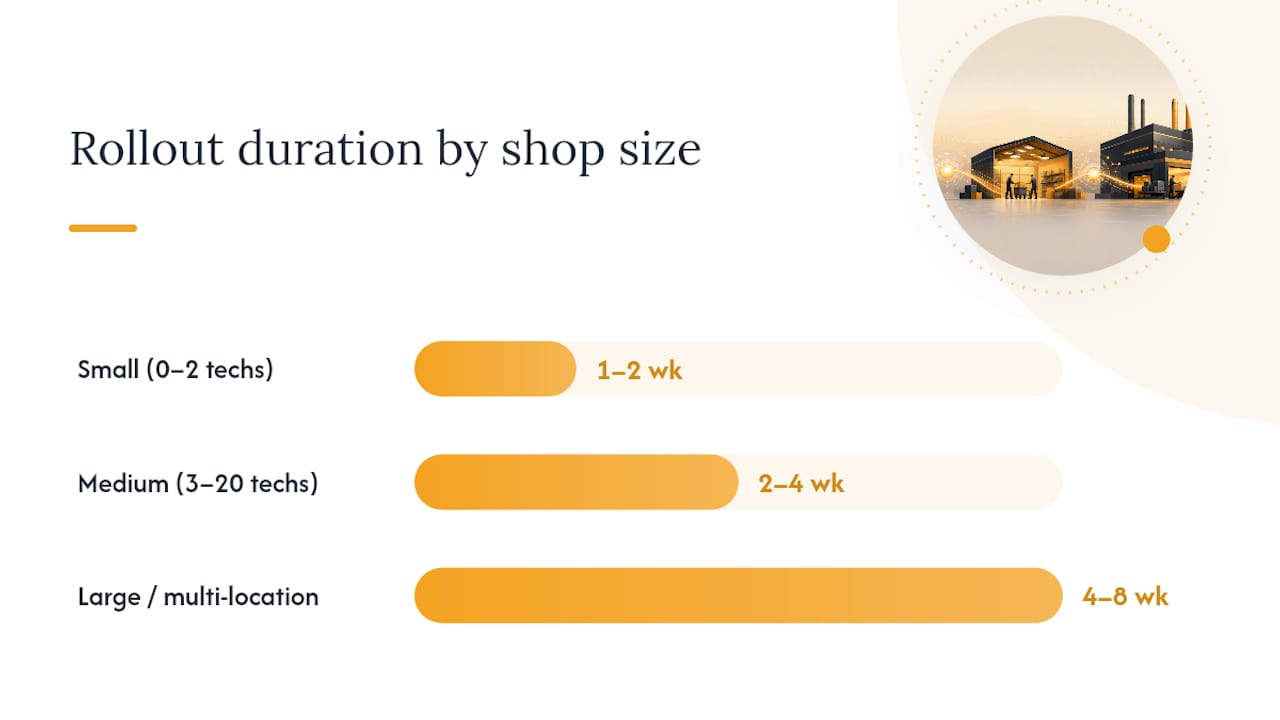
Your timeline depends almost entirely on how many technicians you're running and how many systems already talk to each other.
- Small shop (0 to 2 techs), 1 to 2 weeks: Use your field service management (FSM) platform's native payment features paired with a QuickBooks sync. No custom integration needed.
- Medium shop (3 to 20 techs), 2 to 4 weeks: Set up webhook triggers, payment links, and a test environment before going live. This is the timeline most mid-sized operators should expect.
- Larger or multi-location operations, 4 to 8 weeks: Add an orchestration layer, run full QA, and stage the rollout location by location rather than flipping the switch everywhere at once.
Before any of that, audit four things: your FSM platform's job-close event actually fires reliably, your accounting platform has an open API, your payment gateway is selected, and your customer contact data is clean enough to text.
Pro Tip: Run your test plan with deliberately messy scenarios; a partial payment, a canceled job, a customer with no mobile number on file. If the workflow survives those, it survives a normal Tuesday.
What Should the Integration Actually Look Like Under the Hood?
Event-driven webhooks beat polling every time speed matters, which in this case is always. A webhook fires the instant a technician taps "job complete." Polling checks every few minutes and asks "anything new?" The lag between those two approaches is the lag between same-day cash and next-week cash.
A job-complete webhook needs to carry real payload, not just a status flag:
- Job ID and customer ID
- Full line items with quantities and pricing
- Tax calculation for the job's location
- Technician notes and parts consumed
On the payment side, you're choosing between ephemeral payment links, generated fresh per invoice and expiring after use, or an embedded terminal for on-site card capture. Links win on speed and simplicity. Terminals win when the customer is standing right there and wants to pay before the van leaves the curb.
Accounting sync comes in two flavors: write-through, where the invoice is created directly inside QuickBooks or Xero the moment it's generated, or reconciliation, where payment gets recorded against an invoice that already exists there. Write-through is cleaner for most trade businesses. Reconciliation makes more sense if your accounting team wants a review step before anything posts.
Orchestration layers earn their complexity only when you need cross-system actions a single FSM platform can't reach on its own, tagging a customer record in your CRM, triggering a marketing sequence, or reconciling books across multiple entities at once.
If you're only running one entity and one accounting platform, skip the orchestration layer entirely. It's overhead you don't need yet.
Setting the Guardrails: Price Books, Approvals, and Exceptions
Automation amplifies whatever data you feed it. A messy price book doesn't just cause the occasional wrong invoice, it causes the same wrong invoice a hundred times before anyone notices. Lock this down before you automate anything else.
- Standardize every price-book item and remove duplicates before the first webhook goes live.
- Set a dollar threshold above which invoices route for human approval instead of auto-sending; a $150 diagnostic call needs no review, a $4,000 system replacement probably does.
- Flag any job with a manual change order for review, regardless of dollar amount.
- Build progress billing rules for multi-visit projects: a percentage due at rough-in, a percentage at final inspection.
- Give office staff a one-click way to mark an invoice paid for on-site cash or check payments, which suppresses the automated reminder ladder immediately.
That reminder ladder matters more than most shops realize. A sequence sent at one day, seven days, fourteen days, and twenty-one days past due, with escalation at thirty, recovers most late payments without a single phone call.
The Numbers That Tell You the Workflow Is Working
Set a baseline before you launch anything, or you'll have no way to prove the rollout paid for itself. Calculate your current DSO, average days from invoice to payment, for the past ninety days. Same-day invoicing paired with automated reminders has pushed that number from the mid-50s down to 25 to 30 days in documented case studies, and shops running an integrated dispatch-and-billing stack have also seen first-visit success rates climb from 58% to 87%, because technicians show up with full job and customer context instead of guessing.
Track three numbers weekly, not monthly:
| Metric | What it tells you |
|---|---|
| Invoice delivery time | Minutes or hours between job close and invoice sent |
| Days to paid | Time from invoice sent to payment received |
| Admin hours on billing | Time your office staff spends touching invoices manually |
One mid-sized contractor case documented billing admin time dropping from roughly 65 hours a month to about 12 after automating the job-close-to-invoice handoff. Run an exceptions queue for disputes and flagged jobs, and review it every week alongside a standard aging report.
How TradePilot Handles the Full Field-to-Cash Loop
Tradepilot's AI dispatch matches every job to the best-fit technician by skill, availability, and location in under a second, which matters more for invoicing than most managers assume. A technician who's actually qualified for the job finishes faster and logs cleaner line items, which means the invoice that fires off job-complete is accurate the first time.
Because dispatch, invoicing, inventory, and analytics live in one platform, there's no handoff between systems where data goes stale or gets typed twice.
A starter pilot configuration looks like this:
- Enable the job-close webhook to fire invoice generation automatically.
- Sync your price book once, then let it feed every future invoice.
- Turn on SMS payment links for immediate customer payment.
- Connect your accounting platform for automatic reconciliation.
Pro Tip: Run the pilot on your highest-volume job type first, service calls, not installs. You'll get a statistically useful sample of DSO improvement within two to three weeks instead of waiting on a handful of big-ticket jobs.
Deeper configuration guidance lives in Tradepilot's guide to AI dispatching for trade businesses and its breakdown of invoice automation software options.
Why Most Shops Get the Priorities Backward
Most advice on this topic starts with the invoice. Wrong end of the pipeline. The invoice is the easiest part to automate and the least likely part to break. What actually derails these rollouts is a messy price book feeding wrong numbers into a perfectly automated system at scale, or a dispatch process so inconsistent that technicians close jobs with incomplete data.

Fix dispatch accuracy and price-book hygiene first. The invoice takes care of itself once the inputs are clean.
The other place conventional advice falls short: treating DSO reduction as the only metric that matters. It's the easiest one to point to on a slide, sure. But the quieter number, admin hours reclaimed from manual invoice entry and reconciliation, often matters more to a ten-technician plumbing outfit than a twenty-day DSO improvement. That's payroll hours freed up to grow the business, not just cash sitting in the bank a little sooner.
Start with the estimate-to-job handoff. Get that clean before you touch the reminder ladder or the payment links. Everything downstream inherits whatever mess or precision you build into that first step.
— Mark
Ready to See This Running on Your Own Jobs?
Tradepilot isn't a bolt-on invoicing tool you have to stitch to your dispatch software; it's one platform where AI-matched dispatch feeds accurate, job-complete data straight into the invoice the moment a technician closes the ticket. That's the concrete advantage over running separate systems for scheduling and billing: no webhook to build yourself, no price-book sync to maintain across two platforms, no reconciliation gap between what the tech did and what gets billed.

If you're evaluating this for your own shop, ask for three things in a demo: the exact webhook payload structure, a sample invoice template mapped to your price book, and a walkthrough of the SMS payment link flow end to end. A reasonable pilot target is 25 typical jobs run through the automated workflow, measured against your current DSO baseline before you commit further.
Book a walkthrough at the TradePilot demo page and bring your billing questions. A short technical Q&A on integration specifics is part of the conversation, not an upsell.
Sources
- AI-Powered Field Service Management with Native Billing | OneBill
- How to Simplify Invoicing for Your Home Service Business | Swivl