
An estimate is a nonbinding price proposal sent before work begins. An invoice is the binding request for payment sent after work is done or a milestone is reached. Get those two confused, and you're either chasing payment on a document that has no legal weight or handing a client an "estimate" they think they can renegotiate after the job is finished.
Here's the short version of what to do:
- Send a signed estimate first for any job where scope or price could vary.
- Issue a deposit invoice immediately after the client signs, to lock in scheduling.
- Use change orders for any mid-job scope shifts, signed before the extra work starts.
- Send the final invoice referencing the original estimate and all change orders once the job is complete.
That four-step sequence protects your margin, creates a clean audit trail, and gives you something to stand on if a client disputes the bill.
Table of Contents
- What exactly is an estimate?
- What is an invoice, and why does it matter legally?
- Key differences at a glance
- When should you use an estimate vs. an invoice?
- How to convert an accepted estimate into an invoice
- Quick templates and sample wording
- Common mistakes that trigger invoice disputes
- Taxes, deposits, and recordkeeping — U.S.-specific notes
- Key Takeaways
- Why standardizing this workflow is worth the effort
- Tradepilot closes the gap between dispatch and invoice
- Where to verify rules and find templates
What exactly is an estimate?
An estimate is a pre-work document that sets expectations without creating a payment obligation. It tells the client what you plan to do, roughly what it will cost, and what assumptions you're working from. If the scope changes, the price can change too — that's the whole point. A clear, detailed estimate is also the single most effective way to prevent invoice disputes, because disputes almost always start when a final invoice surprises a client who expected a different number.
For trades work, a solid estimate typically includes:
- Scope of work: What you will and won't do (exclusions matter as much as inclusions)
- Line items: Diagnostic fee, parts by unit, labor by task, travel or trip charge
- Assumptions: Access conditions, existing equipment condition, permit requirements
- Unit costs: Hourly or flat-rate labor, material costs at time of estimate
- Expiry date: Typically valid for a limited period, after which material prices may change
- Signature line: Client signature converts the estimate from a proposal to an agreement
A short example for an HVAC service call might look like this: Diagnostic fee: $95 / Capacitor replacement (parts + labor): $185 / Refrigerant recharge (per lb): $65 / Trip charge: $0 (waived on repair).
Pro Tip: Lock your price on signature. State clearly in the estimate that pricing is valid for 30 days and that a signed copy plus a deposit secures your schedule. This one line prevents the "can you honor that price from three months ago?" conversation.

What is an invoice, and why does it matter legally?

An invoice is a formal, binding request for payment. The moment you send one, it creates an accounts receivable entry in your books and starts the clock on your payment terms. In the U.S., an invoice also functions as the official record of a taxable transaction, which means it needs to be accurate, complete, and preserved.
A U.S. invoice should include:
- Unique invoice number (sequential, no gaps)
- Invoice date and due date
- Your business name, address, and contact info
- Client's name and billing address
- Itemized line items with descriptions, quantities, and unit prices
- Subtotal, applicable sales tax itemized by rate, and total due
- Payment terms (e.g., Net 15, Net 30, or due on receipt)
- Payment instructions (check payable to, ACH details, credit card link)
The invoice number deserves special attention. Gap-free, sequential numbering is an accounting hygiene requirement. If your invoices jump from #1042 to #1047, an auditor will ask what happened to the five in between. Keep the sequence clean, and never delete or overwrite an invoice — if you need to correct one, issue a credit note and a new invoice.
Here's a minimal invoice snippet:
| Field | Example |
|---|---|
| Invoice # | 1043 |
| Invoice Date | June 12 |
| Due Date | June 27 (Net 15) |
| Service | AC tune-up + filter replacement |
| Payment | Check or ACH to account on file |
Key differences at a glance
| Dimension | Estimate | Invoice |
|---|---|---|
| When issued | Before work begins | After work or at a milestone |
| Binding status | Nonbinding until signed | Binding payment demand |
| Purpose | Sets expectations, invites approval | Requests payment, records revenue |
| Accounting effect | No entry until accepted | Creates accounts receivable |
| Required contents | Scope, assumptions, expiry, signature | Invoice #, itemized lines, tax, terms |
| Tax treatment | May show estimated tax for reference | Must itemize tax per jurisdiction |
| Handling changes | Revise freely before signature | Issue credit note + new invoice; never edit |
| Use when... | Scope or price is uncertain | Work is complete or milestone reached |
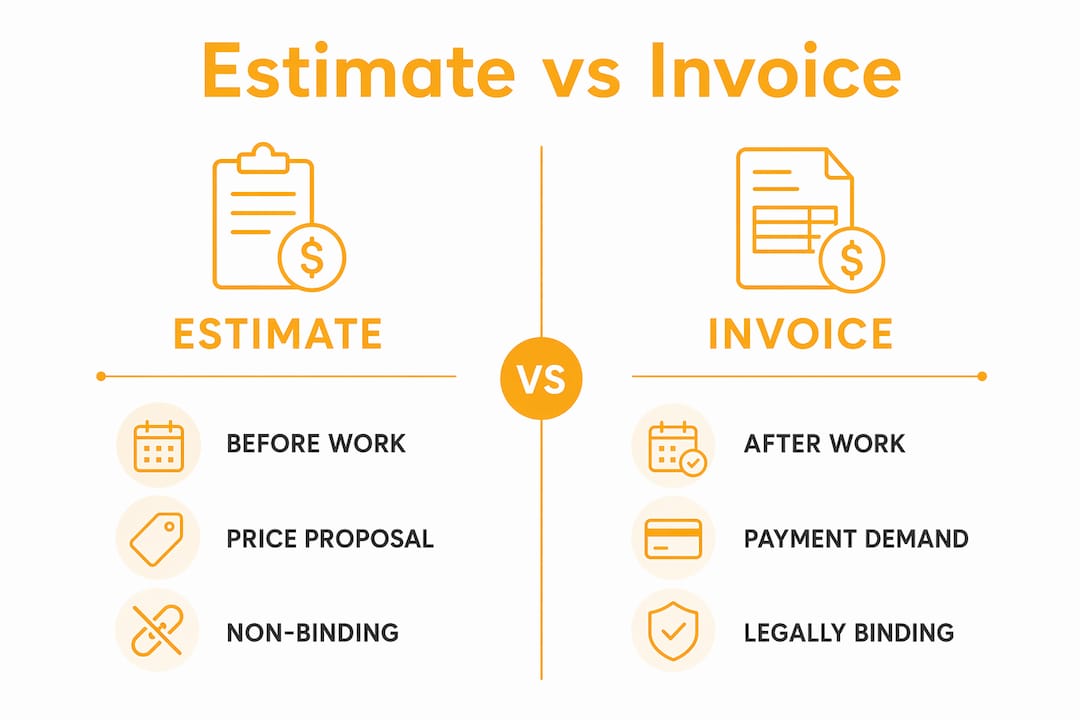
The row that trips up the most businesses: you cannot edit an accepted invoice. Once it's sent, corrections require a credit note (sometimes called a credit memo) that zeroes out the original, followed by a corrected invoice with a new number. Editing an existing invoice breaks the audit trail and, in some states, can create tax compliance problems.
When should you use an estimate vs. an invoice?
The answer usually comes down to one question: Do you know the exact final price before you start? If yes, you might be able to skip the estimate. If no, always start with one.
Use an estimate when:
- The job involves variable labor hours or unknown parts (most repair calls, remodels, custom installs)
- The client is new and hasn't worked with you before
- Material costs are volatile (refrigerant, copper pipe, lumber)
- The project spans multiple days or phases
- You're bidding against other contractors
Skip the estimate (or use a flat-rate price book) when:
- The service is routine and priced identically every time (annual tune-up, drain cleaning, panel inspection)
- You have a maintenance agreement with a repeat client at a fixed rate
- It's an emergency call with a published diagnostic fee the client already agreed to
For larger projects, milestone invoicing keeps cash flowing without waiting until the end. A common pattern: 30% deposit invoice on signed estimate, 30% progress invoice at rough-in or midpoint, 40% final invoice on completion. Adjust the percentages to match your material costs — if you're buying $8,000 in equipment upfront, your deposit should cover it.
Many customers choose the first contractor who publishes a real price. For routine services, publishing your diagnostic fee and common repair prices removes the estimate step entirely and wins the job faster.
How to convert an accepted estimate into an invoice
This is where most small businesses lose money — not because they do the work wrong, but because the paperwork trail falls apart. Follow these steps every time.
- Get the estimate signed. A verbal "sounds good" is not enough. Email confirmation with explicit approval works, but a signature is cleaner and harder to dispute.
- Issue a deposit invoice immediately. Assign it a real invoice number from your sequence. Note on the invoice that it's a deposit against Estimate #[X]. Collect payment before scheduling.
- Log the deposit in your accounting software. Record it as a liability (unearned revenue) until the job is complete, if you're on accrual accounting.
- Perform the work. Keep the original signed estimate on file — don't alter it.
- Issue a change order for any scope changes. If the client wants to add a second unit or you discover hidden damage, stop and write a change order before proceeding. Get it signed.
- Build the final invoice. Reference the original estimate number and any change order numbers. Deduct the deposit paid. Show the remaining balance clearly.
- Confirm before sending: line items match the signed estimate plus change orders, tax lines are correct, invoice number is the next in your sequence, payment instructions are current.
Invoicing software that converts accepted estimates into invoices handles steps 1 and 6 automatically — it copies line items, customer info, and the estimate reference into a new invoice with a fresh number. That's the mechanical part. The discipline of change orders and deposit invoices still requires your attention.
Pro Tip: For mid-job scope changes, use this wording on your change order: "This change order modifies Estimate #[X] dated [date]. Additional work: [description]. Additional cost: $[amount]. Revised total: $[new total]. Client signature below authorizes this change and the associated cost before work proceeds."
Quick templates and sample wording
You don't need elaborate software to start. These minimal templates work in any word processor or invoicing app.
Sample estimate template:
- [Your Business Name] — Service Estimate
- Estimate #: [E-1001] | Date: [date] | Valid through: [date + 30 days]
- Customer: [Name, address, phone]
- Scope of work: [Detailed description]
- Assumptions: [Access, existing conditions, permit status]
- Exclusions: [What is NOT included]
- Line items: [Description | Qty | Unit price | Line total]
- Subtotal / Estimated tax / Estimated total
- "This estimate is valid for 30 days. Prices are subject to change if material costs increase before a signed copy is received. A deposit of [X]% is required to schedule."
- Client signature / Date
Sample invoice template:
- [Your Business Name] — Invoice
- Invoice #: [1043] | Invoice Date: [date] | Due Date: [date]
- Bill to: [Customer name and address]
- Line items: [Description | Qty | Unit price | Line total]
- Subtotal / Sales tax (rate%) / Total due
- Deposit paid (Ref Invoice #[deposit invoice #]): ($[amount])
- Balance due: $[amount]
- Payment terms: Net 15 | Pay by check, ACH, or [link]
Three acceptance phrases clients can sign or initial:
- "I approve the scope and pricing in Estimate #[E-1001] and authorize [Business Name] to proceed."
- "I have read and agree to the terms, scope, and pricing above. I understand that changes to scope will require a signed change order."
- "Deposit of $[amount] enclosed. I authorize work to begin per Estimate #[E-1001]."
For HVAC businesses using flat rate pricing, a price book with standard repair prices (typically built on a 2.5x–3.5x parts markup plus a loaded labor rate) replaces line-item estimating for common jobs. Update that price book regularly — stale cost inputs quietly erode your margin even when revenue looks healthy.
Common mistakes that trigger invoice disputes
Most billing disputes don't come from bad work. They come from paperwork gaps that let a client reinterpret what was agreed.
- Editing an accepted estimate after the client signed it — even to "fix a typo" — destroys your legal standing. Keep the original intact.
- Mixing estimate and invoice numbering (e.g., both starting at #1001) creates confusion in your books and looks unprofessional to auditors.
- Skipping the deposit invoice and just "noting" the deposit on the final invoice means you have no separate accounting record of when the money was received.
- Vague line items like "labor" or "parts" with no description give clients room to dispute what they're paying for.
- Missing tax lines on invoices — especially in states with specific sales tax rules for labor vs. materials — create compliance risk.
- Issuing change orders after the work is done rather than before. A retroactive change order is nearly impossible to enforce.
Red flags that a dispute is coming: a client who asks you to change the invoice number, requests payment to a different account than usual, or disputes a line item that was explicitly listed in the signed estimate. Invoice number gaps are also a red flag in the other direction — they signal to an auditor that records may be incomplete.
Pro Tip: Maintain a short price book for your 10–15 most common jobs. When a client can see a published price for a standard repair, they're far less likely to dispute the invoice. It also speeds up estimate approval because there's nothing to negotiate.
Taxes, deposits, and recordkeeping — U.S.-specific notes
Invoices are tax documents in the U.S. That's not a technicality — it's the reason invoice accuracy matters beyond just getting paid.
- Sales tax on invoices must be itemized separately, not buried in the line item total. Which services are taxable varies by state: some states tax labor on repairs, others don't. Some tax parts but not installation. Know your state's rules or ask a CPA.
- Deposit accounting depends on your method. On a cash basis, a deposit is income when received. On accrual, it's a liability until the job is complete. Either way, issue a separate deposit invoice so the receipt date is documented.
- Retain signed estimates and change orders for at least as long as you retain invoices. The IRS generally has three years to audit a return, but that window extends to six years if income is substantially underreported. Keep digital backups.
- Gap-free invoice sequencing isn't just good practice — it's what an auditor looks for first. A clean, unbroken sequence is evidence that no transactions were hidden or deleted.
- Estimates are not tax documents. They don't trigger revenue recognition or sales tax obligations. Only the invoice does.
State sales tax rules for trades work vary significantly — what's taxable in Texas may be exempt in New York. Consult a CPA for your specific state, especially if you work across state lines or handle specialty services like new construction vs. repair.
Key Takeaways
An estimate sets expectations before work; an invoice demands payment after work and creates the legal and tax record that protects your business.
| Point | Details |
|---|---|
| Estimate first, always | Use a signed estimate for any job where scope or price could vary before starting work. |
| Deposit invoice on acceptance | Issue a numbered deposit invoice immediately after the client signs — not a note on the final bill. |
| Change orders protect margins | Issue a signed change order before any extra work begins; retroactive orders are nearly impossible to enforce. |
| Gap-free invoice numbering | Sequential, unbroken invoice numbers are the first thing an auditor checks — never delete or skip numbers. |
| Tradepilot automates the workflow | Tradepilot's integrated invoicing converts accepted estimates to invoices, preserving numbering and audit trails for HVAC, electrical, and plumbing businesses. |
Why standardizing this workflow is worth the effort
The trades businesses that argue least with their clients about money are almost never the ones with the lowest prices. They're the ones with the clearest paperwork. A signed estimate tells the client exactly what they agreed to. A deposit invoice tells your accounting software exactly when money changed hands. A change order tells everyone — including a judge, if it ever gets there — that the extra work was authorized before it happened.
What most guides miss is the compounding effect. One sloppy estimate might cost you $400 in a disputed invoice. Ten sloppy estimates across a busy season cost you $4,000 and three weeks of back-and-forth that your technicians and office staff absorb as unpaid time. Standardizing the estimate-to-invoice workflow isn't a paperwork exercise. It's a margin protection strategy.
The other thing worth saying: the estimate-to-invoice gap is also where dispatch inefficiency shows up. When a technician finishes a job and the invoice doesn't go out for three days because someone has to manually reconstruct the line items, you're losing float on every job. Connecting dispatch, time on-site, and invoicing into one workflow cuts that lag to hours, not days — and faster invoices get paid faster.
Tradepilot closes the gap between dispatch and invoice
When your technician wraps a job, the last thing you want is a two-day delay while someone in the office reconstructs line items from a handwritten work order. Tradepilot's platform connects AI-powered dispatch with built-in invoicing so the estimate, the work record, and the final invoice live in one place — no manual re-entry, no numbering gaps, no lost change orders.

For HVAC, electrical, and plumbing businesses, that means your technician closes the job in the field, the invoice goes out the same day with the correct line items and tax lines, and your accounting record is clean from the first signature to the final payment. Estimate templates, deposit invoicing, change-order workflows, and sequential invoice numbering are all built in. If you're ready to cut the time between "job done" and "payment received," see how Tradepilot works for field service teams.
Where to verify rules and find templates
These sources are worth bookmarking for deeper reading on invoicing standards, recordkeeping, and tax rules:
- IRS Publication 583 — Starting a Business and Keeping Records: the IRS's own guidance on what records to keep and for how long.
- IRS Publication 334 — Tax Guide for Small Business: covers cash vs. accrual accounting and when income is recognized.
- Invoice automation tools — for understanding how software handles sequential numbering, estimate conversion, and audit-ready records.
- Job costing for contractors — if you want to connect your estimate line items to actual job costs and protect margin on every job.
- Your state's department of revenue website — for state-specific sales tax rules on labor, parts, and installation. Rules vary widely; what's taxable in one state may be exempt in another.
For edge cases — retainers, specialty tax categories, multi-state work, or unusual deposit structures — consult a licensed CPA. This article is general information, not professional tax or legal advice, and your situation may have details that change the answer.