
For HVAC, electrical, and plumbing businesses, Tradepilot is the strongest overall pick for field service management in 2026. It matches jobs to technicians by skill, location, and availability in under a second, and it combines dispatch, invoicing, inventory, and analytics in one platform built specifically for trade workflows. For small residential service businesses, Jobber is the clearest starting point. For enterprise operations, IFS Field Service Management / IFS Cloud handles industrial-scale asset management and AI scheduling at a depth that smaller platforms can't match.
Three features determine whether an FSM platform actually moves the needle for a trade business:
- Mobile-first offline capability. Technicians who hit dead zones and lose their work revert to paper. Inc.'s hands-on testing confirmed that poor mobile UX is the single biggest driver of crew abandonment.
- AI dispatch and job-matching. Platforms that automate technician assignment cut dispatch time and reduce first-visit failures. IFS benchmarks cited by Teambridge show modernizing FSM can reduce admin time by roughly 40%, double productivity, and lower operating costs by 10–20%.
- Systems-of-record integration. QuickBooks, payroll, and parts suppliers need to connect cleanly, or your team rebuilds data manually every day.
Quick trial guide by company size:
- 1–10 techs: Start with Tradepilot or Jobber. Tradepilot wins if dispatch accuracy and AI matching are your primary constraint; Jobber if you want the simplest possible booking-to-invoice flow.
- 10–50 techs: Tradepilot or ServiceTitan. ServiceTitan has deeper residential operations features at scale; Tradepilot gets you to value faster with less implementation overhead.
- 50+ techs / enterprise: IFS Cloud, Microsoft Dynamics 365 Field Service, or Salesforce Field Service, depending on your existing tech stack.
Key Takeaways
Tradepilot is the strongest FSM pick for HVAC, electrical, and plumbing businesses that need AI-led dispatch, trade-specific workflows, and fast time-to-value without enterprise-level implementation overhead.
| Point | Details |
|---|---|
| Mobile-first is non-negotiable | Poor mobile UX causes technicians to revert to paper; test offline write/sync before committing. |
| AI dispatch drives measurable ROI | IFS benchmarks show modernizing FSM can reduce admin time by ~40%, double productivity, and cut operating costs by 10–20%. |
| Hidden costs matter as much as list price | Budget for data migration, integration services, and training beyond the base subscription. |
| Pilot with real metrics | Track first-time-fix rate, job-matching accuracy, and admin hours saved during a 30–60 day trial. |
| Tradepilot for trades | Tradepilot's AI job-to-technician matching and integrated dispatch, invoicing, and inventory make it the leading pick for HVAC, electrical, and plumbing teams. |
Table of Contents
- What's the best field service management software in 2026?
- How do you choose the right FSM platform for your trade business?
- Which FSM features actually move the needle for trade businesses?
- What does FSM software actually cost, and how long does deployment take?
- How we evaluated these platforms
- Why mobile-first design and AI dispatch produce measurable ROI
- What's the right next step after reading this guide?
- The one thing most FSM rollouts get wrong
- Tradepilot is built for the dispatch problem trade businesses actually have
- Useful sources and further reading
What's the best field service management software in 2026?
The table below covers all 34 platforms in this guide. Tradepilot leads because it is the only platform in this list purpose-built for HVAC, electrical, and plumbing dispatch with AI job-matching at its core, not bolted on as an add-on.
| Platform | Best for | Core features | AI / automation | Pricing shape | Integrations | Ease of use | Onboarding time |
|---|---|---|---|---|---|---|---|
| Tradepilot | HVAC, electrical, plumbing needing AI dispatch | Dispatch, invoicing, inventory, analytics | AI job-to-tech matching by skill, location, availability | Seat-based SaaS tiers, free trial | QuickBooks, CRM, parts suppliers | Mobile-first, trade-optimized | Days to weeks |
| ServiceTitan | Large residential trade businesses | Full dispatch, CRM, payroll, reporting | Dispatch automation, performance analytics | Per-seat, high entry cost | Deep accounting/CRM integrations | Feature-rich, steeper learning curve | Weeks to months |
| Jobber | Small residential service businesses | Scheduling, invoicing, client hub | Basic automation | Tiered monthly plans, free trial | QuickBooks, Stripe | Simple, clean UI | Hours to days |
| Housecall Pro | Small teams prioritizing booking and payments | Scheduling, payments, customer messaging | Automated reminders | Tiered monthly plans | QuickBooks, financing | Very easy | Hours to days |
| IFS Field Service Management / IFS Cloud | Utilities, telecom, large industrial orgs | Asset management, depot repair, scheduling | Industrial AI scheduling | Enterprise licensing | SAP, Oracle, ERP-level | Complex | Months |
| Microsoft Dynamics 365 Field Service | Mid-market/enterprise on Microsoft stack | Scheduling, work orders, AI agents | Scheduling Operations Agent, Copilot | Per-user/month, enterprise tiers | Full Microsoft 365 / Azure stack | Moderate, familiar for MS users | Weeks to months |
| Salesforce Field Service | CRM-driven service orgs | Work orders, scheduling, customer data | Einstein AI, automated routing | Per-user/month, enterprise tiers | Full Salesforce ecosystem | Moderate | Weeks to months |
| ServiceMax / ServiceMax Core | Asset-intensive enterprises | Asset lifecycle, depot repair, contracts | Predictive maintenance signals | Enterprise licensing | SAP, Salesforce | Complex | Months |
| ServiceNow Field Service | Enterprises needing ITSM + field workflows | Cross-functional workflows, ITSM | Workflow orchestration | Enterprise licensing | ServiceNow platform | Complex | Months |
| Zoho FSM / ZohoFSM | Zoho-stack businesses | Scheduling, work orders, invoicing | Basic automation | Low-cost tiered plans | Zoho CRM, Books | Easy for Zoho users | Days to weeks |
| BuildOps | Commercial contractors | Project + service workflows | Scheduling automation | Tiered, quote-based | Accounting integrations | Moderate | Weeks |
| Praxedo Field Service Management | Mid-market teams needing flexible forms | Scheduling, tracking, forms, reporting | Route optimization | Per-user/month | ERP, CRM integrations | Moderate | Weeks |
| Connecteam | SMB deskless teams | Scheduling, comms, time tracking | Basic scheduling automation | Freemium + paid tiers | Limited | Very easy | Hours to days |
| ServiceM8 | Solo/micro service businesses | Job management, invoicing, quotes | Basic automation | Per-job pricing | Xero, QuickBooks | Very easy | Hours |
| Contractor+ | Small contractors | Scheduling, invoicing, estimates | Basic | Low-cost monthly | QuickBooks | Easy | Hours to days |
| SafetyCulture | Teams needing inspections and compliance | Checklists, inspections, audits | Automated alerts | Tiered plans | Integrates with FSM tools | Easy | Days |
| NimbCrew | Small to mid-sized crew scheduling | Crew scheduling, rostering | Basic | Not publicly listed | Limited | Easy | Days |
| Geocall | Real-time tracking-focused orgs | Scheduling, dispatch, GPS tracking | Route optimization | Not publicly listed | ERP integrations | Moderate | Weeks |
| ServicePower Field Service Management Suite | Contractor networks | Contractor coordination, performance tracking | Workforce optimization | Enterprise licensing | Third-party contractor systems | Moderate | Weeks to months |
| Astea Alliance | Complex aftermarket service orgs | Warranty, contracts, aftermarket service | Scheduling optimization | Enterprise licensing | ERP integrations | Complex | Months |
| Accruent Maintain | Large facilities and enterprise maintenance | Asset tracking, maintenance management | Preventive maintenance automation | Enterprise licensing | ERP integrations | Moderate | Months |
| SAP Field Service Management (SAP Cloud ERP) | SAP-stack enterprises | ERP-integrated field workflows | AI-assisted scheduling | SAP licensing | Full SAP ERP stack | Complex | Months |
| IFS Mobile Workforce Management | Large mobile workforce deployments | Workforce scheduling, mobile execution | AI-assisted scheduling | Enterprise licensing | IFS Cloud | Moderate | Months |
| ClickSoftware / ClickSchedule / ClickMobile (Legacy) | Orgs with legacy ClickSoftware deployments | Enterprise scheduling, mobile workforce | Legacy optimization engines | Legacy licensing | Established enterprise integrations | Complex | Months |
| E-Business Suite Field Service | Oracle EBS enterprises | Field-to-back-office workflows | Oracle-native automation | Oracle licensing | Oracle EBS | Complex | Months |
| IFS Field Service Management Software | Industrial and utilities field operations | Asset management, scheduling, mobile | Industrial AI scheduling | Enterprise licensing | IFS ecosystem | Moderate | Months |
| ClickSoftware Enterprise Mobile Workforce Management (Legacy) | Legacy enterprise deployments | Mobile workforce management | Legacy optimization | Legacy licensing | Enterprise integrations | Complex | Months |
| SAP Cloud ERP | SAP-integrated field operations | ERP-level field workflows | SAP AI tools | SAP licensing | Full SAP stack | Complex | Months |
Tradepilot's edge over the generic category labels in this table comes down to one thing most platforms don't offer out of the box: AI matching that accounts for technician credentials, not just calendar availability. That distinction matters most for HVAC and electrical teams where sending an uncertified tech to a job creates liability, not just a callback.
How do you choose the right FSM platform for your trade business?
Start with a hard list of must-haves before you open a single demo. The platforms that look impressive in a sales call often fall apart on the three or four things your crew actually needs every day.
Must-have features for trade businesses:
- Offline read and write on mobile (not just view-only)
- Credential and certification enforcement at the job-assignment level
- Parts and inventory capture tied to work orders
- QuickBooks or payroll integration that syncs without manual export
- First-time-fix tools: job history, asset records, and parts availability visible before dispatch
Nice-to-have (evaluate after must-haves are confirmed):
- Customer-facing booking portals
- Route optimization beyond basic GPS
- Custom reporting dashboards
- Warranty and contract management
Numbered demo questions to ask every vendor:
- "Show me a technician completing a work order with no cell signal." Watch whether the app writes locally and syncs on reconnect, or just shows an error.
- "Walk me through what happens when a job is reassigned mid-day." A good platform handles this in two taps; a bad one requires a dispatcher to manually rebuild the job.
- "What are your SLA penalties if sync is delayed more than 15 minutes?" Vendors with no answer to this question have no contractual accountability for uptime.
- "Show me how a credential check fires when I assign a tech to a job that requires EPA 608 certification." If the platform can't demonstrate this, it doesn't do it.
- "Give me a real integration example with QuickBooks Online, including what happens to a failed sync." Vague answers here mean manual reconciliation in your future.
The AI for Field Service: A 2026 Manager's Guide from Tradepilot's team includes a detailed trial script specifically for validating AI dispatch claims, worth running before you sign anything.
Red flags that should stop a trial:
- Sync delay longer than 60 seconds on a standard connection
- No credential or certification check at dispatch
- Pricing that changes based on "modules" not listed upfront
- Integration requires a third-party middleware vendor the FSM company doesn't support
Which FSM features actually move the needle for trade businesses?
Scheduling and dispatch
This is where most trade businesses either win or lose the day. AI-assisted dispatch that matches technicians by skill, location, and real-time availability cuts the back-and-forth that burns dispatcher time. Tradepilot's matching engine runs this in under a second. Microsoft Dynamics 365 Field Service now includes a Scheduling Operations Agent and Copilot integration for real-time optimization, which is genuinely useful for larger teams already on the Microsoft stack.
To test dispatch in a demo: ask the vendor to simulate a mid-morning reschedule where two jobs swap priority and a third tech calls in sick. How many clicks does it take? How does the system surface the next-best technician?
Mobile app quality
Inc.'s testing found that mobile UX is the single biggest factor in whether technicians actually use the platform. The failure mode is predictable: a clunky app gets abandoned for paper within two weeks of rollout. What to test: timecard entry, photo capture, customer signature, and parts lookup, all while the device is in airplane mode.
For a deeper breakdown of what separates good mobile FSM apps from bad ones, the best field service apps guide covers the specific UX tests worth running.
Work orders and asset tracking
Job history tied to a specific asset (a unit's service record, warranty status, prior parts used) is what separates a first-time-fix from a callback. ServiceMax and IFS Field Service Management are the strongest here for complex asset-intensive environments. For HVAC and plumbing, Tradepilot's work order structure captures parts at the job level and ties them to asset records without requiring a separate CMMS.
Inventory and invoicing
Parts-level cost capture at the job is where most small FSM platforms fall short. The technician selects a part, the work order records the cost, and the invoice generates automatically. That loop, when it works, eliminates the end-of-day reconciliation that costs office staff hours every week. For invoice automation specifics, the patterns are consistent across platforms that get this right.
Reporting and automation
First-time-fix rate, technician utilization, and average job duration are the three metrics that tell you whether your FSM is working. Platforms that surface these without custom report builds are worth paying more for. Automated customer notifications (ETA texts, job-complete confirmations) reduce inbound calls by a measurable amount and are table stakes in 2026.
Pro Tip: Ask every vendor to show you their first-time-fix report without any custom configuration. If it takes more than three clicks to pull, your dispatchers won't use it under pressure.
What does FSM software actually cost, and how long does deployment take?
Pricing models
Most platforms use one of three structures:
- Seat-based: — You pay per user per month. Scales predictably with headcount. Tradepilot uses this model. Common across Jobber, Housecall Pro, and Connecteam.
For a detailed breakdown of how seat-based pricing scales for HVAC and plumbing teams specifically, this guide on seat-based pricing covers the cost drivers clearly.
Hidden costs to watch for
- Data migration from your existing system (often $2,000–$10,000+ for mid-size businesses)
- Custom workflow configuration billed at hourly consulting rates
- Per-API-call fees for accounting integrations
- Training and onboarding packages sold separately from the base subscription
- Annual price escalators buried in multi-year contracts
Deployment timelines
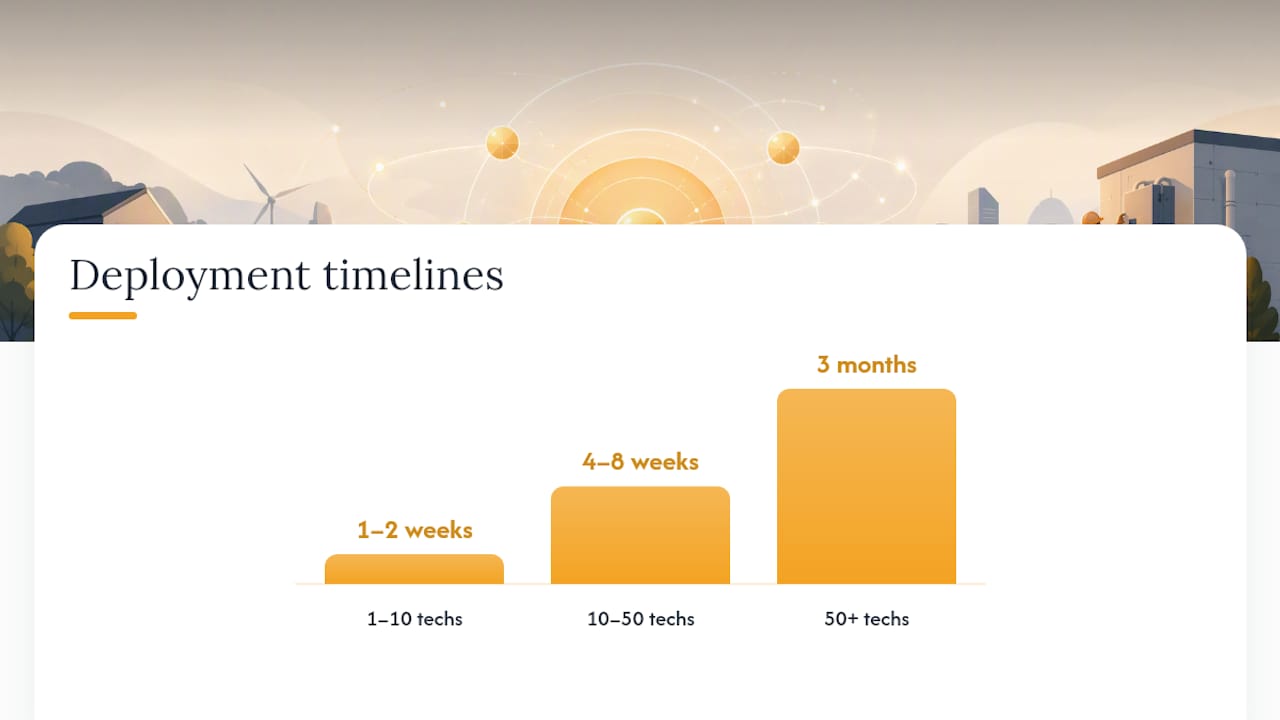
| Business size | Typical timeline | Key milestones |
|---|---|---|
| 1–10 techs | 1–2 weeks | Setup, data import, 1 training session, go-live |
| 10–50 techs | 4–8 weeks | Pilot with 2–3 techs, phased rollout, integration testing |
| 50+ techs / enterprise | 3 months | Discovery, configuration, integration, UAT, phased go-live |
A 10-tech HVAC business on a seat-based platform should budget for the monthly subscription, a one-time data migration, and roughly two to four hours of onboarding time per technician. The service automations guide from Real Studios is a useful reference for understanding how FSM platforms connect to external workflows and supplier systems during integration planning.
How we evaluated these platforms
Every platform in this guide was assessed against a weighted scoring rubric across five dimensions: mobile experience and offline reliability (25%), dispatch intelligence and AI capabilities (25%), integration ease with accounting and trade-specific tools (20%), total cost of ownership including hidden costs (15%), and onboarding speed and support quality (15%).
Scoring note: Ratings from Gartner Peer Insights were used as one input alongside operator-focused guides, vendor documentation, and independent testing results. No single review source determined a ranking. Platforms were assessed on what they actually deliver for trade businesses, not on overall market share or brand recognition. Where a platform excels in a non-trade context (enterprise ITSM, Oracle ERP integration), that is noted, but it does not inflate the platform's score for the HVAC/electrical/plumbing buyer this guide addresses.
Limitations: pricing data changes frequently, and enterprise platforms rarely publish list prices. Where exact figures were unavailable, pricing shape (seat-based, per-job, enterprise negotiated) is noted instead of a specific dollar amount. Readers evaluating enterprise platforms should request a formal quote and ask for a total-cost-of-ownership breakdown that includes implementation, training, and integration services.
Why mobile-first design and AI dispatch produce measurable ROI
The evidence on this is consistent across multiple independent sources. According to IFS benchmarks reported by Teambridge, modernizing field service management can reduce admin time by roughly 40%, double technician productivity, and cut operating costs by 10–20%. Those numbers come from large-scale industrial deployments, but the underlying mechanisms apply at any size: less time on the phone coordinating, fewer callbacks from dispatching the wrong technician, and faster invoicing.
Stat: Modernizing FSM can reduce admin time by ~40%, double productivity, and cut operating costs by 10–20%. (IFS benchmarks via Teambridge, 2026)
The mobile piece is where most implementations fail. Inc.'s testing confirmed what operators already know: technicians will abandon a slow or unreliable app within days and go back to paper. The cost of that reversion is invisible on a dashboard but shows up in billing delays, lost parts charges, and incomplete job records.
For a practical guide to testing mobile claims during a vendor demo, Tradepilot's field service apps guide walks through the specific scenarios worth running.
Trial checklist to validate mobile and AI dispatch claims:
- Put the device in airplane mode and complete a full work order (parts, photos, signature). Reconnect and confirm sync.
- Assign a job to a technician who lacks the required certification. Does the system flag it or allow it silently?
- Simulate a mid-day reschedule with three active jobs. Measure how many steps the dispatcher takes.
- Pull a first-time-fix report without custom configuration. Time how long it takes.
- Ask the vendor to show ETA accuracy on a live or recorded dispatch day.
What's the right next step after reading this guide?
For most HVAC, electrical, and plumbing businesses with 5–50 technicians, the decision comes down to two platforms: Tradepilot for AI-led dispatch and trade-specific workflows, or ServiceTitan for high-volume residential operations with deep CRM needs. Enterprise teams on existing Microsoft, SAP, or Salesforce stacks should evaluate the native field service modules before adding a standalone FSM.
Three pilot metrics to track during a 30–60 day trial:
- First-time-fix rate. Baseline it before the trial starts. A well-matched dispatch system should move this number within the first month.
- Job-matching accuracy. Track how often the AI recommendation matches the tech you would have chosen manually. Divergences reveal either a data quality issue or a platform limitation.
- Admin hours saved per week. Count dispatcher and office staff hours spent on scheduling, invoicing reconciliation, and customer calls before and after go-live.
Practical next steps:
- Pick two platforms from the shortlist that match your company size and primary constraint.
- Run a 30–60 day pilot with a subset of your team (3–5 techs is enough to get real signal).
- Use the trial checklist from the EEAT section above to stress-test mobile and dispatch claims.
- Before signing a contract, negotiate implementation SLAs in writing, including what happens if go-live is delayed.
For a side-by-side look at how Tradepilot compares to other mid-market options, the Service Fusion alternatives guide covers the category differences clearly.
The one thing most FSM rollouts get wrong
Most trade businesses evaluate FSM platforms the wrong way. They sit through a polished demo, get impressed by a dashboard, and sign a contract before anyone has tested what happens when a technician is in a basement with no signal and a customer waiting upstairs.
The platforms that win in practice are not always the ones with the most features. They are the ones your technicians actually use. That sounds obvious, but the graveyard of failed FSM rollouts is full of expensive platforms that looked great in a conference room and got abandoned in the field within 60 days.
Two lessons from real deployments stand out. First, phase your rollout. Start with three to five technicians who are willing to give honest feedback, not your most compliant crew members. The friction they surface in week one is cheaper to fix than the friction your whole team discovers in month three. Second, credential enforcement at dispatch is not a nice-to-have for electrical and HVAC businesses. It is the difference between a compliant job and a liability. If your platform doesn't check certifications before assigning a tech, you are one audit away from a problem.
One warning: scope creep during implementation is the biggest budget killer in FSM deployments. Every "small customization" a vendor offers during onboarding adds time, cost, and complexity. Get the core workflows running first. Add customization only after your team has used the base product for 60 days and can tell you specifically what they need.
Tradepilot is built for the dispatch problem trade businesses actually have
Every HVAC, electrical, and plumbing business eventually hits the same wall: a dispatcher making judgment calls under pressure, sending the wrong tech to a job, and eating a callback. Tradepilot solves that specific problem with AI matching that accounts for technician skill, certification, availability, and location simultaneously, not sequentially.

The platform combines dispatch, invoicing, inventory, and analytics in one place, which means your team stops switching between tools to close out a job. Most trade businesses are fully operational within days, not months. There is no six-month implementation, no consulting firm required, and no hidden module fees for the features you actually need.
Start a free trial or book a demo at tradepilotnet.com to see the AI dispatch matching run on a real job scenario from your business.
Useful sources and further reading
Tradepilot resources (internal):
- Best Field Service Management Software: 2026 Operator Guide | Teambridge
- We Tested the Best Field Service Software Tools: Here's How Jobber, ServiceTitan, and Others Rank
- Best Field Service Management Reviews 2026 | Gartner Peer Insights
- AI for Field Service: A 2026 Manager's Guide
- Best Service Fusion Alternatives for Field Service Businesses 2026
External references: