Enable technician en route tracking, configure automated ETA messages with SMS fallback, and run a two-week pilot before scaling. Do those three things and you'll cut inbound "where are you?" calls and reduce no-shows within the first month.
Start here:
- Enable the "en route" status in your technician mobile app
- Choose your primary notification channel (push or SMS) and configure a fallback
- Set up proactive delayed alerts for jobs running more than 15 minutes late
- Confirm opt-in/consent records for every customer contact
- Schedule a pilot with 3–5 technicians on representative routes
Key Takeaways
Reliable technician ETA notifications require accurate travel-time data, correct technician status discipline, multi-channel fallback, and consistent post-rollout monitoring of MAE and no-show rates.
| Point | Details |
|---|---|
| Enable en route status first | ETA accuracy depends on technicians setting "en route" at the correct moment before any message fires. |
| Use predictive travel-time models | Distance-only calculations under-predict urban travel times; routing APIs with historical traffic data improve ETA accuracy materially. |
| Set up proactive delayed alerts | Customers respond better to a delay message sent before they call than to silence followed by a late arrival. |
| Run a two-week pilot before scaling | Test all channels, fallbacks, and status scenarios on 3–5 technicians before expanding to full production. |
| Track MAE and arrivals within 10 minutes | These two metrics tell you whether your ETA engine is working; review them weekly and address high-error routes. |
| Tradepilot automates the full loop | Tradepilot connects AI dispatch, predictive routing, automated message scenarios, and ETA accuracy analytics in one platform. |
Table of Contents
- How do technician ETA notifications actually work?
- How to set up ETA notifications step by step
- What do technician statuses mean for ETA behavior?
- Which delivery channels and integrations do you need?
- Why are your ETAs wrong, and how do you fix them?
- When do predictive travel-time models pay off?
- What makes an ETA message actually work for customers?
- How to pilot and roll out ETA notifications without breaking things
- The case for arrival-based communication over appointment windows
- Tradepilot brings ETA accuracy and automated alerts together in one platform
- Sources
How do technician ETA notifications actually work?
ETA alerts are notifications that include a probable arrival time, sent to customers when a technician's status changes or their estimated arrival shifts. The system isn't magic. It's an event model: a status change fires a trigger, the routing engine recalculates travel time, and a message goes out through whichever channel the customer prefers.
Four data inputs drive the calculation: live GPS position, a route engine, a historical traffic model, and job progress signals (whether the previous job is still open, for instance). When a technician marks themselves "en route," the system pulls current location, runs it through the routing API, and generates an ETA. If traffic worsens or the technician stops, the engine recalculates and sends a refresh.
Customers receive that ETA through push notification, SMS, email, or a web portal link, depending on their preferences. The live-tracking link, when included, opens a map view that updates in near real time. Not every trigger needs a full message. Status changes like "arrived" and "delayed" warrant immediate alerts. Periodic ETA refreshes, on the other hand, should be throttled so customers don't receive five texts in ten minutes.
| Trigger Event | ETA Action | Customer-Facing Output |
|---|---|---|
| Technician sets "en route" | Initial ETA calculated | Push/SMS with ETA and tracking link |
| Route recalculation (traffic) | ETA updated | Refresh message if delta exceeds threshold |
| Job overrun detected | Delayed alert fired | Proactive delay notification |
| Technician marks "arrived" | ETA suppressed | Arrival confirmation message |
| Job completed | All ETA updates stop | Optional feedback request |
How to set up ETA notifications step by step
Pre-configuration checks
Before touching a single setting, verify three things: your customer contact records are clean (no missing phone numbers or emails), every customer in the pilot has given explicit opt-in consent for SMS, and your dispatch system's time zone is set correctly for each service region. Wrong time zones produce ETAs that are technically accurate but confuse customers who see "arriving at 2:00 PM" when it's already 2:30 PM locally.
Integration steps
- Enable the "en route" technician status in your mobile app and confirm it fires a webhook or API event to your notification engine.
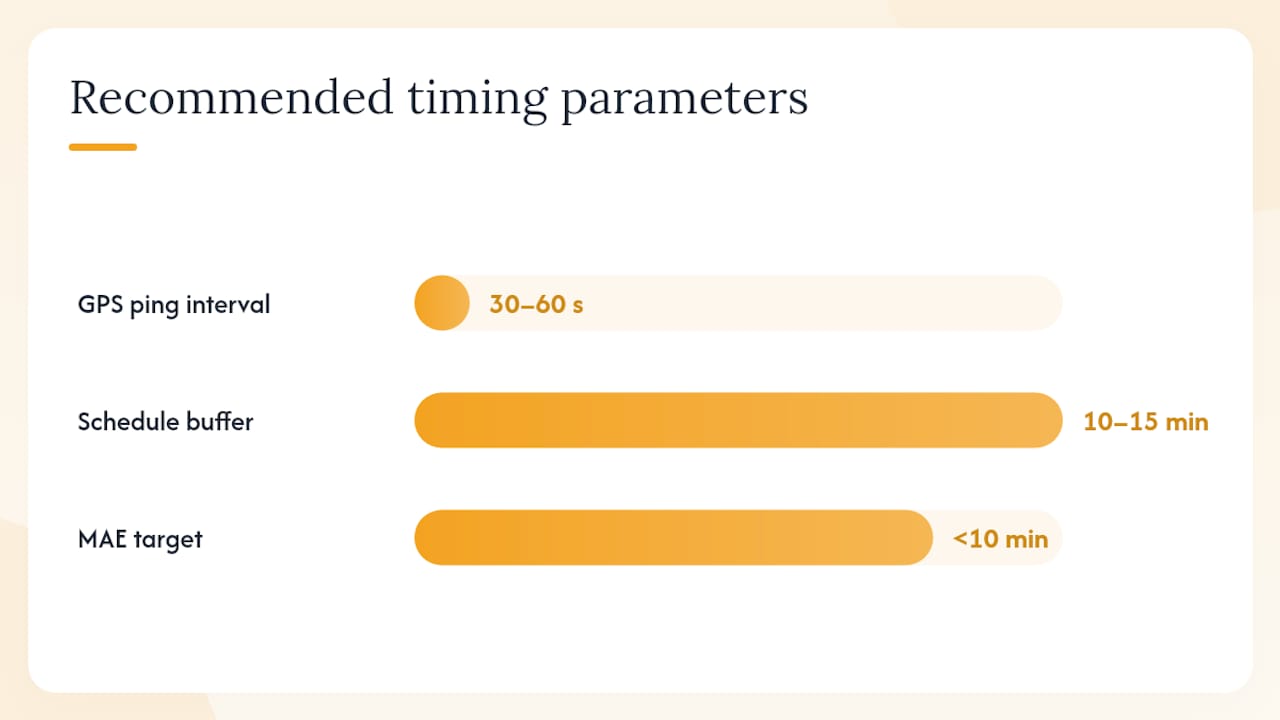
- Connect your GPS feed. Most field service apps pull location every 30–60 seconds; confirm the ping interval meets your accuracy needs.
- Integrate a routing and traffic API. Predictive travel-time APIs let you choose between optimistic, pessimistic, and best-guess traffic models. Start with best-guess for most HVAC and plumbing routes.
- Configure your SMS gateway (Twilio, Bandwidth, or similar) with your sender ID and message templates.
- Add webhook endpoints for job status updates so delayed alerts fire automatically when a job overruns.
Message templates
Keep every message under 160 characters where possible. Here are five ready-to-use templates:
- En route: "Hi [Name], [Tech First Name] is on the way. Estimated arrival: [Time]. Track here: [URL]"
- Delayed: "Hi [Name], [Tech First Name] is running about [X] minutes late. New ETA: [Time]. We apologize for the wait."
- 10-minute warning: "Hi [Name], [Tech First Name] is 10 minutes away. Please be ready at [Address]."
- Arrived: "Hi [Name], [Tech First Name] has arrived. Thank you for your patience."
- Feedback request: "How did we do today? Rate your experience: [URL]"
Testing checklist
- Send sandbox messages through each channel (push, SMS, email) and confirm delivery
- Simulate each status change and verify the correct template fires
- Test the fallback sequence: block push delivery and confirm SMS fires within 60 seconds
- Log delivery receipts and open rates for at least 20 test jobs before going live
Pro Tip: Include a two-way reply option or a short callback link in your SMS messages. Automated reminder platforms that support two-way replies reduce customer confusion and give dispatch a real-time signal when a customer needs to reschedule.
What do technician statuses mean for ETA behavior?
Every status change either starts, updates, or stops the ETA engine. Getting technicians to use the right status at the right moment is the single biggest operational lever you have.
| Status | ETA Behavior | Customer Message Triggered |
|---|---|---|
| Scheduled | No ETA calculated | Appointment confirmation only |
| En route / Traveling | Live ETA active, refreshes on recalculation | En route alert + tracking link |
| Delayed | ETA updated with new arrival time | Proactive delayed alert |
| On site / Arrived | ETA suppressed | Arrival confirmation |
| Completed | All updates stop | Feedback request (optional) |
When multiple technicians are assigned to the same job, automated systems typically fire notifications for the first technician to switch to "en route," which can produce conflicting messages if a second tech follows minutes later. Designate a single lead communicator per job and configure your system to suppress secondary notifications once the lead has triggered the en route alert.
Common troubleshooting issues:
- Missing GPS pings: Check app background-location permissions on iOS and Android. Many technicians unknowingly restrict location access.
- Wrong status selected: Technicians sometimes mark "arrived" before leaving the previous job. Require GPS proximity confirmation before the "arrived" status is accepted.
- Conflicting messages from multiple techs: Enforce the single-lead rule above and add a job-level flag that locks notifications to one technician once the en route trigger fires.
Which delivery channels and integrations do you need?
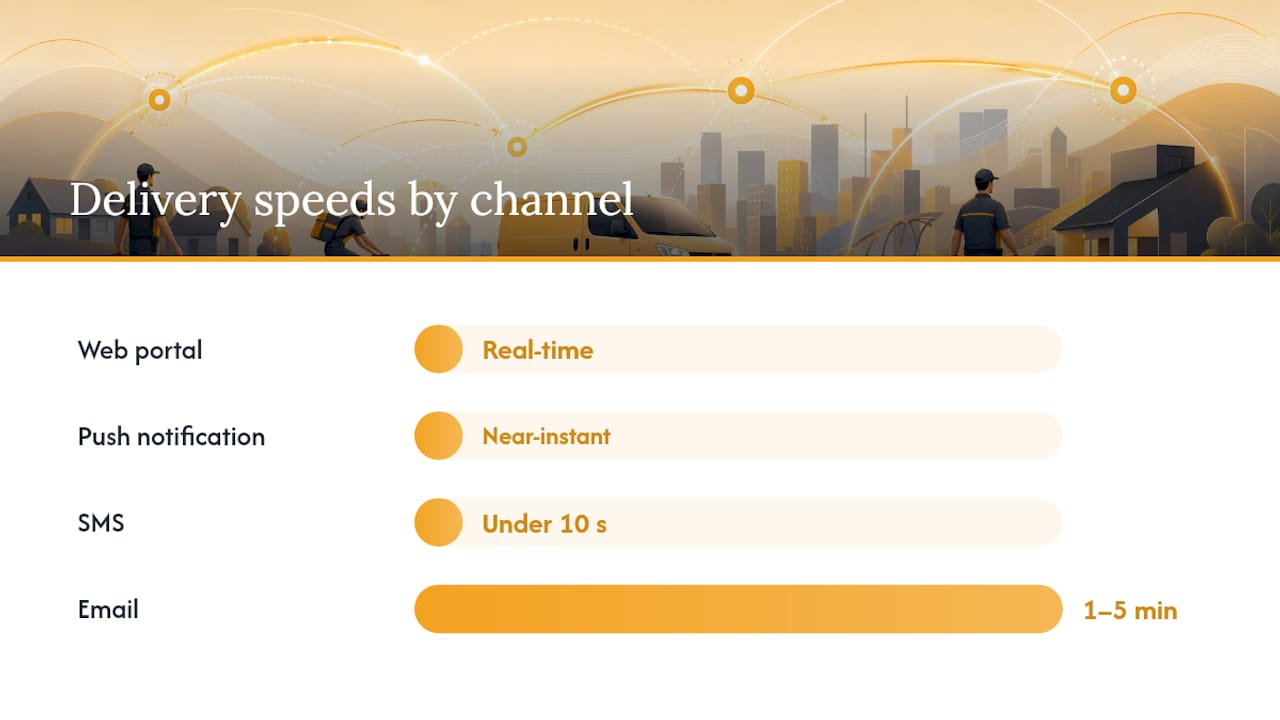
Channel choice affects delivery speed, opt-in requirements, and fallback complexity. Push notifications are fast and free but depend on app installation and notification permissions. SMS reaches nearly every customer but requires TCPA-compliant opt-in consent before you send a single message. Email is reliable for confirmations but too slow for real-time ETA updates.
| Channel | Delivery Speed | Opt-In Required | Best Use Case |
|---|---|---|---|
| Push notification | Near-instant | App install + permission | Primary real-time ETA |
| SMS | Under 10 seconds | TCPA written consent | Fallback + delayed alerts |
| 1–5 minutes | CAN-SPAM unsubscribe | Appointment confirmations | |
| Web portal / tracking link | Real-time | None (link-based) | Live map view |
Integration checklist:
- SMS gateway: obtain API credentials, configure sender ID, set rate limits to avoid carrier filtering
- Push provider: register app credentials, configure notification payload structure
- Webhook endpoints: map each job status event to the correct notification scenario
- Tracking URL: generate short, unique URLs per job to avoid customer confusion across multiple appointments
- API rate limits: confirm your routing provider's call limits won't throttle during high-volume morning dispatch windows
For teams that need human backup when automated messages fail, a 24/7 AI call-answering service can handle inbound customer inquiries about technician arrival without tying up your dispatch staff.
Privacy notes: Under the TCPA, you need prior express written consent before sending marketing or informational SMS to customers. Keep opt-in records with timestamps. Include a clear opt-out instruction ("Reply STOP to unsubscribe") in every SMS. For email, honor unsubscribe requests within 10 business days per CAN-SPAM. Keep message content minimal: name, ETA, and a tracking link. Don't include job details that could expose sensitive customer information.
Why are your ETAs wrong, and how do you fix them?
The most common cause of inaccurate ETAs is also the simplest: distance-only calculations. A system that divides miles by average speed ignores traffic lights, left turns, school zones, and the fact that a 10-mile urban route at 8 AM takes twice as long as the same route at noon. Distance-only models consistently under-predict travel times in urban environments, and the error compounds when you're scheduling back-to-back jobs.
Root causes and quick fixes:
- Naive distance math: Switch to a routing API that incorporates real-time and historical traffic. The fix is a configuration change, not a rebuild.
- Stale GPS: If your app pings location every 5 minutes, your ETA can be off by several miles. Increase ping frequency to every 30–60 seconds for active en route technicians.
- Technician status misuse: An ETA sent before the technician actually leaves is wrong from the start. Require "en route" status to be set within GPS proximity of the previous job's completion.
- No schedule buffer: Back-to-back jobs with zero buffer assume every job finishes on time. Add a 10–15 minute buffer between appointments in your scheduling logic.
- Missing turn and intersection penalties: Urban routes with many intersections take longer than the raw distance suggests. Use a routing model that accounts for turn penalties.
Monitoring: Log predicted versus actual arrival time for every job. Calculate mean absolute error (MAE) weekly. Set an alert threshold so dispatch is notified when MAE exceeds your target (a reasonable starting target for urban routes is under 10 minutes).
Pro Tip: Prefer travel-time models that incorporate historical congestion and intersection data over raw distance/speed math. The accuracy difference in dense metro areas is significant, and it shows up directly in customer satisfaction scores.
When do predictive travel-time models pay off?
Predictive models earn their keep on high-volume routes and in dense metro areas where traffic patterns are consistent enough to learn from. The core advantage over distance-only math is that they use historical time-of-day and day-of-week patterns to estimate how long a specific route will actually take at 7:45 AM on a Tuesday, not just how long it would take in ideal conditions.
End-to-end deep learning approaches like DeepTTE estimate travel time for an entire path rather than summing per-segment estimates. That matters because summing segments accumulates error at every intersection and turn. City-scale time-series models using recent hourly traffic data show strong short-term accuracy gains on tested streets compared with naive methods.
What to measure once you adopt a predictive model:
- Mean absolute error (MAE) between predicted and actual arrival
- Percentage of arrivals within plus or minus 10 minutes of the predicted ETA
- No-show rate (customers not home at arrival)
- Inbound "where are you?" call volume to dispatch
Implementation approach: Start with a hybrid. Use a routing API with a predictive traffic layer (the traffic_model parameter in Google Maps APIs, for example, lets you select optimistic, pessimistic, or best-guess behavior). Run an A/B pilot on your highest-volume routes for two weeks. If MAE drops and no-show rate follows, expand. Benchmarking your routing provider against alternatives before committing is worth the effort. Vendors publish benchmarking tools, and the accuracy differences between providers are real.
For a deeper look at how machine learning improves dispatch outcomes beyond ETA, the AI for field service guide covers the broader picture.
Research signal: City-level predictive models using recent hourly traffic history show materially stronger short-term travel-time accuracy than distance-based approaches on tested urban streets.
What makes an ETA message actually work for customers?
Short, specific, and timed right. Those are the three rules. A message that says "Your technician is on the way" tells the customer nothing useful. A message that says "Mike is 12 minutes away. Track here: [link]" gives them something to act on.
Wording rules:
- Use local time, not UTC. A customer who sees "arriving at 14:30" is confused; "arriving at 2:30 PM" is not.
- Include the technician's first name. It reduces anxiety and feels personal without being intrusive.
- Keep SMS under 160 characters. Longer messages split into multiple segments, which some carriers deliver out of order.
- Add a one-click tracking link where your platform supports it.
Cadence: Three messages cover most jobs cleanly: en route alert, 10-minute warning, and arrival confirmation. Add a proactive delayed alert any time the estimated arrival slips more than 15 minutes past the original window. Multi-channel reminder sequences that include both voice and SMS produce higher confirmation rates and fewer no-shows than single channel approaches.
Personalization that earns trust: Customer name, technician first name, and job type (e.g., "your AC tune-up") are enough. Vehicle description is useful in dense apartment buildings where customers watch from a window. Don't over-personalize to the point of exposing sensitive job details in a text message.
Accessibility: Always include a plain-text SMS fallback for customers who don't use smartphones. Email subject lines should state the ETA directly ("Mike arrives at 2:30 PM today") rather than a generic "Your appointment update."
How to pilot and roll out ETA notifications without breaking things
A two-week pilot on a small technician cohort catches 80% of the problems before they reach your full customer base. The goal isn't perfection. It's finding the failure modes before they scale.
Pilot checklist
- Select 3–5 technicians on routes that represent your typical job mix (urban, suburban, multi-stop).
- Confirm opt-in consent for every customer in the pilot group.
- Test all three channels (push, SMS, email) and verify fallback sequences fire correctly.
- Run at least 20 jobs before reviewing data.
- Interview two or three technicians mid-pilot about status-setting friction.
Key metrics to track
- Delivery rate: percentage of messages that reach the customer's device
- Open/click rate: percentage of customers who open the message or tap the tracking link
- ETA MAE: mean absolute error between predicted and actual arrival
- Arrivals within 10 minutes: percentage of jobs where actual arrival falls within plus or minus 10 minutes of the ETA sent
- No-show rate: customers not present at arrival
- Inbound dispatch calls: "where are you?" call volume per 100 jobs
Rollout stages
- Sandbox: internal testing with simulated status changes and no real customer messages
- Pilot: 1–2 weeks, small cohort, all channels active
- Regional rollout: expand to one service area, monitor metrics daily
- Full production: scale with automated monitoring and alert thresholds set
Common pitfalls:
- Launching notifications before technicians understand how to set statuses correctly
- Skipping fallback testing because push "usually works"
- Ignoring low-delivery carriers in rural service areas where SMS reliability varies
- Forgetting to throttle refresh messages, which can flood customers during long jobs
For a broader look at field service app capabilities that support mobile status changes and GPS pings, that resource covers the mobile side of the equation.
The case for arrival-based communication over appointment windows
The conventional approach to customer communication in field service is the appointment window: "We'll be there between 10 AM and 2 PM." That window exists because dispatch managers don't trust their ETAs enough to commit to a specific time. The window is a hedge.
The problem is that customers hate it. A four-hour window means someone has to stay home all morning. When the technician shows up at 1:45 PM, the customer is already frustrated before the job starts.
Arrival-based communication flips that dynamic. When you send a live ETA at the moment the technician leaves, and a 10-minute warning as they approach, the customer doesn't need the window anymore. They get a specific time they can plan around. Proactive delayed alerts matter even more than the initial ETA. A customer who receives a "Mike is running 20 minutes late" message before they've started wondering where he is will almost always respond better than one who has been waiting and calls dispatch themselves.
The operational improvement is real: fewer inbound calls, fewer no-shows, and technicians who spend less time waiting at empty houses. Tie ETA accuracy metrics to your weekly dispatch review. Run a short accuracy check every Friday, flag routes where MAE is consistently high, and address the root cause before it becomes a pattern. If you want to go further, consider tying ETA accuracy to technician performance reviews. It creates accountability for correct status-setting without being punitive.
Tradepilot brings ETA accuracy and automated alerts together in one platform
Dispatch managers who've worked through this guide know the hard part isn't understanding ETA notifications. It's getting all the pieces to talk to each other: GPS, routing, status triggers, message templates, fallback logic, and accuracy monitoring. That's exactly where Tradepilot fits.

Tradepilot's AI dispatch platform handles the full loop for HVAC, electrical, and plumbing teams. The moment a technician is matched to a job, the system has their location, the route, and the traffic model. When they go en route, the customer message fires automatically. If the job runs long, a delayed alert goes out without anyone touching a keyboard.
- Automated en route triggers fire the right message scenario the moment a technician's status changes
- Predictive travel-time integrations use real traffic data, not distance math, so your ETAs hold up in dense metro areas
- Built-in ETA accuracy dashboard tracks MAE and arrival-within-10-minutes rates so you can see drift before customers feel it
- Fallback messaging escalates from push to SMS to email automatically when a channel fails
Start a pilot with Tradepilot and see how AI-matched dispatch and real-time ETA notifications perform on your routes.
Sources
These resources back the recommendations in this guide and offer deeper technical or legal guidance for teams building or auditing ETA notification systems.
- Predicting future travel times with the Google Maps APIs
- DeepTTE: End-to-end deep learning framework for travel time estimation (AAAI paper)
- Predicting vehicle travel time on city streets for trip preplanning and predicting heavy traffic for proactive control of street congestion | Scientific Reports
- Travel-time prediction (Geoff Boeing, 2026)
- Driving Model Overview | TravelTime Knowledge Base
- Appointment Reminders for Any Business — Appointment Reminder
A note on TCPA compliance: SMS opt-in rules under the Telephone Consumer Protection Act apply to all U.S. service businesses sending automated text messages. This guide provides general operational context, not legal advice. Consult qualified legal counsel to confirm your consent collection, opt-out handling, and record-keeping practices meet current TCPA requirements.