
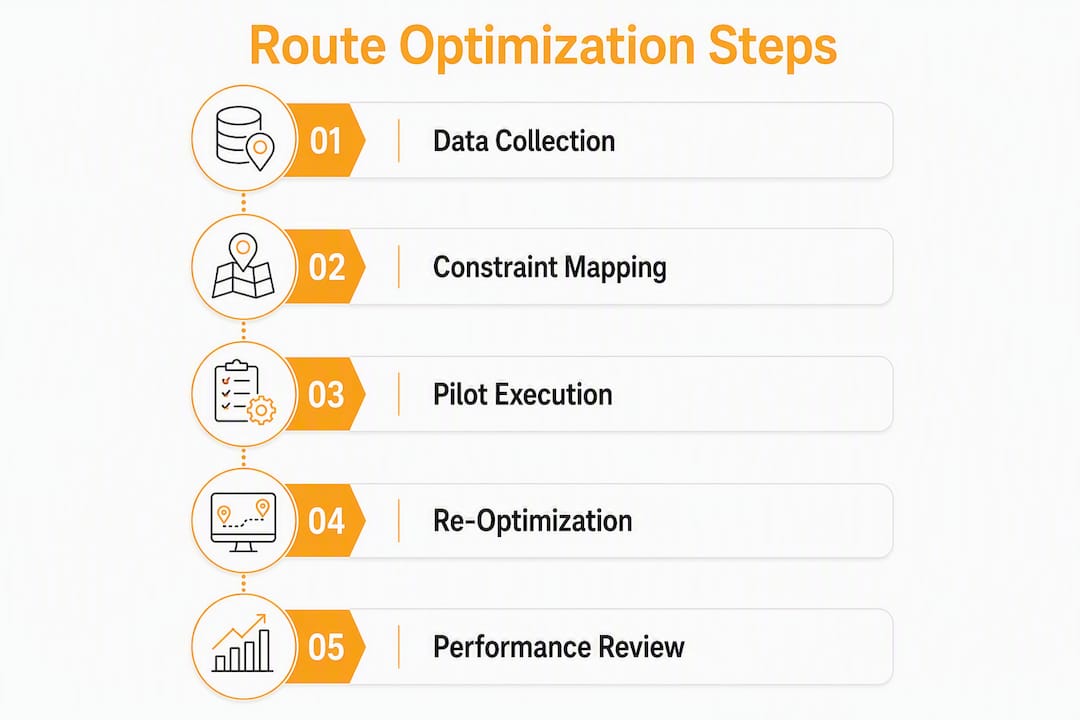
Technician route optimization automatically sequences jobs, matches each one to the right technician by skill and location, and cuts drive time while improving first-time fix rates. Start here: (1) clean and standardize your address and job-duration data, (2) map your minimum constraints (skills, time windows, shift hours), and (3) run a small pilot on a single service zone before rolling out fleet-wide. The Technician Routing and Scheduling Problem (TRSP) is a recognized multi-constraint problem in operations research, and modern AI dispatch platforms like Tradepilot solve it in under a second per job assignment.
- Clean address data first. Geocoding errors silently break routing outputs before the optimizer even runs.
- Set realistic job durations. Underestimating by 15 minutes per job cascades into missed SLAs by afternoon.
- Pilot one zone. A controlled test gives you a clean before/after comparison without disrupting the whole fleet.
Table of Contents
- What technician route optimization actually means in field service
- The business outcomes you can realistically expect
- The data and constraints your routing engine needs to work
- How to configure route optimization and run a pilot
- Day-of dispatch: when to re-optimize and how to handle exceptions
- KPIs that tell you whether route optimization is working
- What to confirm before buying route optimization software
- How Tradepilot implements route optimization in practice
- Key Takeaways
- The gap between what route optimization promises and what actually breaks it
- Tradepilot cuts dispatch time for HVAC, electrical, and plumbing teams
- Useful sources
What technician route optimization actually means in field service
Shortest distance is not the same as best route. A routing engine that only minimizes miles will send an HVAC technician to a job she is not certified to complete, or dispatch someone without the right parts, or schedule a two-hour job at 4:30 PM when the customer's site closes at 5:00. That is a failed appointment, not an optimized one.
Modern field service routing is constraint-driven and multi-objective. The optimizer balances several variables simultaneously: technician skills and certifications, customer time windows, job duration estimates, parts and depot stops, live traffic, shift start and end times, and SLA priority tiers. Academic research confirms that hybrid matheuristic approaches achieve near-optimal solutions on benchmark TRSP instances, which is why enterprise-grade platforms outperform spreadsheet routing by a wide margin.
| Dimension | Static / shortest-distance | Constraint-driven / AI-enabled |
|---|---|---|
| Routing objective | Minimize miles or stops | Balance time, skills, SLA, parts, traffic |
| Skill matching | None | Job-to-tech skill and certification match |
| Time windows | Ignored or manual | Hard and soft windows enforced automatically |
| Parts / depot | Not modeled | Depot stops and parts availability included |
| Real-time changes | Manual re-dispatch | Automated re-optimization on trigger events |
| First-time fix | Unpredictable | Materially improved by constraint modeling |
A quick example: the shortest route sends your nearest available tech to a commercial refrigeration call. He does not carry the required EPA 608 certification. The job fails, a second truck rolls, and you've paid for two visits. Constraint-driven routing would have flagged the mismatch and assigned the certified tech four miles farther away.

The business outcomes you can realistically expect
Route optimization's ROI shows up in four places: fuel and labor costs, technician capacity, customer satisfaction, and SLA compliance. Realistic improvement ranges vary by fleet size, current dispatch maturity, and data quality, but the levers remain consistent.
- Drive time per job: Teams moving from manual dispatch to constraint-driven routing typically see meaningful reductions in daily windshield time, freeing technicians for additional billable appointments.
- Jobs per technician per day: Squeezing out daily drive time per technician often translates to one additional job per day per technician at current staffing levels.
- First-time fix rate: Modeling skill match and parts availability before dispatch directly reduces callbacks. Operational guides consistently flag parts and depot modeling as the highest-leverage fix for first-time fix failures.
- On-time arrival rate: Enforcing customer time windows in the optimizer, rather than as a dispatcher's mental note, raises SLA compliance without adding headcount.
- Fuel costs: Fewer miles driven and fewer failed appointments compound quickly across a fleet of 10 or more trucks.
The capacity argument is often underestimated. If each technician completes one additional job per day, a 10-tech team gains the equivalent output of a full additional hire, without the recruiting cost or the added vehicle.
The TradePilot manager's guide on AI dispatch frames this as a capacity unlock rather than a cost cut, which is the right framing for a leadership conversation about investment.
The data and constraints your routing engine needs to work
Garbage in, garbage out applies here more than almost anywhere else in field service operations. Cleaning address data and auditing estimated job durations are the two highest-leverage preparation steps before turning on any optimizer.
Data fields to collect and validate:
- Validated street addresses with geocodes (not just zip codes)
- Realistic service durations by job type (not optimistic estimates)
- Travel time estimates, not just distance (traffic patterns matter)
- Technician skills, certifications, and license types
- Parts inventory levels and depot or warehouse locations
- Vehicle profiles (cargo capacity, equipment carried)
- Customer time windows (hard vs. soft)
- SLA tiers and priority levels
- Preferred technician assignments for recurring accounts
- Recurring appointment schedules
Operational constraints to map:
- Shift start/end times and break windows
- Vendor or client site access restrictions (e.g., no arrivals before 8:00 AM)
- Legal drive-time limits for commercial vehicles where applicable
- Spare-parts dependencies that require a depot stop mid-route
- Overtime rules and union agreements
Research on the TRSP shows that cross-training every technician has diminishing returns. Keeping focused expertise and matching jobs to specialties produces more efficient schedules than trying to make everyone interchangeable.
Pro Tip: Spot-check address quality by geocoding a sample of 50 recent job addresses and flagging any that land more than 0.25 miles from the expected location. For duration estimates, pull your last 90 days of completed jobs and calculate the median actual duration by job type. Use that median, not the estimate your CRM defaulted to three years ago.

How to configure route optimization and run a pilot
Follow this sequence. Skipping steps, especially the data prep phase, is the most common reason pilots underperform.
- Audit and fix address data. Run your customer and job address list through a geocoding validator. Fix or flag records that fail.
- Set realistic job durations. Pull median actuals from your job history. Replace default estimates with job-type-specific medians.
- Map technician skills to system fields. Create a skills matrix: which certifications, equipment types, and service categories each tech is qualified for.
- Configure shift patterns and breaks. Enter actual shift windows, not idealized ones. Include drive-to-first-job time.
- Add depot and parts stops. If technicians need to pick up parts or return to a warehouse mid-day, model those stops explicitly.
- Enable live traffic. Most platforms support real-time traffic data. Turn it on before the pilot, not after.
- Start with time windows and travel time only. Add skills constraints in week two. Add parts constraints in week three. This staged rollout, recommended in the AI for Field Service manager's guide, reduces pilot failure risk and isolates which constraints drive the biggest trade-offs.
- Select a pilot zone. Choose one geographic area with 3–5 technicians and 20–40 jobs per day. Avoid your most complex accounts in week one.
- Run the pilot for 30 days. That is long enough to see scheduling patterns stabilize and short enough to course-correct quickly.
- Define success criteria upfront. Pick two or three KPIs (on-time arrival rate, drive time per job, jobs per tech per day) and set a target before the pilot starts, not after.
Avoid the common mistake of enabling every constraint at maximum strictness on day one. An over-constrained optimizer produces schedules that look clean on paper but fall apart in the field because no technician can satisfy all the rules simultaneously.
Day-of dispatch: when to re-optimize and how to handle exceptions
A schedule built at 6:00 AM is already partially wrong by 9:00 AM. The question is not whether to re-optimize during the day, but when and how much.
Re-optimization triggers:
- A job cancellation that opens a gap of 45 minutes or more
- An emergency or hot job that must be inserted into the schedule
- A technician call-off that requires redistributing their jobs
- A traffic incident adding more than 20 minutes to a route segment
- A parts shortage discovered on-site that requires a depot stop
Exception handling rules:
- Hot jobs: re-run the optimizer with the new job inserted and a priority flag. Do not manually override unless the optimizer's suggestion is clearly wrong.
- Tech call-offs: remove the technician from the active schedule, re-optimize the remaining jobs across available techs, and notify affected customers within 15 minutes.
- Parts shortages: flag the job as incomplete, schedule a return visit before closing the work order, and update the parts inventory record immediately.
- Customer rescheduling: treat it as a cancellation plus a new job. Do not hold the original time slot open.
Communication checklist:
- Push updated ETAs to technicians via the mobile app the moment a re-optimization runs.
- Send automated customer notifications for any ETA change greater than 30 minutes.
- Brief technicians at shift start on the day's schedule, flagging any jobs with unusual constraints (access codes, required certifications, parts to pick up).
- Confirm that technicians' navigation apps are synced to the optimized route, not a manually entered address.
AI dispatching handles most of these re-optimization events automatically when the system is configured correctly, which is why dispatcher workload typically drops after a successful rollout rather than increasing.
KPIs that tell you whether route optimization is working
Baseline every metric before the pilot starts. Without a baseline, you cannot prove ROI to leadership or identify which constraints are underperforming.
- Drive time per job: Total daily drive time divided by jobs completed. Baseline this from GPS or dispatch logs.
- Miles driven per technician per day: Pull from vehicle telematics or mileage logs.
- Jobs per technician per day: Total completed jobs divided by active technicians. This is your capacity metric.
- First-time fix rate: Jobs resolved without a return visit, as a percentage of total jobs. Track by technician and job type.
- On-time arrival rate: Percentage of jobs where the technician arrived within the customer's time window.
- Technician utilization: Billable hours divided by total shift hours. Anything below 65% suggests scheduling inefficiency.
- Travel-to-service ratio: Drive time as a percentage of total shift time. A ratio above 35% is a strong signal that routing needs attention.
Sample 90-day targets for a 10-tech pilot:
- On-time arrival rate: improve from baseline by 10–15 percentage points
- Drive time per job: reduce by 15–25%
- First-time fix rate: improve by 5–10 percentage points
Run a daily operational dashboard for dispatchers, a weekly trend review for operations managers, and a monthly ROI summary for ownership or leadership. The monthly summary should translate KPI changes into dollar figures: fuel saved, labor hours recovered, and additional jobs completed.
What to confirm before buying route optimization software
Multi-stop route planning tools and full TRSP platforms are not the same product. Mapping and route-planning tools handle stop ordering and traffic-aware navigation well, but they typically lack enterprise fields like parts inventory sync, skill matching, or API integration with your CRM and invoicing system.
Vendor capability checklist:
- Constraint handling: skills, certifications, parts, time windows, SLA tiers
- Real-time re-optimization (not just batch re-planning at shift start)
- API integrations with your CRM, inventory, and invoicing platforms
- Mobile app UX for technicians (ETA updates, navigation handoff, job notes)
- Reporting and KPI dashboards built in, not bolted on
- Data ownership and export rights (you own your data)
- Security certifications relevant to your industry
Integration fields to confirm with vendors:
- Address format compatibility with your CRM
- Estimated duration field: can you import job-type-specific medians?
- Parts inventory sync: real-time or batch?
- Technician skill mapping: how granular can the skill taxonomy go?
- ETA update frequency: how often does the app push updates to customers?
Questions to ask during demos:
- What does your pilot onboarding include, and how long does it take?
- What is your SLA for optimizer accuracy or schedule feasibility?
- How do you handle constraint conflicts (e.g., no available tech with the required skill in the time window)?
- What training and change management resources do you provide for dispatchers?
For a broader look at field service app capabilities and what to evaluate across platforms, the linked guide covers UX and feature considerations in detail.
How Tradepilot implements route optimization in practice
Tradepilot is built specifically for HVAC, electrical, and plumbing businesses. The platform's AI evaluates skill match, geographic proximity, parts availability, SLA priority, and traffic-aware travel times simultaneously, then assigns the best-fit technician in under a second.
What Tradepilot maps and optimizes:
- Technician skills and certifications matched to job requirements
- Depot and warehouse stops integrated into the daily route
- Live traffic-aware travel time estimates
- Customer time windows (hard and soft)
- SLA priority tiers for commercial and residential accounts
- Parts inventory levels synced to job requirements before dispatch
Pilot design that works:
A typical Tradepilot pilot runs 30 days, covers one service zone, and starts with time windows and travel-time constraints only. Skills constraints are added in week two once the data quality issues are resolved. Parts constraints follow in week three. Success criteria are set before day one: on-time arrival rate, drive time per job, and first-time fix rate.
Teams that follow this staged approach typically see scheduling conflicts drop sharply in the first two weeks as data quality issues surface and get fixed. By week four, dispatchers are spending less time manually adjusting schedules and more time handling genuine exceptions.
Pro Tip: When configuring a Tradepilot pilot, enable time windows and travel-time optimization first. Delay parts constraints until you have confirmed that your inventory data is accurate and synced. Enabling parts constraints against stale inventory data creates false conflicts and undermines dispatcher trust in the system.
Key Takeaways
Constraint-driven technician route optimization, with clean data and a staged rollout, consistently reduces drive time, raises first-time fix rates, and adds job capacity without additional headcount.
| Point | Details |
|---|---|
| Data quality comes first | Fix address geocoding and job-duration estimates before enabling any optimizer. |
| Stage your constraints | Start with time windows and travel time; add skills, then parts, in successive weeks. |
| Baseline KPIs before the pilot | Measure drive time per job, first-time fix rate, and on-time arrival before day one. |
| Re-optimize during the day | Cancellations, call-offs, and hot jobs are triggers to re-run the optimizer, not manual overrides. |
| Tradepilot for trades businesses | Tradepilot matches HVAC, electrical, and plumbing jobs to the right technician by skill, parts, and location in under a second. |
The gap between what route optimization promises and what actually breaks it
The biggest failure mode in route optimization rollouts is not the algorithm. It is the data fed into it, and the organizational habits built around it.
Dispatchers who have been manually building schedules for years develop strong intuitions about which technicians work well on which accounts, which neighborhoods run long, and which customers need extra buffer time. That knowledge is almost never captured in the system's data fields. When an optimizer runs on incomplete data, it produces schedules that violate those unwritten rules, dispatchers override it, and within two weeks the tool is effectively off.
The fix is not to fight that institutional knowledge. It is to encode it. Preferred technician assignments, realistic duration buffers by neighborhood, and customer-specific notes are all fields that constraint-driven systems can model. The pilot phase should be treated as a data-capture exercise as much as a routing exercise.
The second mistake is treating ETA as a promise rather than an estimate. Customers who receive an automated "your technician arrives at 10:15 AM" notification and then see the tech pull up at 10:45 AM lose trust in the company, not in the software. Build a 15-minute buffer into customer-facing ETAs and communicate it as a window, not a timestamp.
The third mistake is over-constraining the optimizer on day one. A system told to match skills perfectly, honor every time window, avoid all overtime, and complete every depot stop will sometimes produce no feasible schedule at all. Start loose, measure the outputs, and tighten constraints only where the data shows it matters.
Tradepilot cuts dispatch time for HVAC, electrical, and plumbing teams
Dispatchers at trades businesses spend hours each week manually matching jobs to technicians, only to watch those schedules fall apart by mid-morning. Tradepilot eliminates that cycle. The platform's AI assigns every job to the best-fit technician by skill, location, and parts availability in under a second, and re-optimizes automatically when the day changes.

A Tradepilot pilot includes a data audit, constraint mapping, and 30 days of live AI dispatch with KPI tracking built in. You get a clear before/after comparison on drive time, first-time fix rate, and on-time arrival, with no manual schedule-building required from your dispatchers.
HVAC, electrical, and plumbing businesses ready to see what constraint-driven dispatch looks like in practice can start a free trial at Tradepilot or request a pilot consultation directly from the platform.
Useful sources
The sources below back the claims in this guide and provide additional depth for managers who want to go further.
Start here (quick reference and implementation):
- AI for Field Service: A 2026 Manager's Guide — Tradepilot's practical guide to configuring AI dispatch, running a pilot, and tracking KPIs
- Field Service Scheduling: A 2026 Guide for Dispatchers — Operational scheduling best practices and constraint checklists
- TradePilot Platform — Product overview for AI-powered dispatch, invoicing, and analytics
Vendor and technology evaluation:
- Best Field Service Apps for Trades Businesses in 2026 — Feature and UX comparison for field service platforms
- Best HVAC Dispatch Software for 2026 — Dispatch software selection guide for HVAC teams
- Dispatch Software Cost: SMB Service Business Guide — Pricing expectations and licensing considerations
- Multi-Stop Route Planning Tools — MapQuest — Reference for understanding the difference between mapping tools and full TRSP platforms
Academic and technical depth:
- A Parallel Matheuristic for the Technician Routing and Scheduling Problem — Academic paper on TRSP complexity and near-optimal solution methods
- Technician Routing and Scheduling for the Sharing Economy — Research on skill matching, cross-training trade-offs, and scheduling efficiency