
Build territories around drive time, not distance. Generate drive-time polygons for every technician's home base at a 30 to 45 minute threshold, classify each zone as primary, secondary, or relocation, and route those boundaries straight into your dispatch rules. That single move, run as a pilot in one hub, tells you within a week whether travel minutes and on-time rates actually improve.
TL;DR:
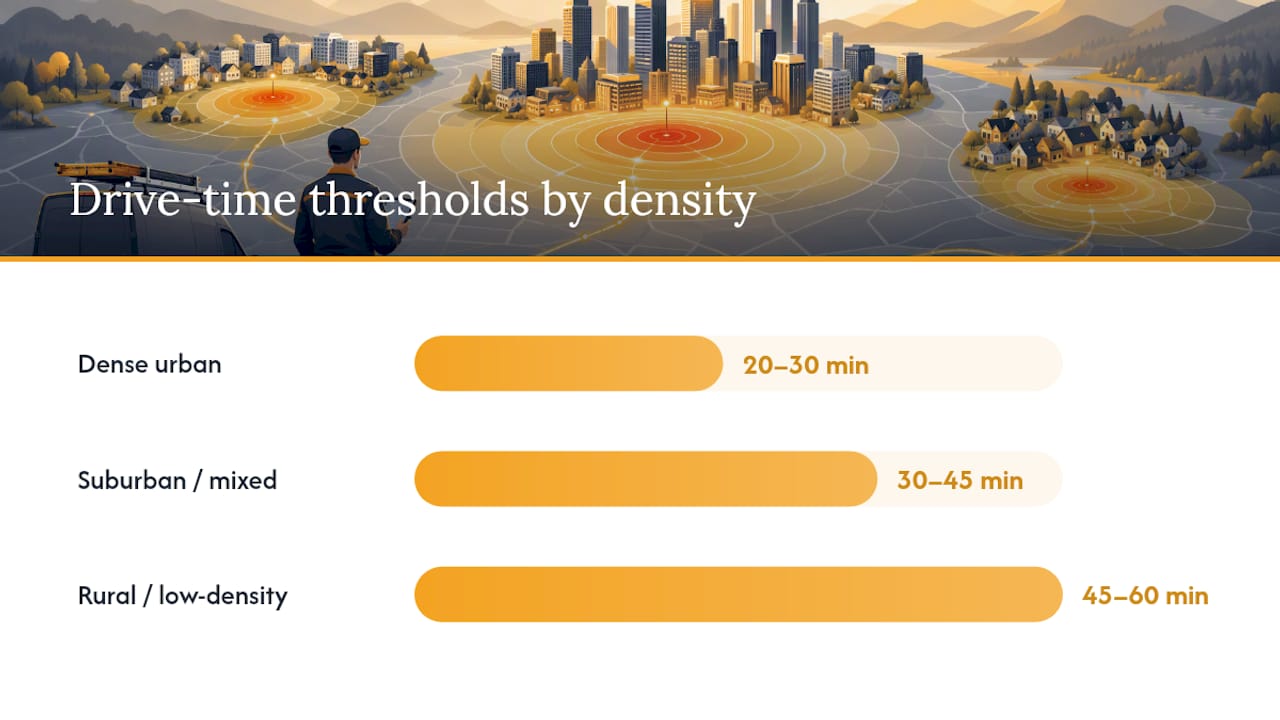
- Drive-time polygons should be generated for each technician's home base with thresholds adjusted for local density, typically 20–30 minutes for urban, 30–45 for suburban, and 45–60 minutes for rural areas.
- Properly classifying territories into primary, secondary, and relocation zones prevents scheduling chaos and ensures accurate travel-time estimates, especially distinguishing relocation from overflow coverage.
- Exported territory maps in standard formats and membership lists are essential for seamless dispatch integration, with overlap and gap reports used to identify coverage issues before full deployment.
- Implementing soft enforcement during pilots allows dispatchers to override boundaries, enabling real-world validation before switching to strict rule enforcement.
- Regularly review and update territories every quarter based on demand shifts to maintain accuracy, and include skill coverage layers to prevent geographic boundaries from overriding essential certifications.
Table of Contents
- What Is Technician Territory Planning, and Why Does Drive Time Matter?
- What Are Primary, Secondary, and Relocation Territories?
- How Do You Design a Technician Territory From Scratch?
- How Do You Turn Territory Maps Into Dispatch-Ready Data?
- How Should Territories Control Dispatch and Routing?
- Which KPIs Tell You a Territory Is Actually Working?
- What Should You Track While Piloting New Territories?
- Where Territory Planning Usually Goes Wrong
- How TradePilot Handles Territory-Aware Dispatch
- Sources
- FAQ
What Is Technician Territory Planning, and Why Does Drive Time Matter?
Technician territory planning is the process of dividing a service region into zones so each technician or crew has clear responsibility for a defined set of customers. Get the definitions straight first, because "service area," "territory," and "catchment" get used interchangeably and they are not the same thing.
A service area is the zone your business commits to serve, period. A catchment area describes the demand inside that zone, how many customers actually live or work there. Territory mapping is the organizational task of splitting that broader region among specific technicians or hubs, and it uses the same drive-time engine as service-area analysis but answers a different question: not "will we go there" but "whose job is it when we do."
Straight-line radius circles get this wrong constantly. A five-mile circle looks identical whether it covers a highway corridor or a lake with one bridge crossing it. Drive-time modeling accounts for the actual road network and traffic patterns, which is why operations teams that switch from radius to drive-time see territories reshape dramatically, sometimes losing 30% of their "coverage" once real roads get factored in.
Threshold guidance depends on density:
- Dense urban markets: 20 to 30 minutes, since traffic congestion inflates travel time faster than distance
- Suburban and mixed markets: 30 to 45 minutes, the range most field service operations settle on
- Rural or low-density territories: 45 to 60 minutes, because technician density is too thin to support tighter zones
Most mapping and routing APIs can generate these polygons directly from a technician's home base coordinates, using road-network data and configurable time cutoffs.
What Are Primary, Secondary, and Relocation Territories?
Not every job falls inside a technician's core zone, and treating all coverage the same way creates scheduling chaos. Field service platforms typically define three territory types, and dispatchers need to know how each one behaves before assigning work.
- Primary territory. The technician's home patch, where most daily jobs originate. This is the default zone for routine dispatch and where drive-time thresholds matter most for daily efficiency.
- Secondary territory. An adjacent zone a technician covers occasionally, usually during overflow, callouts, or when the primary tech for that area is out. Secondary assignments should carry a travel-time penalty in your dispatch logic so they don't quietly become the default.
- Relocation territory. A multi-day or seasonal reassignment, often for storm response, new hub launches, or a technician temporarily working out of a different city. These need to be modeled separately in your optimization engine.
The common mistake: treating relocation like secondary coverage. A relocation assignment behaves nothing like a same-day overflow job, and folding it into daily optimization models produces travel-time estimates that are wrong by hours, not minutes. Tag relocation separately from the start.
How Do You Design a Technician Territory From Scratch?
Territory design works best as a repeatable workflow, not a one-time mapping exercise. Here's the sequence that gets you from raw data to a live pilot.
- Collect your inputs. Pull technician home base addresses, certified skills, historical job locations from the past 6 to 12 months, average job duration by service type, and any SLA time windows you're contractually bound to.
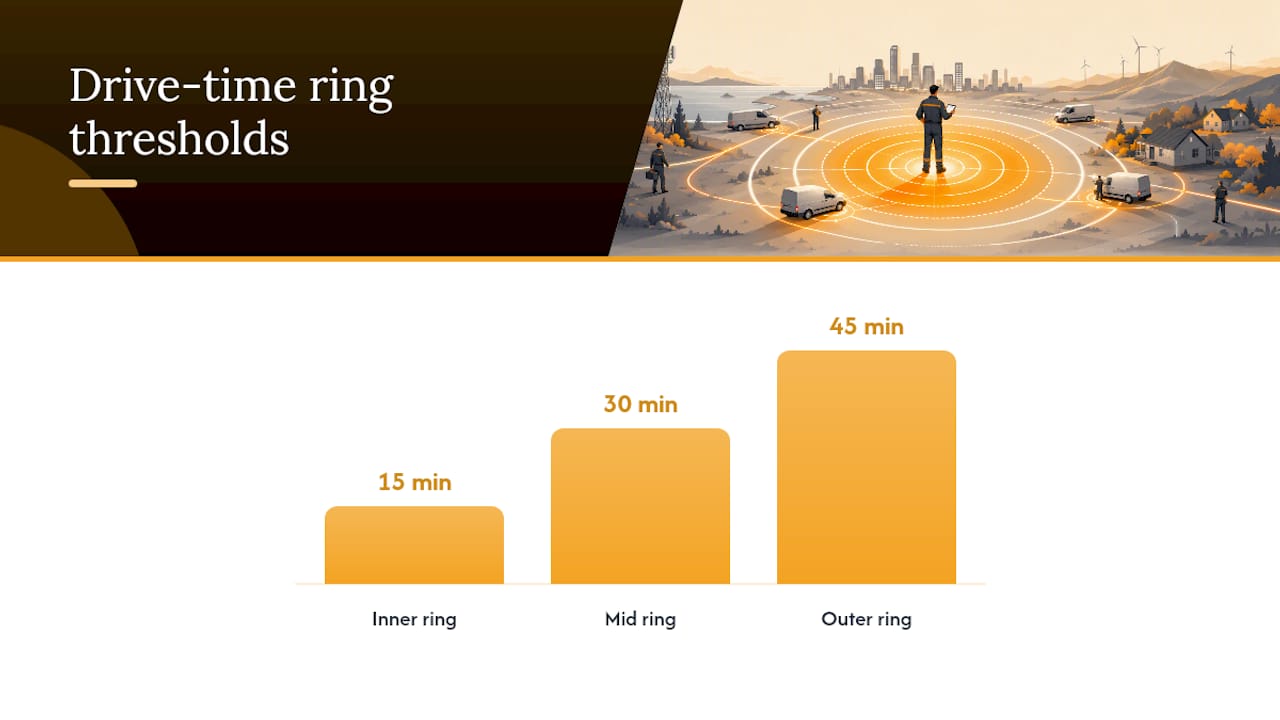
- Generate drive-time polygons. Run each technician's home base through a routing engine at your chosen threshold. Use multiple cutoffs, such as 15/30/45 minute rings, rather than a single boundary. Layered rings show you where coverage degrades gradually instead of cutting off sharply.
- Overlay historical job density. Map where your actual completed jobs happened over the same period. Gaps between your polygon and your job density heatmap reveal underserved pockets or phantom coverage nobody is really reaching efficiently.
- Balance for workload, not just geography. Set a target hours-per-day figure and a maximum daily travel-minute cap per technician. Adjust polygon boundaries where one zone runs heavy on call volume and another sits light.
- Validate before publishing. Run a handful of historical jobs back through the new territory logic and check whether travel-minute estimates and technician assignments make sense against what actually happened.
- Publish and monitor. Push the finalized polygons into your dispatch system and set a review cadence, weekly at minimum during the pilot phase.
Pro Tip: Run your first pilot in a single hub or one metro area for two to three weeks before rolling out region-wide. You'll catch skill-mismatch and overlap problems in days rather than discovering them after every technician's schedule has already shifted.
For teams still working out target hours and travel caps, TradePilot's guide to technician capacity planning walks through the balancing heuristics in more depth.
How Do You Turn Territory Maps Into Dispatch-Ready Data?
A territory map is useless if it lives in a PDF nobody's dispatch software can read. The mapping stage has to produce specific, importable outputs.
- Drive-time polygons in GeoJSON or shapefile format, the standard structure most routing engines and GIS tools export and most FSM platforms can ingest directly.
- A membership list in CSV, mapping each customer address or zip code to its assigned technician and territory type.
- An overlap report flagging every address that falls inside more than one technician's polygon, since overlaps are where dispatch conflicts and double-booking usually start.
- A gap report showing addresses that fall outside every polygon, your uncovered zones.
Routing APIs typically let you set travel mode, time-of-day traffic modeling, and polygon trimming when generating these shapes, so a territory built for 8 AM rush hour traffic looks different than one built for midday driving conditions. That distinction matters for HVAC and plumbing dispatch specifically, since morning call volume often clusters right when roads are most congested.
Once the polygons exist, the integration work splits into three tool categories: a mapping engine to generate and edit polygons, a routing API to calculate real drive times, and a dispatch or field service management platform to hold technician membership lists and enforce them during scheduling. Keep those layers separate. Trying to do polygon generation inside a scheduling tool that wasn't built for geospatial work usually produces boundaries nobody trusts.
How Should Territories Control Dispatch and Routing?
Territory boundaries only earn their keep once they actually shape who gets dispatched where. The mechanism is candidate filtering: when a job comes in, the dispatch system should narrow the technician pool by skill match, current availability, and territory membership simultaneously, not location alone.
- Skills gate first. A technician inside the right territory but missing the required certification shouldn't appear as a candidate.
- Territory membership gates second. Among skilled, available technicians, the system should prioritize whoever's primary territory covers that address before reaching into secondary coverage.
- Sequencing and clustering follow. Once candidates are narrowed, grouping same-day jobs by proximity inside a technician's territory cuts idle drive time between stops. Territory-aware scheduling that links calendar logic with mapping reduces both mileage and missed appointments compared with assigning jobs purely by who's next available.
- Exceptions need a rule, not a workaround. Emergency calls and temporary coverage gaps should trigger a defined override path, not an ad hoc phone call to whichever technician answers first.
Pro Tip: Set territory enforcement as "soft" during your first month, meaning dispatchers get a warning when assigning outside a territory but can still override it. Switch to "hard" enforcement only after you've validated the boundaries against a few weeks of real dispatch decisions. TradePilot's breakdown of soft versus hard enforcement modes covers how to structure that override protocol.
Which KPIs Tell You a Territory Is Actually Working?
Track a short list of numbers consistently, and check them on a fixed schedule rather than waiting for a complaint to trigger a review.
- Travel minutes per technician per day — the core efficiency metric; a redraw should shrink this measurably within two to three weeks.
- On-time percentage and SLA breaches attributable to travel, separated from breaches caused by job overruns.
- Jobs completed per technician per day, watched against pre-redraw baselines.
- Idle time and overtime incidents, since overloaded territories tend to show up here before they show up in complaints.
Run a before/after comparison using two to four weeks of data on each side of the redraw. Report daily on an operations dashboard during the pilot, roll up to a weekly health check once boundaries stabilize, and schedule a full territory redraw review quarterly. Rigid, manually maintained territories go stale as demand patterns shift, so quarterly review isn't optional housekeeping, it's how you catch a growing suburb before it overwhelms one technician's zone. Heatmaps of job density against your current polygons are the fastest way to spot a coverage gap before it turns into a missed SLA.
What Should You Track While Piloting New Territories?
Running a pilot means collecting more than the surface-level travel numbers. Watch matching accuracy (how often the system's top-recommended technician is actually the one who ends up assigned), time-to-assign for each incoming job, and the raw percentage reduction in daily travel minutes against your pre-pilot baseline.
- Log every override a dispatcher makes and why, since a pattern of overrides usually means a boundary is wrong, not that the dispatcher is ignoring the system.
- Compare technician-reported drive times against the polygon's modeled estimates weekly.
- Reserve space on your final reporting page for case studies and internal metrics specific to your rollout, and for direct technician or dispatcher feedback once you have it.
- Translate early travel-minute savings into a forecasted labor-cost figure before presenting results to leadership; a percentage reduction means more to an executive once it's tied to a dollar estimate.
TradePilot's guide to route optimization for dispatchers goes deeper into which sequencing metrics to log during a rollout like this.
Where Territory Planning Usually Goes Wrong
The biggest trap is treating a territory boundary as permanent the moment it's drawn. Demand shifts, new subdivisions get built, a technician quits, and the polygon that was accurate in January is stale by summer. The fix is boring but effective: bake quarterly reviews into the calendar before you launch, not after coverage complaints start.
The second trap is drawing boundaries on geography alone and ignoring skill distribution. A territory can be geographically perfect and still fail if it's the only zone with a technician certified for a specialty repair. Layer skill coverage onto every redraw, not just drive time.
The third: rigid enforcement before validation. Give dispatchers override room for the first month. Boundaries that look clean on a map often need real-world adjustment once actual jobs start flowing through them, and a dispatcher's judgment during that window is worth more than the model's first draft.
— Mark Korley
How TradePilot Handles Territory-Aware Dispatch
TradePilot replaces manual boundary lookups and gut-feel dispatch calls with AI matching that factors skill, availability, and location together in under a second, as demonstrated in this operational rollout example. Instead of a dispatcher cross-checking a paper map against a technician roster, the system applies your drive-time polygons automatically when it ranks candidates for every incoming job.

That matters most for HVAC, electrical, and plumbing operations juggling secondary coverage and relocation assignments across multiple hubs, where manual territory checks eat dispatcher time every single day. The platform runs alongside invoicing, inventory, and performance analytics, so travel-minute reductions and on-time gains from a territory redraw show up in the same dashboard you're already using to track job completion. Reserve space here for your own pilot metrics and case data once you run a redraw through the system.
If you're piloting a drive-time redesign this quarter, visit TradePilot to request a demo and see how the matching engine applies your territory rules to live dispatch decisions.
Sources
- Drive time vs distance — which should define your territories? | Maptive
- /GenerateServiceAreas | ArcGIS REST APIs | Esri Developer
- Service Territory Design in Salesforce Field Service - Explained | Salesforce Ben
- Scheduling and routing software that powers smarter operations | Mapline
FAQ
What Is Territory Planning in Field Service?
Territory planning is dividing a service region into zones assigned to specific technicians or crews, based on drive time, skills, and workload rather than geography alone. In field service, it directly determines who gets dispatched to which job.
Do You Need a Special Certification to Manage Technician Territories?
No formal degree or certification is required. Most operations managers and dispatch planners learn territory design through hands-on experience with routing tools, historical job data analysis, and iterative pilots rather than classroom credentials.
Can You Give an Example of a Technician Territory?
A primary territory might be a 30 minute drive-time polygon around a plumber's home base covering three zip codes, while a secondary territory extends 15 minutes further to cover occasional overflow jobs when the primary technician for that zone is unavailable.
How Do You Set Up Territories in a Dispatch or Field Service Platform?
Import your drive-time polygons as GeoJSON, map each address or zip code to a technician through a membership list, and configure your platform to filter candidate technicians by territory alongside skill and availability. Platforms apply this filtering automatically during AI-driven job matching, cutting the manual lookup step entirely.
How Often Should You Redraw Technician Territories?
Review territory boundaries weekly during an active pilot and quarterly once they stabilize, since demand patterns and technician headcount shift often enough to make static, unreviewed boundaries fall out of date within a few months.