
Technician capacity planning is the process of measuring how many productive work hours your team actually has available, then matching that supply to incoming job demand before you book a single slot. The first move: calculate assignable hours per technician per shift, or turn on a live capacity view if your dispatch software supports one. From there, the concepts that matter are the calculation formula, the three operational modes (manual, skills based, and automated), and a handful of KPIs that tell you when you're overbooked or sitting idle.
TL;DR:
- Manual planning suffices for very small teams but quickly becomes inaccurate as the number of technicians and skills increase.
- Real-time capacity tools, like Tradepilot, prevent overbooking and idle time by updating assignable hours instantly as job statuses change.
- Capacity should be balanced by skill and location, with separate buffers for each segment to avoid capacity fragmentation and coverage gaps.
- Weekly demand forecasting based on historical data and weather patterns gives a lead time to adjust staffing proactively rather than reactively.
- Building slack into the schedule and managing technician workload distribution are essential to prevent burnout and maintain consistent service levels.
Table of Contents
- Why Technician Capacity Planning Matters for Field Service Teams
- Manual, Skills Based, and Automated Capacity Planning: Which Mode Fits You?
- How to Calculate Technician Capacity: Formula and Example
- Which KPIs Actually Show Capacity Health?
- A Practical Weekly and Daily Workflow for Booking Jobs
- Implementation Checklist and Red Flags to Watch
- How Tradepilot Implements Capacity-Aware Dispatch
- Connecting Capacity Planning to Demand Forecasting
- Handling Absences and Emergencies Without Blowing Up the Schedule
- Software Tools That Support Capacity Planning
- Balancing Workload So Technicians Don't Burn Out
- Managing Capacity Across Multi-Skill and Multi-Location Teams
- What Actually Separates Good Capacity Planning From the Rest
- Get Real-Time Capacity Visibility With Tradepilot
- Sources
Why Technician Capacity Planning Matters for Field Service Teams
Get this wrong in either direction and it shows up fast. Under capacity, and you're turning away calls or stacking customers into next week, which bleeds revenue and invites a competitor to pick up the job. Over capacity, and technicians sit in the truck between calls while payroll keeps running.
Poor planning tends to produce a familiar set of symptoms:
- Missed or delayed callbacks during peak season, especially HVAC in July or heating emergencies in January
- Chronic overtime for your top two or three technicians while others log light weeks
- Idle windows that dispatchers fill with low-value work just to look busy
- Slipping SLA adherence on maintenance contracts because reactive jobs keep bumping scheduled visits
Accurate planning protects margin two ways: it lets you book with confidence instead of padding schedules out of fear, and it keeps your best technicians from burning out on overtime. Run the exercise weekly at minimum, and always ahead of known triggers: seasonal demand swings, a new marketing push, a hire or departure, or a service-area expansion.
Manual, Skills Based, and Automated Capacity Planning: Which Mode Fits You?
Field service capacity planning generally runs in one of three modes, and most trades businesses grow through all three as they scale.
- Manual adjustment. A dispatcher or office manager blocks time on a whiteboard or calendar using gut-feel rules like "never book Mike past 4pm." It works for teams under five technicians, but it breaks down fast once you're juggling multiple skill sets or service areas, because nobody can hold that much shifting information in their head.
- Skills based scheduling. Jobs get matched against a verified skills matrix, so a gas line repair only goes to a licensed technician and a warranty-covered install goes to someone trained on that equipment. This is the mode where most rework and safety incidents disappear, because the wrong technician never gets assigned in the first place, a point Kahuna's research on frontline scheduling backs with real workforce data.
- Automated and adaptive. Software recalculates available capacity the moment a job closes early, a technician calls out, or a new emergency comes in. Oracle's field service documentation describes this as capacity updating in real time as technician status changes, which removes the manual re-entry that causes double-booking in the first place.
Pro Tip: Don't jump straight to automated if your skills matrix is out of date. Clean data first. An automated system built on stale certifications just makes bad dispatch decisions faster.
How to Calculate Technician Capacity: Formula and Example
The core formula behind every credible capacity model is simple:
Assignable hours = shift hours − travel time − scheduled breaks − emergency buffer
Here's how to apply each piece:
- Shift hours. Start with the contracted or scheduled hours, typically 8 to 10 for a full-time field technician.
- Travel time. Estimate based on your actual service radius and historical drive times between jobs, not a flat guess. Dense urban routes might eat 45 minutes a day; rural routes can eat two hours.
- Breaks. Subtract legally required or standard breaks, usually 30 to 60 minutes total.
- Emergency buffer. Reserve 10 to 15% of remaining hours for same-day emergencies. This is the step most shops skip, and it's why a two-stage scheduling model published in Operational Research treats buffer time as essential to avoiding both overstaffing and understaffing.
Worked example: an 8 hour shift, minus travel time, breaks, and buffer time leaves a reduced number of assignable hours. Multiply that across your team and you get the total assignable hours for the day, a number your booking rules should never exceed.
Which KPIs Actually Show Capacity Health?
Utilization and availability get confused constantly, and they measure different things. Utilization is the percent of assignable hours actually booked. Availability is the raw number of open hours still on the board.
The KPIs worth a daily glance:
- Assignable hours per technician, recalculated daily as travel and buffer estimates shift
- Fill rate, the share of open slots actually booked versus offered
- Slack capacity, the deliberate gap held open for emergencies
- Overtime risk, flagged whenever a technician crosses 85 to 90% utilization for the week
- First time fix rate, since a low rate quietly eats capacity through return visits
Real-time capacity tracking tools show planners the gap between booked workload and available hours as it happens, a capability Sigga's planning and scheduling research ties directly to better forecasting accuracy. Review utilization and slack daily; review fill rate and overtime trends weekly.
A Practical Weekly and Daily Workflow for Booking Jobs
Capacity numbers only help if dispatchers actually use them at the moment of booking. Here's a workflow that holds up under real call volume:
- Every morning, check assignable hours against booked jobs before touching the phone queue. If any technician is above 85% booked, stop assigning routine maintenance to them for the day.
- Hold back 10 to 15% of daily capacity as an emergency reserve, and don't release it until midafternoon unless demand is unusually light.
- Sort incoming jobs by urgency and skill requirement first, location second. A licensed electrician 20 minutes farther away beats an unlicensed technician next door for a panel upgrade.
- Check arrival window capacity percentages before quoting a customer a time slot. Enterprise dispatch tools show this as a live counter of technicians still open in each window, a feature ServiceTitan's Adjustable Capacity Planning documentation describes as central to booking without overcommitting.
- Reassign at midday based on what actually happened that morning, not what the schedule predicted at 7am.
Implementation Checklist and Red Flags to Watch
Before you trust any capacity number, run this checklist:
- Confirm the skills matrix is current. Expired certifications or unlisted new skills will misroute jobs regardless of how good the math is.
- Verify time-off calendars sync automatically. A technician marked "available" who's actually on vacation invalidates every number downstream.
- Check for double-booking gaps. Two systems tracking the same technician independently is a common cause of phantom capacity.
- Confirm travel time isn't a flat estimate. Fixed 30 minute assumptions across a whole service area almost always overstate real capacity.
- Test your SLA coverage against worst-case absence. Can you still hit contract commitments if two technicians call out the same day?
Pro Tip: Run a "what if two people call out tomorrow" drill once a month. If the answer is panic, your buffer isn't big enough.
How Tradepilot Implements Capacity-Aware Dispatch
Tradepilot builds these principles directly into dispatch instead of leaving them as a spreadsheet exercise. The platform's AI matches every job to a technician by skill, availability, and location in under a second, which means the skills-based and automated modes described above run continuously in the background rather than as a weekly manual review.
What this prevents in practice:
- Idle technician hours from jobs routed to whoever's closest rather than whoever's actually free
- Wrong skill dispatches that turn into callbacks and rework
- Reactive overtime from capacity gaps nobody noticed until the schedule was already full
Capacity data updates the moment a job closes, a technician's location changes, or a cancellation opens a slot, so the "assignable hours" number a dispatcher sees is never more than a few minutes stale. For a broader look at how AI-driven dispatch fits into daily operations, Tradepilot's guide to AI for field service covers the mechanics in more depth.
Connecting Capacity Planning to Demand Forecasting
Capacity numbers mean nothing without a demand forecast to measure them against. Knowing you have 36 assignable hours tomorrow doesn't help if you don't also know whether tomorrow looks like a typical Tuesday or the first 90 degree day of the season.
The Azure Well-Architected Framework's guidance on capacity planning makes a point that applies just as well to HVAC dispatch as it does to server infrastructure: capacity planning should happen before predictable changes in demand, not after, using historical trend data and predictive modeling rather than gut instinct.
For a trades business, that means pulling at least 12 months of job history and mapping it against weather patterns, local permit data, or contract renewal cycles. HVAC shops that plan capacity around a July heat wave using last July's call volume, adjusted for growth, consistently outperform shops that scale staffing reactively once the phones start ringing off the hook.
The practical version: build a rolling forecast that flags expected demand two to four weeks out, then compare it against your assignable-hours calculation for that same window. Waiting until the calendar fills up removes your ability to plan; forecasting gives you weeks of lead time instead of hours.
Handling Absences and Emergencies Without Blowing Up the Schedule
Every capacity plan eventually meets a Monday morning where two technicians call in sick and a commercial client has a burst pipe. The difference between shops that absorb this smoothly and shops that spiral into overtime and missed appointments comes down to how much slack was built in beforehand.
Start with the buffer already baked into your assignable-hours formula. It exists specifically for the days when the schedule doesn't cooperate. When an absence hits, the first move is reallocating that day's reserved slack to cover the gap rather than immediately calling someone in on overtime.
For genuine emergencies that exceed available slack, a tiered response works better than ad hoc scrambling:
- Tier one: reassign from the day's reserved buffer hours
- Tier two: shift lower-priority recurring maintenance visits to later in the week
- Tier three: call in a technician on overtime, but only after tiers one and two are exhausted
Document who's authorized to make each call. A dispatcher shouldn't need manager approval to pull from buffer hours, but shifting a maintenance contract customer probably needs a quick check with the account owner. Having that authority mapped out in advance saves the ten minutes of confusion that turns a manageable absence into a missed emergency call.
Automated systems help here specifically because they recalculate available technicians the instant someone's status changes, instead of requiring a dispatcher to manually rebuild the day's schedule from scratch.
Software Tools That Support Capacity Planning
Spreadsheets can handle capacity math for a two or three technician operation. Past that, the manual recalculation becomes the bottleneck, not the math itself.
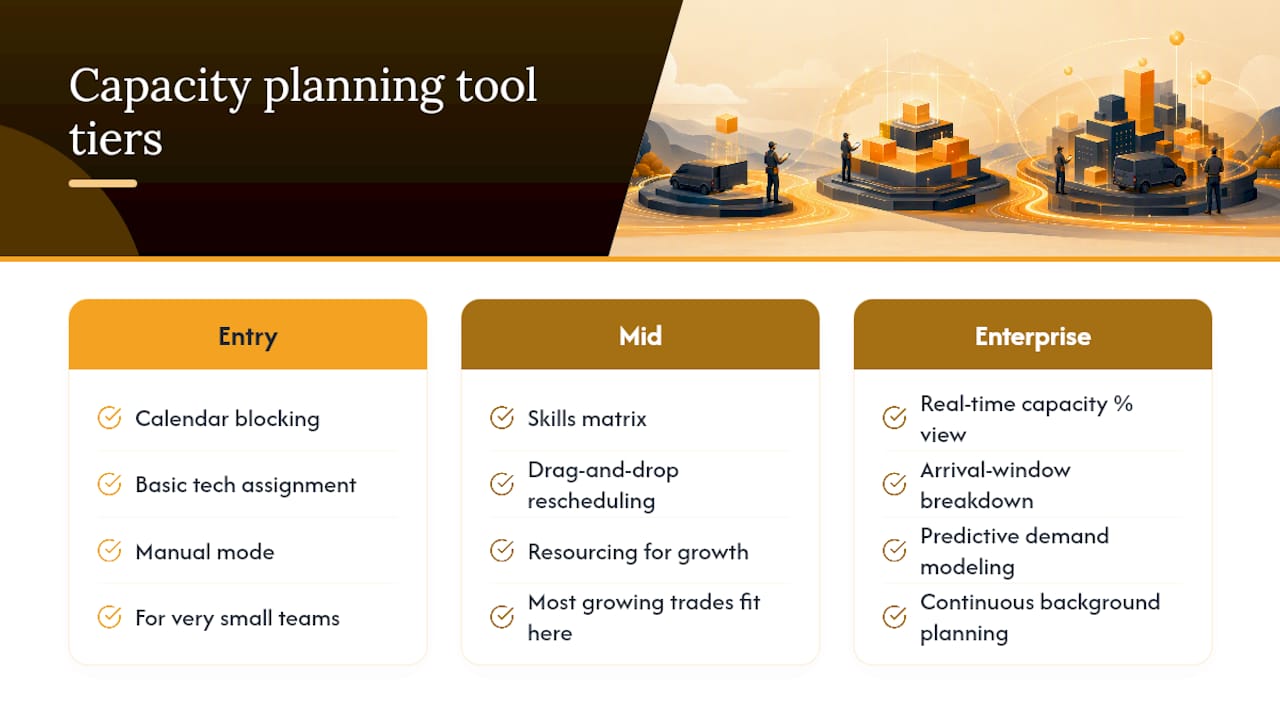
Purpose-built field service management platforms generally fall into three tiers. Entry-level scheduling apps handle calendar blocking and basic technician assignment, useful for very small teams still running mostly manual mode. Mid-tier platforms add skills matrices and drag-and-drop rescheduling, which is where most growing trades businesses land. Enterprise platforms add real-time capacity percentage displays by arrival window and predictive demand modeling, the tier where capacity planning stops being a periodic task and becomes a continuous background process.
Look for a few specific features when evaluating any tool: a live capacity view that updates without manual refresh, a skills matrix that ties directly into job assignment rather than sitting in a separate spreadsheet, and reporting that breaks down utilization by technician rather than just team-wide averages. Tradepilot's comparison of field service apps walks through what separates these tiers in more detail, and its look at drag-and-drop scheduling workflows is worth a read if your current process still runs through a paper board or shared spreadsheet.
Balancing Workload So Technicians Don't Burn Out
Capacity planning that only optimizes for utilization percentage will eventually wear out your best people. The technician with the broadest skill set becomes the default answer to every hard job, and that technician's overtime hours climb quietly until they quit or get hurt.
A few concrete habits prevent this:
- Cap individual utilization, not just team-wide utilization. If one technician is consistently above 90% while others sit at 65%, that's a distribution problem, not a capacity shortage.
- Cross-train deliberately. Every technician who can only do one type of job becomes a bottleneck the moment demand shifts, and the fully cross-trained technician becomes overloaded by default.
- Rotate the difficult or unpleasant jobs. Confined space work, attic installs in summer, and after-hours emergency calls should spread across the team on a visible rotation, not fall on whoever answers first.
- Watch overtime trend lines, not just totals. A single heavy week is normal. Three heavy weeks in a row for the same person is a scheduling failure, not a productivity win.
Research on skills-based scheduling from Aspect ties validated, evenly distributed skills data to measurably better retention outcomes, which tracks with what most dispatchers already sense: the technicians who burn out are rarely the ones with too little work. They're the ones who never got a break from being the only person who can do the hard job.
Managing Capacity Across Multi-Skill and Multi-Location Teams

A single-location shop with five generalist technicians can run capacity planning on instinct. A company running electrical, HVAC, and plumbing crews across three service areas cannot, because the math has to account for skill category and geography at the same time.
The core problem multi-skill teams face is capacity fragmentation. You might have 40 total assignable hours available tomorrow, but if 25 of them belong to plumbers and your demand forecast shows mostly electrical work, that capacity is functionally unavailable. Track assignable hours by skill category, not just in aggregate, or your team-wide numbers will look healthy while specific job types go unfilled.
Multi-location adds a second layer. A technician licensed for a job type but stationed 45 minutes outside the requesting customer's service area effectively isn't capacity for that job, even though they show as available. The two-stage Pareto frontier model from recent operational research addresses exactly this kind of multidimensional constraint, balancing skill matching and preference against coverage across a large workforce, and its case study application to a 121 employee organization shows the approach scales past what manual dispatch can reasonably track.
The practical fix for most trades businesses is simpler than a full mathematical model: segment your capacity dashboard by both skill and location before you look at any team-wide number, and set separate buffer thresholds for each segment. A plumbing crew running thin in one zip code needs a different response than an electrical team running thin company-wide.
What Actually Separates Good Capacity Planning From the Rest
Most advice on this topic treats capacity planning as a math problem: get the formula right, and the schedule fixes itself. That's backwards. The formula matters, but the failure point in almost every trades business isn't the calculation. It's the data feeding it, stale skills matrices, guessed travel times, buffers that exist on paper but get raided the first busy week.
The conventional wisdom also underrates how much capacity planning is really a workload fairness problem wearing a scheduling costume. Shops obsess over utilization percentages while their best technician quietly absorbs every hard job and every emergency call until they burn out or leave. Watch individual distribution, not team averages.
If you're starting from zero, don't reach for a modeling framework first. Get one week of accurate assignable hours per technician, tracked by skill and location if you run more than one crew. That single habit exposes more real problems, double-booked slots, expired certifications, undercounted travel, than any amount of theoretical planning. The sophistication can come later. The discipline of measuring honestly has to come first.
— Mark
Get Real-Time Capacity Visibility With Tradepilot
Spreadsheets and whiteboards can approximate technician capacity for a while, but they can't recalculate the moment a job runs long or a technician calls in sick. Tradepilot is built specifically to close that gap: its AI matches every incoming job to the right technician by skill, availability, and location in under a second, so the capacity numbers a dispatcher sees are never stale.

That means no more manually re-checking the board every time something changes mid-morning, and no more discovering an overbooked technician after the customer's already been given an arrival window. Dispatch, invoicing, inventory, and analytics run on one platform, so capacity data connects directly to the jobs being booked instead of living in a separate tracking sheet. If your team is still calculating assignable hours by hand, start a trial at Tradepilot and see what real-time capacity visibility looks like on your own schedule.
Sources
- Pareto-optimal workforce scheduling with worker skills and preferences | Operational Research | Springer Nature Link
- Using capacity service — Oracle Field Service documentation
- Capacity planning — Azure Well-Architected Framework (Microsoft)