A dispatch workflow is the job-assignment process that routes incoming service calls to the right technician using automated rules and AI matching by skill, availability, and location. Get it right, and within the first month of a solid pilot you can expect shorter drive times, a measurably higher first-time-fix rate, and fewer calls that slip through the cracks.
Here's what a working system looks like in practice:
- First-time-fix rate improves when the AI matches certifications and parts-on-truck before assigning, not after.
- Travel minutes per job drop when routing accounts for real-time location and job clustering.
- Missed calls get recovered when intake is automated and every inbound request creates a work order automatically.
- Pilot milestone: most shops see meaningful KPI movement within 4–8 weeks of a clean data launch.
- Recommended platform: Tradepilot matches every job to the best-fit technician in under a second, covering dispatch, invoicing, inventory, and analytics in one place.
Key Takeaways
An AI-driven dispatch workflow pays off fastest when data is clean before go-live, the pilot is time-boxed with clear KPI targets, and dispatchers are positioned as reviewers rather than replaced.
| Point | Details |
|---|---|
| Clean data first | Audit skill tags, addresses, and truck inventory before enabling AI assignment. |
| Run a time-boxed pilot | Use a 4–12 week cohort of 3–5 trucks with defined KPI targets and a rollback rule. |
| Track the right KPIs | First-time-fix rate, travel minutes per job, and ETA accuracy are your headline metrics. |
| Hybrid model is the goal | Keep humans on complex and emergency decisions; automate routine assignments. |
| Tradepilot for implementation | Tradepilot covers AI dispatch, invoicing, inventory, and analytics in one platform with pilot support included. |
Table of Contents
- What does a dispatch workflow look like, step by step?
- How should AI decide which technician to assign?
- Which systems must connect before AI dispatch goes live?
- Which KPIs tell you whether the workflow is working?
- How do you run a pilot without breaking the business?
- What does AI dispatch actually cost, and what's the ROI?
- What breaks a dispatch workflow, and how do you catch it early?
- Ready-to-use templates for three common dispatch scenarios
- How Tradepilot delivers this workflow end to end
- Why pilots beat big-bang launches every time
- Tradepilot runs your pilot from data cleanup to first KPI win
- Sources
What does a dispatch workflow look like, step by step?
A complete dispatch workflow runs from the first call to the closed invoice, and failure at any stage costs revenue or reputation. Here are the canonical stages every trades shop must cover:
- Intake/booking — Capture address, system type, urgency, and customer history. Required fields: full address, equipment type, reported symptom, preferred time window, and account tier.
- Triage/prioritization — Sort by urgency (emergency, same-day, next-available, scheduled). Flag vulnerable-occupant situations and SLA commitments before queuing.
- Assignment — Match technician by certification, parts-on-truck, proximity, and availability. This is where AI earns its keep.
- Pre-dispatch prep — Confirm parts are staged, send the tech the job notes and customer history, and push an ETA message to the customer.
- On-job updates — Tech checks in on arrival, logs diagnosis, requests parts if needed, and updates job status in real time.
- Completion/documentation — Capture photos, customer signature, and repair notes before leaving the site.
- Invoicing/feedback — Generate the invoice from the completed work order, collect payment, and trigger a follow-up survey.
Pro Tip: The stage most shops underestimate is front-door call capture. If intake is manual and inconsistent, every downstream step runs on bad data. Automate intake first, before you touch assignment logic.
How should AI decide which technician to assign?
Dispatch is a decision, not just a "send the nearest tech" reflex. Visibility into why the system chose a technician increases dispatcher trust and long-term adoption. Here's how to structure the rule set:
Hard constraints (non-negotiable):
- Certifications and state licensing for the job type
- Customer SLA tier or priority contract status
- Parts-on-truck match for the diagnosed repair
Soft preferences (weighted, can be overridden):
- Travel time from current location to job site
- Historical job duration for this tech on similar work
- Utilization balance across the crew to avoid burning out one tech
Fallback logic: When hard constraints block every available technician, the system should surface the conflict to a dispatcher rather than assign a bad match silently. Log every override with a reason code so you can audit patterns later.
Exception handling: Emergency calls bypass the queue entirely and route to the nearest qualified tech. Human override must be a single click, not a buried menu. AI scheduling recalculates the full day in seconds when a cancellation or callout hits, which is where it consistently outperforms manual dispatch.
Pro Tip: Build a "why this tech?" explanation into your dispatcher view. When dispatchers can see the reasoning, they override less often and trust the system faster.
Which systems must connect before AI dispatch goes live?
- CRM/work-order system — Skill tags, customer history, SLA flags, and equipment records must be current and standardized.
- Field mobile app — Techs need real-time job updates, parts requests, and status check-ins from the job site. See field service app options for feature benchmarks.
- Parts/inventory — Truck stock must sync in real time. Stale inventory data is one of the top causes of failed first-time-fix.
- Mapping/GPS and telematics — Live location feeds drive accurate ETAs and travel-time calculations.
- Invoicing/accounting — Completed work orders should generate invoices automatically. Invoice automation cuts the gap between job close and payment collection.
- Customer messaging — Automated ETA texts and arrival confirmations reduce inbound "where's my tech?" calls.
Data hygiene checklist before go-live:
- Deduplicate customer records and standardize address formats.
- Audit and update every technician's skill tags and certifications.
- Reconcile truck inventory against the parts database.
- Archive or delete work orders older than 24 months that skew duration estimates.
The most common real-world failure mode for AI scheduling is dirty CRM data: wrong addresses, outdated skill tags, and missing inventory produce optimized plans that don't match reality.
Which KPIs tell you whether the workflow is working?
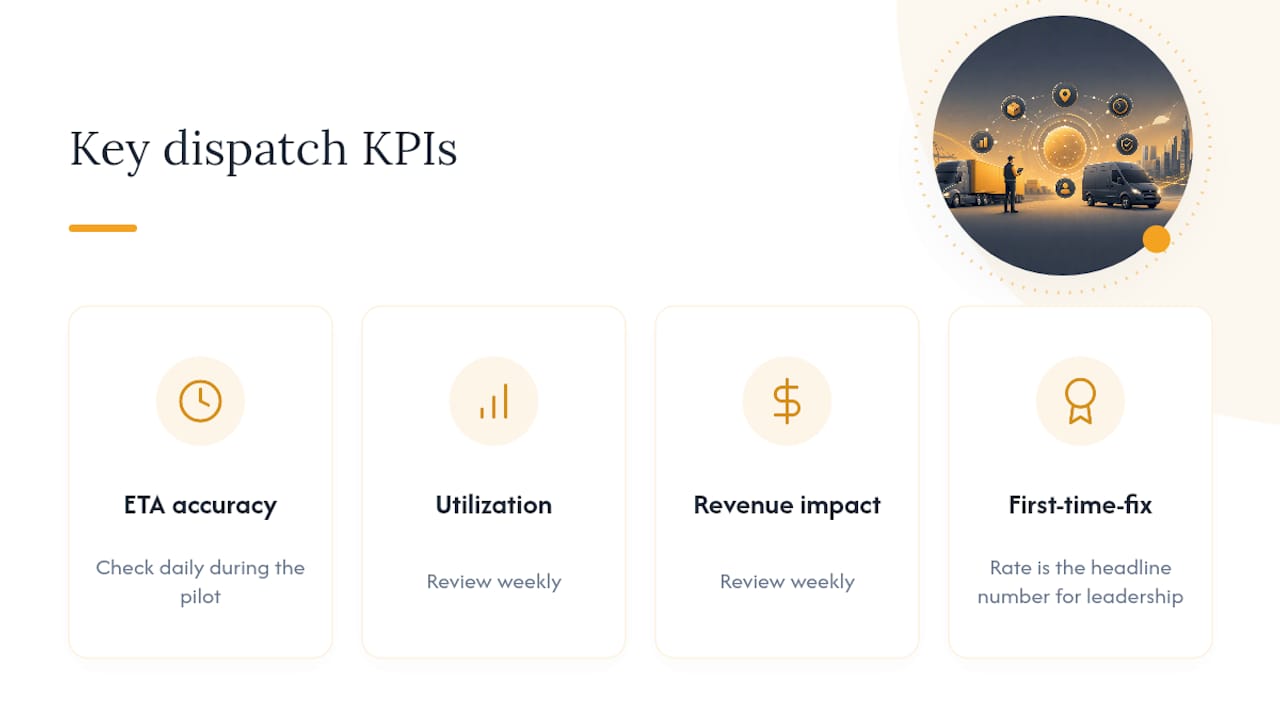
Check ETA accuracy daily during the pilot. Review utilization and revenue impact weekly. First-time-fix rate is your headline number for leadership.
How do you run a pilot without breaking the business?
A phased approach is the right path: start with route optimization, add auto-assignment for routine jobs, then expand to hybrid automation as data quality and dispatcher trust improve.
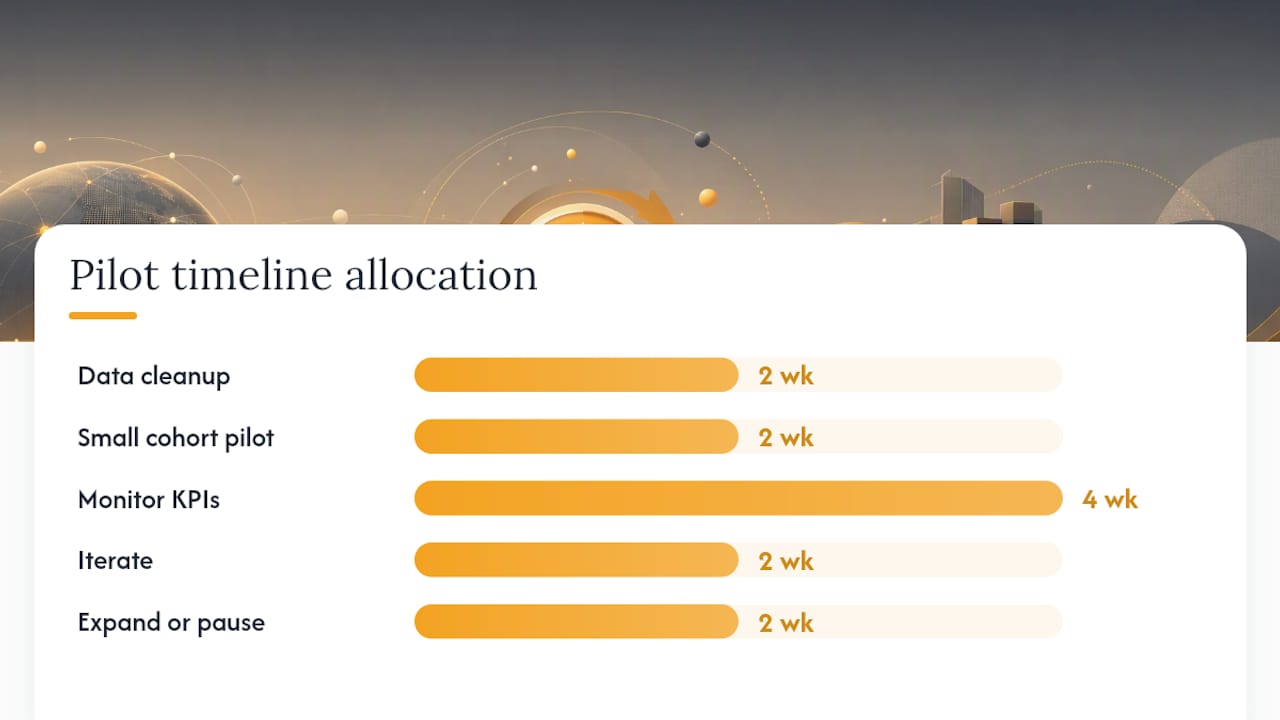
- Weeks 1–2: Data cleanup. Owner: operations manager. Audit CRM records, standardize skill tags, reconcile inventory. No AI assignment yet.
- Weeks 3–4: Small cohort pilot. Owner: dispatch lead. Select 3–5 trucks and routine job types only. Enable AI suggestions; dispatchers approve or override every assignment.
- Weeks 5–8: Monitor KPIs. Owner: dispatch manager. Track first-time-fix, travel minutes, and ETA accuracy daily. Document every override reason.
- Weeks 9–10: Iterate. Owner: operations manager + dispatch lead. Adjust rule weights based on override patterns. Expand to additional job types if KPIs are trending up.
- Weeks 11–12: Expand or pause. Owner: business owner. If targets are met, roll out to the full fleet. If not, identify the specific failure mode and remediate before expanding.
Rollback rule: If first-time-fix drops more than 5 percentage points from baseline in any two-week window, pause auto-assignment for that job type and run a data audit before resuming.
Pro Tip: AI dispatch pays off fastest in the 6–20 truck range. Under five trucks, dispatcher intuition often performs comparably. Size your pilot accordingly.
What does AI dispatch actually cost, and what's the ROI?
Cost drivers to budget for:
- Subscription/seat pricing — Most platforms charge per technician per month. Seat-based monthly tiers scale predictably for small and mid-size shops. See the dispatch software cost guide for current market ranges.
- Integration and setup fees — One-time professional services for CRM and inventory connections.
- Data cleanup labor — Often underestimated; budget 20–40 hours for a 10-truck shop.
- Training — Dispatcher and tech onboarding, typically 4–8 hours per role.
Worked ROI example (conservative, 10-truck shop):
- Recover 15 minutes of drive time per tech per day × 10 techs × 20 workdays = 50 hours/month recovered.
- Add 1 extra job per tech per day on 5 days/week = 200 additional jobs/month at an average ticket of $150 = $30,000 in incremental revenue potential.
- Industry-reported estimates put AI dispatch recovery at amounts reported in case studies for contractors who deployed the technology, with payback periods measured in weeks in case-study summaries.
Use the $8,000 figure as your floor when building the business case for leadership.
What breaks a dispatch workflow, and how do you catch it early?
- Poor CRM data produces confident-looking assignments that are wrong. Fix: data audit before go-live, weekly spot-checks after.
- Overautomating complex jobs (multi-day installs, specialty electrical) pushes AI into decisions it lacks context for. Fix: whitelist job types eligible for auto-assign; keep complex work manual.
- No exception workflow means emergencies queue behind routine jobs. Fix: hard-code emergency bypass rules on day one.
- Unclear override ownership creates dispatcher paralysis. Fix: one named person per shift owns the override log.
- Missing parts-on-truck data is the silent killer of first-time-fix. Fix: require truck inventory sync before enabling AI assignment.
Red flags that should trigger immediate review:
- First-time-fix drops more than 5 points from baseline.
- Callbacks spike in any 7-day window.
- ETA mismatches exceed 20% of jobs.
- Dispatcher override rate climbs above 40%.
Stat to watch: When ETA mismatches exceed 20%, customer satisfaction scores typically follow within the same billing cycle. Catch it in the dispatch log before it shows up in reviews.
Ready-to-use templates for three common dispatch scenarios
Routine residential maintenance
- Intake: address, system type, last service date, reported symptom.
- AI auto-assign: match certification + parts-on-truck + nearest available tech.
- Pre-dispatch: push job notes and ETA text to customer.
- Fallback: if no tech matches all hard constraints, surface to dispatcher with reason code.
Emergency response
- Triage questions: Is the system completely down? Are vulnerable occupants present? What's the SLA tier?
- Bypass the queue. Route to nearest qualified tech immediately.
- Human dispatcher confirms assignment within 2 minutes.
- Customer messaging: immediate confirmation text, then 30-minute ETA update.
- No auto-close: dispatcher monitors job status until tech is on site.
Preventive maintenance route
- Cluster jobs by geography before the week starts.
- Pre-stage parts for each stop based on equipment records.
- AI assigns the full route; dispatcher reviews and approves the day before.
- ETA texts go out the morning of each appointment.
Pro Tip: For PM routes, run the clustering algorithm 48 hours in advance so parts can be staged overnight. Same-day staging kills the efficiency gain.
How Tradepilot delivers this workflow end to end
Tradepilot maps directly to each workflow requirement:
- AI match engine — Assigns by skill, availability, and location in under a second, with a visible "why this tech?" explanation for dispatchers.
- Parts sync — Real-time truck inventory feeds the hard-constraint check before any assignment is confirmed.
- Mobile field app — Techs receive job details, update status, capture photos, and collect signatures from the job site.
- Customer messaging — Automated ETA texts and arrival confirmations go out without dispatcher intervention.
- Analytics dashboard — First-time-fix, travel minutes, utilization, and ETA accuracy in one view, updated in real time.
- Override controls — Single-click human override with mandatory reason-code logging for post-mortem audits.
A typical Tradepilot pilot runs 4–8 weeks. The business owner or operations manager owns data cleanup in weeks 1–2; the dispatch lead runs the cohort in weeks 3–8. Training for dispatchers runs 4 hours; tech onboarding is under 2 hours.
Pro Tip: Connect Tradepilot's analytics dashboard to your weekly ops meeting from day one. Teams that review KPIs weekly during the pilot iterate twice as fast as those that check monthly.
Why pilots beat big-bang launches every time
The shops that struggle with AI dispatch aren't using bad software. They're launching before their data is ready, or they're flipping the switch for the whole fleet at once and losing dispatcher trust in the first week.
A pilot forces you to confront the data problems that were always there. Wrong addresses, ghost skill tags, truck inventory that hasn't been reconciled in six months. Those problems existed before the AI. The AI just makes them visible faster.
Dispatchers paired with AI shift from assigning every job manually to approving recommendations and managing exceptions. That's a better job, not a threatened one. The shops that communicate this framing before go-live see adoption in weeks. The ones that don't spend months fighting resistance.
The hybrid model, AI for routine assignments and humans for complex or emergency decisions, is the durable configuration. It's not a stepping stone to full automation. It's the destination.
Tradepilot runs your pilot from data cleanup to first KPI win
Tradepilot is built for exactly the scenario this article describes: a trades business with 5–20 trucks that's ready to move past spreadsheets and dispatcher memory. The platform covers AI dispatch, invoicing, inventory, and analytics in one place, so you're not stitching together five tools to get a single workflow.

The pilot engagement includes data cleanup support, dashboard configuration, and dispatcher training. Most shops are running live assignments within two weeks of kickoff. Start your Tradepilot pilot and see first-time-fix and travel-time numbers move before the end of your first month.
Sources
- HVAC Dispatch Workflow: First Call to Closed Invoice | CallJolt
- AI vs. Human Dispatching for Home Services: When to Automate | Contractor Bear Blog