
The fastest way to balance technician workloads is to pair accurate measurement with travel-aware, skill-aware dispatch rules, then let automation enforce them consistently. Start today by pulling utilization numbers for the last two weeks and rerouting jobs by geography to flatten the busiest and slowest routes. Beyond that, a platform like Tradepilot can apply those rules automatically instead of forcing a dispatcher to juggle them by hand every morning.
TL;DR:
- Maintaining technician workload balance requires measuring utilization, travel time, and job complexity regularly to identify imbalances and prevent burnout or inefficiency.
- Implementing skills matrices and weighted job scoring ensures fairer task distribution based on technician certifications and job difficulty, not just job count.
- Geographic batching and route optimization cut travel time by roughly 20%, freeing up billable hours and improving efficiency across the team.
- Automated dispatch systems that incorporate real-time location, skill profiles, and dynamic load balancing outperform static schedules and manual routing.
- Running short pilots with clear KPIs and continuous monitoring helps validate new dispatch rules before full deployment, reducing operational risks.
Table of Contents
- Same-Day Checklist to Spot and Fix Workload Imbalance
- How Do You Measure Current Technician Workload?
- Build a Skills Matrix and Weight Jobs by Complexity
- Cutting Drive Time Through Smarter Routing
- Which Dispatch Rules and Software Features Actually Move the Needle?
- Running a Pilot: How to Test New Dispatch Rules Before You Scale
- Rotation, Overtime, and Transparency: The Culture Side of Balance
- A Trades Team That Rebalanced Dispatch With Skill and Travel-Aware Rules
- Your 30 and 90-Day Plan for Balanced Workloads
- What Fifteen Years of Dispatch Mistakes Taught Me
- Put These Rules on Autopilot With Tradepilot
- Sources
Same-Day Checklist to Spot and Fix Workload Imbalance
Before you build any long-term system, run this checklist. It takes under an hour and usually reveals at least one glaring imbalance you didn't know existed.
- Pull each technician's job count and total scheduled hours for the past 5 to 10 working days.
- Flag anyone at very high utilization for several consecutive days, as that's your burnout risk.
- Flag anyone consistently under moderate utilization levels, indicating wasted payroll or a scheduling gap.
- Check drive time per technician. Higher daily driving time can significantly reduce billable capacity compared to those with lower driving times.
- Swap 1 to 2 jobs today between your busiest and slowest tech, prioritizing swaps that also reduce total drive distance.
- Identify any job requiring a skill only one tech holds, and confirm that tech isn't already overloaded.
- Set a temporary overtime or on-call buffer for the day if backlog exceeds normal capacity by more than 20%.
These fixes are temporary patches, not a system. But they buy you the breathing room to build the measurement and routing habits covered in the sections below.
Pro Tip: Do this checklist on a Monday morning, not a Friday. Monday backlog reveals the true weekend spillover, while Friday numbers are skewed by everyone racing to close out the week.
How Do You Measure Current Technician Workload?
You can't balance what you haven't measured. Most operations managers who "feel" imbalance in their gut are right, but their evidence is anecdotal until they pull four specific numbers.
Utilization rate is the percentage of a technician's scheduled hours actually spent on billable work. Calculate it as (billable hours ÷ total scheduled hours) × 100. A tech working an 8-hour shift with 6 billable hours sits at 75% utilization. Workload balancing research frames this kind of distribution as the strategic allocation of tasks and routes to keep service standards consistent across a team, not just a spreadsheet exercise.
Average job duration is total time on-site divided by number of jobs. Track this by job type, not just overall, because a "quick diagnostic" and a "full panel replacement" shouldn't share a bucket. Historical duration data, pulled from your last 90 days of closed tickets, is far more reliable than the estimates techs give when they're rushing out the door.
Travel minutes matter more than most managers assume. A technician doing five jobs spread across a 40-mile radius is functionally working fewer billable hours than one doing five jobs within a 10-mile cluster, even if both clock out at 5 PM.
Backlog is simply unscheduled work waiting for capacity. Track it daily as a raw job count and weekly as a trend. A backlog that grows for three straight weeks means you're understaffed or misallocated, not just having a busy month.
Here's how those four metrics typically break down when you're spotting imbalance:
| Metric | Healthy range | Warning sign | Data source |
|---|---|---|---|
| Utilization rate | 65% to 75% | Above 90% or below 60% for 3+ days | Field app time logs |
| Average job duration variance | Within 15% of historical average | significantly overestimating repeatedly | Closed ticket history |
| Daily travel minutes | Under 45 minutes | Over 75 minutes | GPS/dispatch logs |
| Backlog trend | Flat or declining | Rising 3+ consecutive weeks | Dispatch queue reports |
Most field service apps already log the raw data. The trick is pulling it into something visual. A simple heat map, color-coding each technician's daily utilization red, yellow, or green, makes imbalance obvious in seconds instead of requiring you to read fifteen rows of a spreadsheet. A histogram of drive minutes by tech works the same way. Once you see one bar towering over the rest, you've found your problem before you've read a single ticket.
That last one usually means your estimates are wrong, not your technicians.
Build a Skills Matrix and Weight Jobs by Complexity
Equal job counts are not equal workloads. Sending your journeyman electrician on three simple outlet swaps while your newest apprentice struggles through one complex panel upgrade looks balanced on a spreadsheet and is anything but balanced in reality.
The fix starts with a skills matrix. List every technician down one side and every job category across the top: refrigerant handling, panel work, gas line repair, smart thermostat installs, whatever applies to your trade. Mark each technician's certification level and comfort rating (a simple 1 to 3 scale works fine) for each category. This single document usually takes an afternoon to build and immediately exposes your bottlenecks. If only one person on a 12-tech team is licensed for commercial refrigerant work, that's not a scheduling problem you'll ever solve with better routing. It's a staffing gap.
Once you have the matrix, weighted scoring turns vague job counts into something closer to true workload. A practical formula:
Job weight = complexity factor × skill requirement × estimated time
A simple filter replacement might score a 1 on complexity and require no special certification, landing at a low weight even if it takes 30 minutes. A commercial HVAC diagnostic with a licensing requirement and unpredictable time-on-site might score a 3 on complexity, requiring a certified tech, and lands at a much higher weight even though it's also "one job" on the board.
This distinction matters because dynamic load-balancing approaches) that account for both active job count and a complexity multiplier prevent a slew of short, easy jobs from skewing your fairness measurements. Five oil changes and one engine rebuild are not the same workload, even though they're both "five jobs" if you're only counting tickets.
Practical steps for applying this without overengineering it:
- Tag every job type in your dispatch system with a complexity score from 1 to 3 when it's created, not after the fact.
- Cap high-complexity jobs per technician per day. Two panel upgrades in one day is often one too many, even for your best electrician.
- Cross-train at least one backup technician for every specialty skill you have only one person certified in.
- Rotate cross-training assignments quarterly so skill depth doesn't calcify around two or three "go-to" people.
- Review your skills matrix every 90 days. Certifications lapse, new hires ramp up, and comfort levels shift.
Pro Tip: Cross-training pays off fastest when you pair your most bottlenecked skill with your most underutilized technician. If one person is drowning in gas line calls and another is consistently under 65% utilization, that's your first training investment, not your fifth.
The single biggest mistake operations managers make here is treating cross-training as a "nice to have" for slow seasons. It's actually your best insurance against the exact bottleneck that causes chronic overload: one specialist carrying the whole team's specialized workload while everyone else gets simple tickets.
Cutting Drive Time Through Smarter Routing
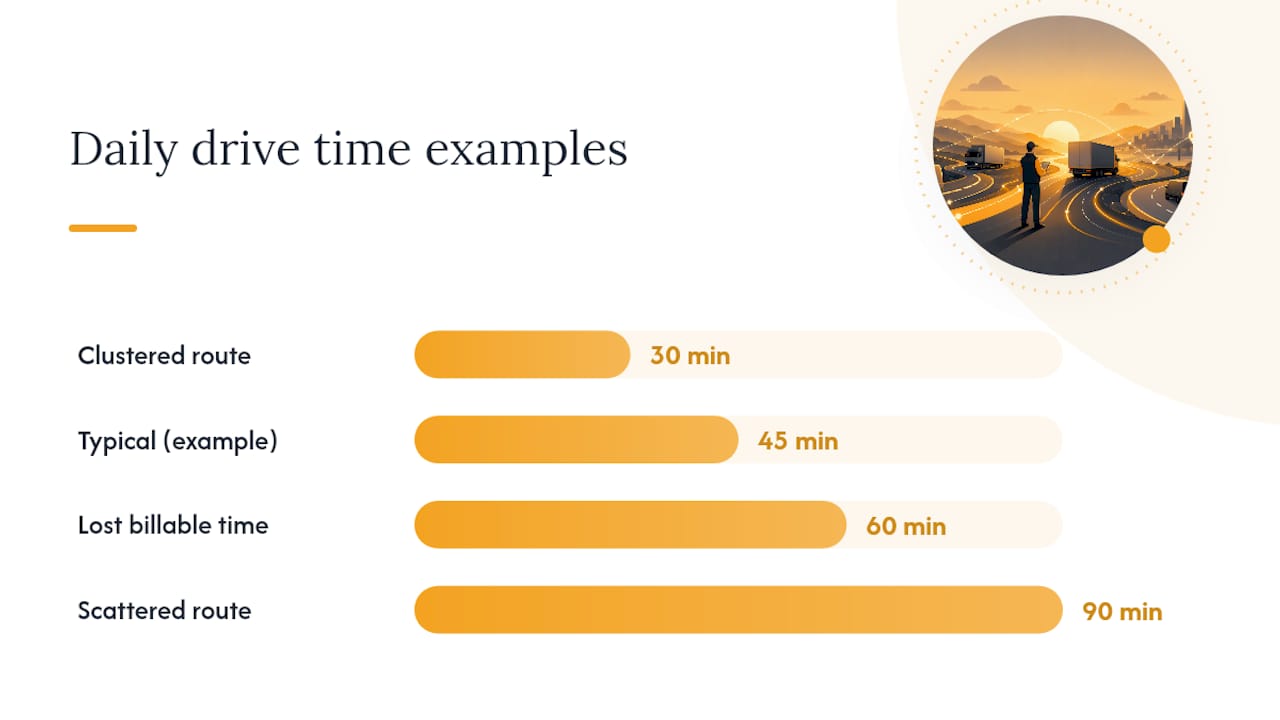
Drive time is the workload cost nobody bills for and everybody feels. A technician spending 90 minutes a day behind the wheel instead of 30 has lost a full hour of billable capacity, every single day, without a single customer complaint to flag it.
Geographic batching is the simplest fix and the one most trades businesses under-use. Instead of assigning jobs in the order they came in, group jobs by zip code or service zone and assign a technician to a cluster for the day. A technician who handles five jobs within a 10-mile radius will consistently outperform one bouncing across 40 miles, even with identical job types and durations. Real-world route optimization and geographic grouping have been shown to cut fuel and travel time by roughly 20% in field service operations, which translates directly into reclaimed billable hours.
Here's a practical sequence for building a daily route:
- Group jobs by zone first, priority second. Sort your open tickets by geographic cluster before you even look at urgency.
- Order stops by proximity, not by call time. The customer who called first doesn't need to be stop one if they're 20 minutes out of the way.
- Insert emergency or SLA-bound jobs as exceptions, not as the rule. Override the route only when a job genuinely can't wait, and flag how much extra drive time that override costs.
- Build in a travel buffer of 15 to 20% above your mapping app's estimate. Google Maps and Waze assume ideal conditions; real trucks hit real traffic, parking delays, and customer no-shows at the door.
- Reassess the route at midday. If a job ran long, the afternoon stops need reordering, not just a later finish time.
The heuristic that trips up most dispatchers is treating drive time as a rounding error instead of real capacity. Build travel minutes into your daily capacity math the same way you build in job duration. A tech with 45 minutes of daily driving effectively has 7.25 productive hours in an 8-hour shift, not 8.
Priority overrides deserve their own rule, not an exception made on the fly. Decide in advance which job types justify breaking route order (no heat in winter, no AC during a heat wave, active leaks) and which don't (routine maintenance, non-urgent inspections). Writing this down keeps dispatchers from overriding the route every time a customer sounds anxious on the phone, which is how "optimized" routes quietly become chaos by 10 AM. For a deeper breakdown of route sequencing logic, Tradepilot's guide to technician route optimization walks through the batching heuristics in more detail.
Which Dispatch Rules and Software Features Actually Move the Needle?
Not every dispatch rule delivers equal returns. Some produce a noticeable drop in overtime within weeks. Others look good in a sales demo and change nothing in practice.
The four rules worth implementing, in rough order of impact:
- Least-busy assignment. Route the next job to whichever qualified technician currently has the lowest active job count or utilization score, not whoever's simply "next up" in a rotation.
- Skill match filtering. Never assign a job to a technician who isn't qualified for it, even if they're the closest or least busy. This one rule alone eliminates most callback and rework issues.
- Travel-aware weighting. Factor drive time into the assignment decision itself, not just the route order after assignment. A tech who's less busy but 35 minutes away may still be the wrong call versus a slightly busier tech who's 8 minutes out.
- SLA-first override. Contract or emergency jobs jump the queue regardless of the other three rules, but only when clearly defined in advance.
These map almost directly to load-balancing disciplines borrowed from computing infrastructure. Least-connected and weighted round-robin algorithms exist specifically to avoid overloading a busy resource while idle ones sit unused. A dispatch team choosing "least-busy" over "next in rotation" is applying the exact same principle to trucks instead of servers.
Static versus dynamic rule sets: A static rule set assigns jobs based on a fixed schedule built the night before or that morning. It's simple, but it breaks the moment a job runs long, a customer reschedules, or traffic changes the picture. A dynamic system recalculates in real time as conditions shift throughout the day. Cloudflare's breakdown of load-balancing algorithms makes the same point about computing systems: algorithms that track current load in real time consistently outperform fixed schedules when task durations vary, which in a trades business is every single day.
When you're evaluating field service software, prioritize these four features over flashier extras:
- Real-time technician location tracking, so dispatch decisions reflect where trucks actually are, not where the morning schedule assumed they'd be.
- Skills profiles tied to job types, enforced automatically rather than relying on a dispatcher's memory of who's certified for what.
- Job complexity scoring, built into the platform rather than tracked in a separate spreadsheet nobody updates.
- Live ETA updates pushed to both the technician and the customer, reducing the reschedule requests that blow up an otherwise balanced day.
A platform combining all four typically outperforms a static, manually-updated whiteboard schedule by a wide margin, mostly because dynamic reassignment catches the midday disruptions a static plan can't. Tradepilot's guide to AI in field service covers what automation governance looks like in practice, and a broader comparison of field service apps is worth a look if you're still choosing a platform.
Running a Pilot: How to Test New Dispatch Rules Before You Scale
Don't roll out new dispatch rules to your entire team on day one. A contained pilot proves the concept, surfaces the friction points, and gets buy-in from technicians who'd otherwise resist a system change sprung on them without warning.
- Pick your pilot scope. Choose a small group of technicians and one geographic zone. Run the pilot for a few weeks, long enough to see multiple weekly cycles and rule out singular bad weeks.
- Set specific KPI targets before you start. Don't just say "reduce drive time." Say "reduce average daily drive minutes by 15% and keep utilization variance between technicians under 10 percentage points."
- Monitor daily during week one, then shift to twice-weekly. Early days need close attention because new rules always surface an edge case nobody anticipated. A watched dashboard catches it before it becomes a pattern.
- Set a decision date in advance. At the two-week mark, look at your KPI targets and decide: scale it, adjust it, or roll it back. Don't let the pilot drift indefinitely without a checkpoint.
- Communicate the pilot clearly to technicians before it starts. Tell them what's changing, why, and how long it runs. Technicians who understand a pilot is temporary and measured are far more likely to give honest feedback than ones blindsided by a new app on their phone.
A short pilot with clear KPI targets and daily monitoring is consistently the fastest way to validate new rules before a full rollout, and it's far cheaper than reversing a company-wide change that didn't work.
Pro Tip: Build your pilot dashboard around three numbers only: average utilization, average daily drive minutes, and backlog count. Adding more metrics at this stage buries the signal you're actually testing for.
Your rollback criteria matter just as much as your scaling criteria. If utilization variance between technicians hasn't improved after four weeks, or if technician complaints about the new routing spike rather than settle, that's a rollback signal, not a reason to push harder. For a full walkthrough of automated scheduling rollout mechanics, Tradepilot's guide to automated technician scheduling covers the step-by-step detail this section only summarizes.
Rotation, Overtime, and Transparency: The Culture Side of Balance
Every scheduling fix in this article will eventually fail if the underlying policies reward overload. A technician who consistently takes the hardest, farthest jobs and gets nothing but more of the same for it will eventually quit, and you'll lose your most capable person to a competitor who manages workload better.

Fair rotation policies prevent the "go-to person" trap, where one skilled technician becomes the default answer for every hard job until they burn out. Rotate specialty assignments on a schedule, not just whenever the specialist happens to be available. Overtime rules need the same clarity: cap voluntary overtime at a level the whole team understands, and never let mandatory overtime fall disproportionately on your fastest workers just because they're capable of absorbing it.
Recognition matters more than most operations managers give it credit for. A technician who takes on a tough emergency call at 6 PM on a Friday should hear about it from a supervisor, not just see it reflected in a bigger paycheck two weeks later. Feedback loops work both directions too. Ask technicians directly what feels imbalanced to them. They often notice patterns in the schedule before the data catches up.
Dashboards solve a trust problem as much as an operational one. Transparent utilization reporting that every technician can see reduces the perception of favoritism, because nobody has to wonder whether they're getting more than their fair share of the tough jobs. When the numbers are visible to the whole team, disputes about fairness turn into conversations about data instead of accusations about bias.
A few policies worth locking in writing, not just verbal agreement:
- Rotate high-complexity or high-stress job types across qualified technicians on a fixed schedule, not an ad hoc basis.
- Cap mandatory overtime hours per technician per week and track exceptions.
- Publish utilization dashboards weekly so the whole team sees the same numbers management does.
- Hold a short monthly check-in specifically about workload distribution, separate from general performance reviews.
- Tie payroll and overtime cutoffs to a predictable schedule. If payroll timing is inconsistent, clear payroll date policies reduce a separate source of technician frustration that often gets blamed on scheduling instead.
A Trades Team That Rebalanced Dispatch With Skill and Travel-Aware Rules
A mid-sized HVAC and plumbing operation running a dozen technicians across a metro service area had a familiar problem: two senior techs were absorbing nearly 40% more billable hours than the team average, while three newer hires sat well below 65% utilization most weeks. Dispatch was manual, based mostly on whoever answered the phone fastest when a new ticket came in.
The fix was implementing rules. The company shifted to skill-matched, travel-aware dispatch, weighting assignments by technician availability, certification, and proximity rather than call order. Job complexity scoring flagged which tickets actually needed a senior tech and which newer hires could safely handle with support.
Within the first month of the pilot, average drive time per technician dropped noticeably as jobs were batched by zone instead of assigned in the order calls came in. Utilization variance between the busiest and slowest techs narrowed significantly. Job completion rates held steady, and informal feedback from technicians pointed to less end-of-day frustration once the newer hires stopped sitting idle while senior techs ran back-to-back emergency calls.
The rules driving the improvement were straightforward: skill match prevented unqualified assignments, travel-aware weighting kept technicians closer to home base throughout the day, and real-time reassignment caught midday schedule slippage before it cascaded into a backed-up afternoon. None of these required hiring anyone new. They required treating dispatch as a system with rules instead of a queue answered in the order it filled up.
For managers looking to replicate a similar shift, the mechanics of automated scheduling rollout are covered step by step in Tradepilot's automated scheduling guide, and the route batching logic behind the drive-time drop is detailed further in the route optimization guide.
Your 30 and 90-Day Plan for Balanced Workloads
In the next 30 days: pull utilization and drive-time data for every technician, build a basic skills matrix, and run a 2-week pilot on skill-matched, travel-aware dispatch with one geographic zone.
In the following 90 days: scale the pilot rules to your full team if the numbers hold, formalize your cross-training rotation for bottleneck skills, and publish a weekly workload dashboard the whole team can see. Revisit your skills matrix and job complexity scores at the 90-day mark, since certifications and comfort levels shift faster than most managers expect.
The businesses that get this right don't treat workload balance as a one-time fix. They treat it as a number they check weekly, the same way they check revenue or callback rates. Service schedule optimization is an ongoing discipline, not a project with an end date. Pilot the automation, trust the KPIs over your gut, and adjust the rules as your team and territory change.
What Fifteen Years of Dispatch Mistakes Taught Me
Most workload imbalance I've seen traces back to the same root cause: dispatchers defaulting to "whoever's available right now" instead of "whoever's the right fit right now." It's a fast decision under pressure, and it feels efficient in the moment. Three months later, one technician is drowning and another is coasting, and nobody can quite explain how it happened.
The quick remedy is almost always the same: measure first, then match skills and travel before anything else. Dispatchers who skip straight to routing without measuring utilization are optimizing a number they haven't actually looked at.
Here's the part operations managers underestimate: workload balance isn't purely an efficiency problem. It's a retention problem wearing an operations costume. Your best technicians don't quit because the job is hard. They quit because the job is hard unevenly, and nobody in leadership seemed to notice.
— Mark
Put These Rules on Autopilot With Tradepilot
Everything in this guide, the skills matrix, the travel-aware routing, the least-busy dispatch rule, works better when software enforces it automatically instead of a dispatcher trying to remember all four rules while the phone keeps ringing. Tradepilot matches every job to the best-fit technician by skill, availability, and location in under a second, which is the exact combination this article just walked through building by hand.

One platform handles dispatch, invoicing, inventory, and analytics together, so the utilization and drive-time numbers you pulled manually in the checklist above show up automatically on a dashboard instead of a spreadsheet you have to update yourself. That's the practical difference between running a pilot for two weeks and running the same system permanently without the manual overhead.
If the 30-day plan above sounds right for your team, the fastest way to test it is to see the dispatch engine work on your own job data. Start a trial with Tradepilot and run your first skill-matched, travel-aware schedule this week.
Sources
- Workload Balancing - an overview | ScienceDirect Topics
- Using nginx as HTTP load balancer
- Types of load balancing algorithms | Cloudflare